62
Assigning PIN Codes to Scanning Jobs
When saving scanned jobs on the machine’s hard disk
drive, you can assign PIN codes. Assigning PIN codes to
scanned jobs ensures privacy of the jobs, because the PIN
code must be entered to access the job.
This function is available when the machine’s internal hard
disk is specied in [Directory].
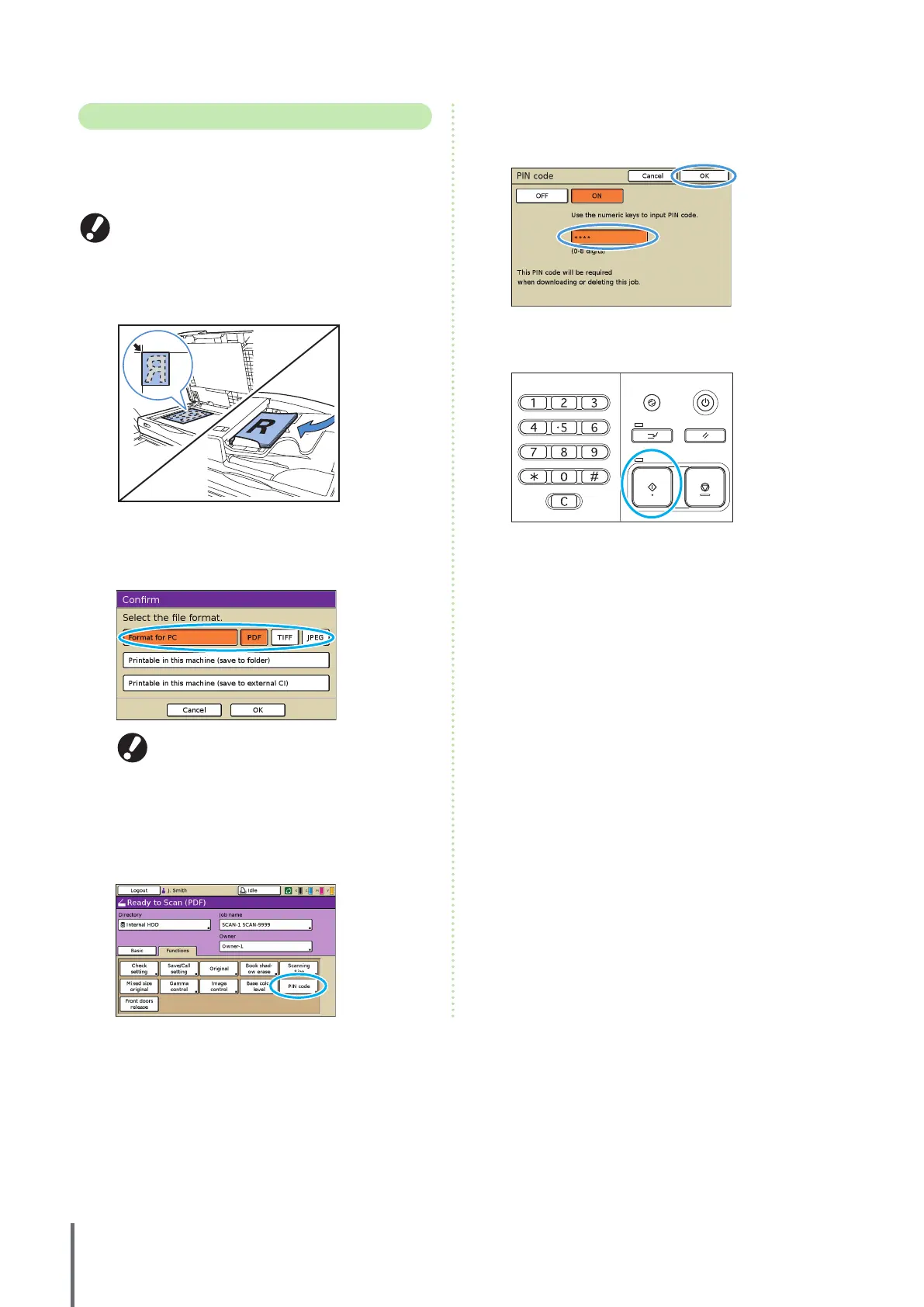
1
Load the original.
Load the original on the platen glass or in the ADF.
2
On the conrmation screen, select [Format for PC]
and press [OK].
Also at this time, select [PDF], [TIFF], or [JPEG] as the format.
This screen may not be displayed, depending on
the administrator settings.
3
Specify the scanning settings.
4
On the [Functions] screen, press [PIN code].
5
Enter a PIN code on the [PIN code] screen and press
[OK].
As the PIN code, specify a number up to eight digits.
6
Press the [START] key.
ComColor Series Basic Guide 02










 To Next Page