66
16. Robe Ethernet Access Portal (REAP)
Before running the REAP, your computer needs to be connected to the xture (s) through the means of
Ethernet wired network and a network switch. The computer needs to have congured network settings in
order to be able to communicate with the xture(s) through the network. The Ethernet network connection (Local
LAN) typically needs to be set to 2.x.x.x address, the computer IP address has to be set to 2.x.x.x (for example
2.247.136.20) with netmask 255.0.0.0. On the xture make sure to use the default 2.x.x.x IP address as provided
You do not need change any IP settings on the xture, there is no need to set the xture into Art-Net mode.
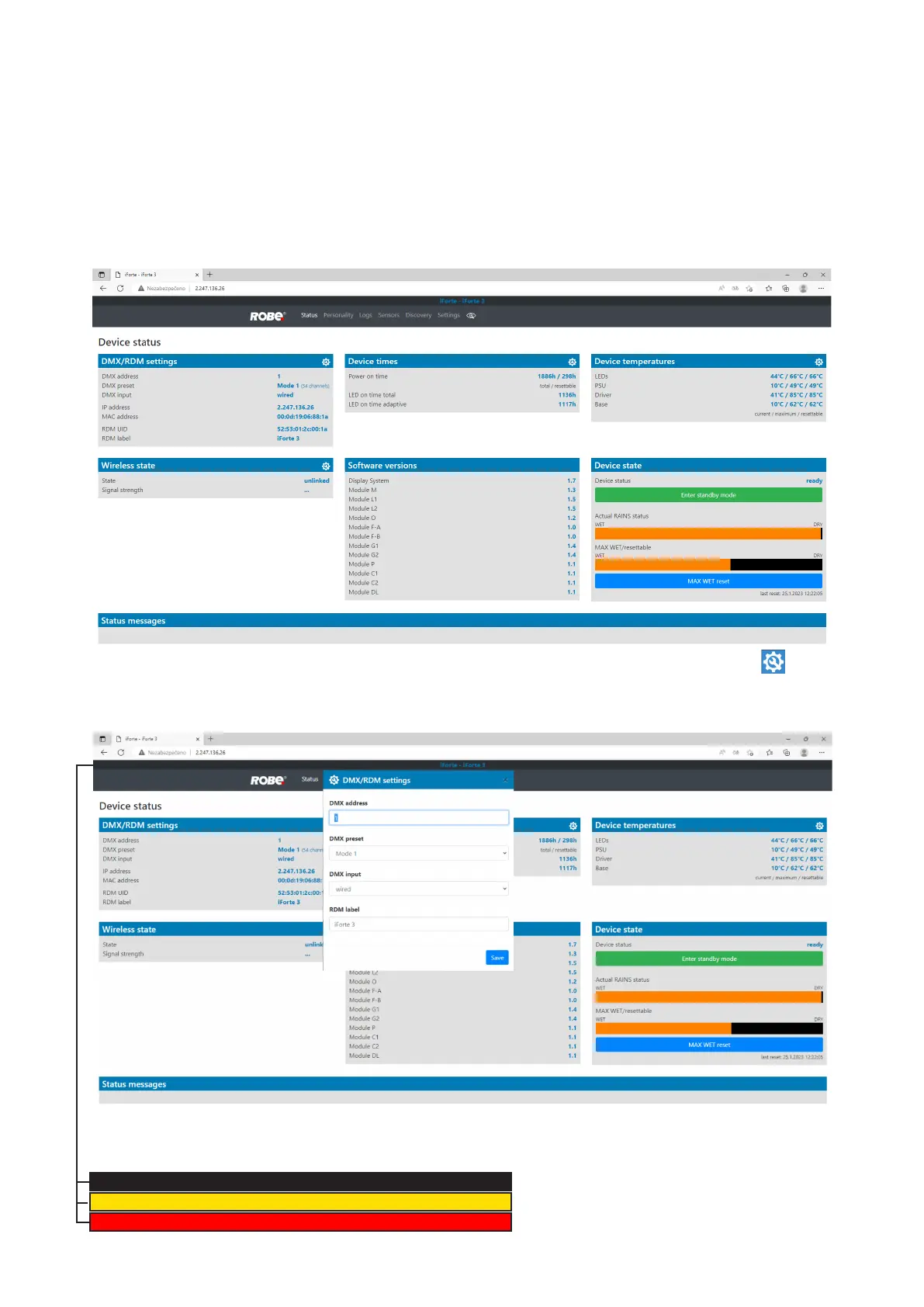
Type the IP address of the iForte to your web browser, e.g. http://2.247.136.26, enter the user name: robe and
the password: 2479, the Status screen of the iForte will appear.
This screen gives you a fast overview of xture settings and environment in the xture. The icon allows
you to change some values in a corresponding table.
Example for DMX/RDM settings:
Note.
The background colour of the top raw of the Status screen with the name and RDM label of the xture denotes
state of the xture:
IForte-IForte 3 xture is ready for operation
IForte-IForte 3 xture does not communicate with computer
IForte-IForte 3 xture with error message(s)













 To Next Page