10
3.3 Replacing rotating gobos
Unplug the xture from mains before replacing the gobos!
Do not replace gobos in a damp environment (e.g. rain, snowfall)!
Do not remove xture covers in smoky or particularly dirty
environment (e.g. with fog machines).
1. Close a light output of the xture and allow the xture to cool about 60 minutes.
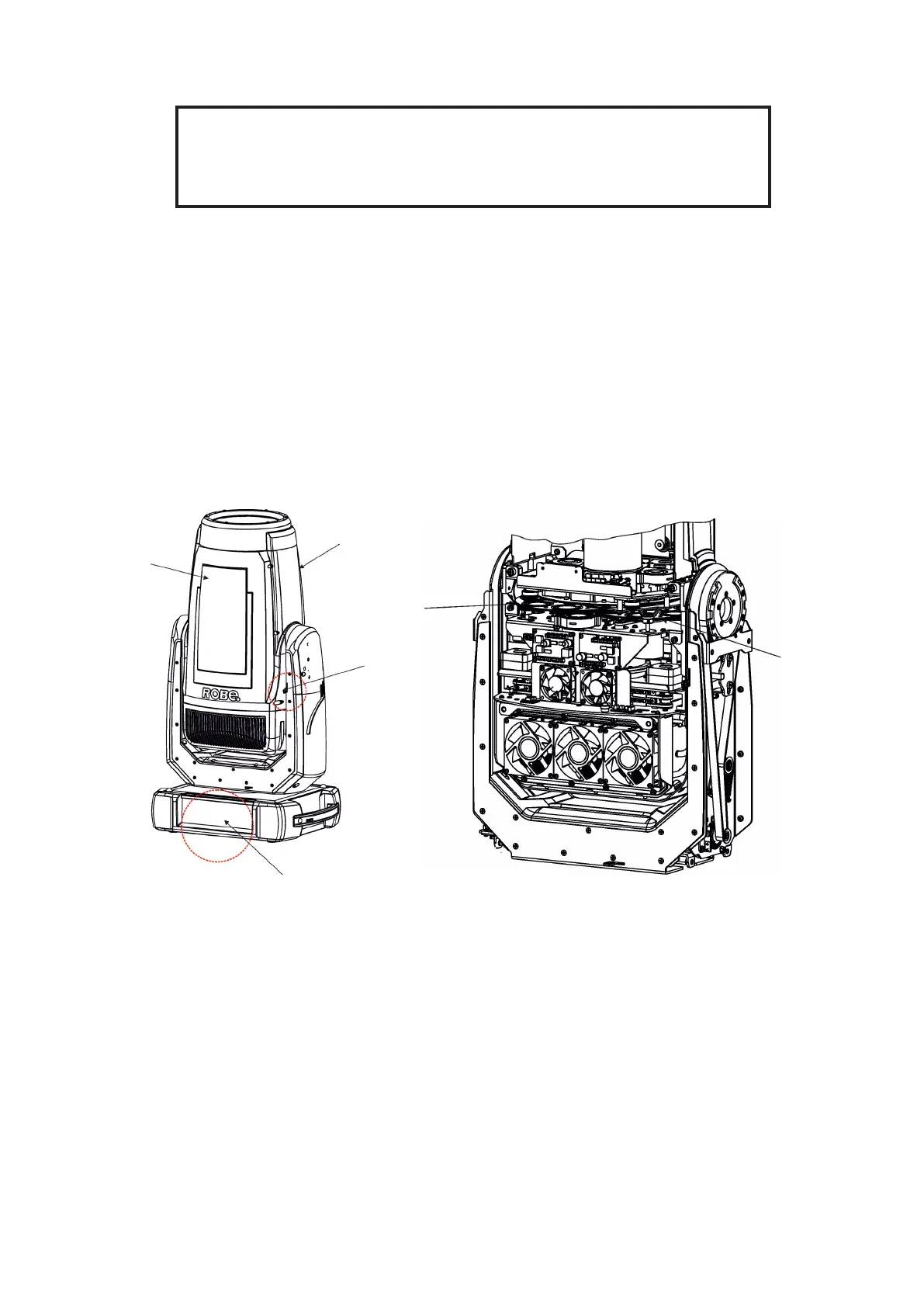
2. Move the xture head to the position as shown on the pixture below (the tilt lock has to be on the same side
as the display) to determine which top cover of the head has to be removed. Remove the top cover of
the head by unscrewing 6
h
ex socket head screws M5x16 on the cover to get access to desired gobo wheel.
IMPORTANT: The xture head should be uncovered as short time as possible (about 1-2 hours depending on
air humidity) otherwise silica gel in the small boxes in the xture head may become damp.
If you have removed head cover and you need to interrupt your work for long time (hours, days), we recommend to
place the head cover on the head and fasten it provisionally by means of two screws, next possibility is un-
screwing small boxes with silica gel from the head and put it to a sealed container with limited access of air
(e.g. sealed plastic bag).
3. Connect the xture to mains. Go to the tab "Service", select the menu "Adjust DMX values " and move
the xture head to the position which is suitable for changing rot. gobos.
4. Escape from the menu "Adjust DMX values " and go to the menu " Rotating Gobos Change" in the same tab,
select menu Gobo Carousel 1 (or Gobo Carousel 2) and enter the menu.
5. Select a gobo (G1-Mg, G2, G3, G4, G5, G6 ) which you wish to replace. The selected gobo will move to
the accessible position for its changing.
Note: "G1-Mg" means the gobo holder with a magnet.
6. Check that the position point (4) on the gobo holder aims exactly to the
toothlike projection (6) on
the edge of the rotating gobo wheel. If not, go to the option "Gobo Oset" and adjust the position point (4)
exactly opposite of the
toothlike projection(6). Adjusted value in the "Gobo Oset" is valid for all gobos on
the gobo carousel.
Gobo
wheel 1
Gobo
wheel 2
Display
Top cover
for access to
gobo wheel 2
Tilt lock
Top cover
for access to
gobo wheel 1














 To Next Page