INFORMATION ABOUT THE USE
6.4. MULTI-FUNCTION SELECTOR USAGE MODE (ECOPLAT PLUS FRD)
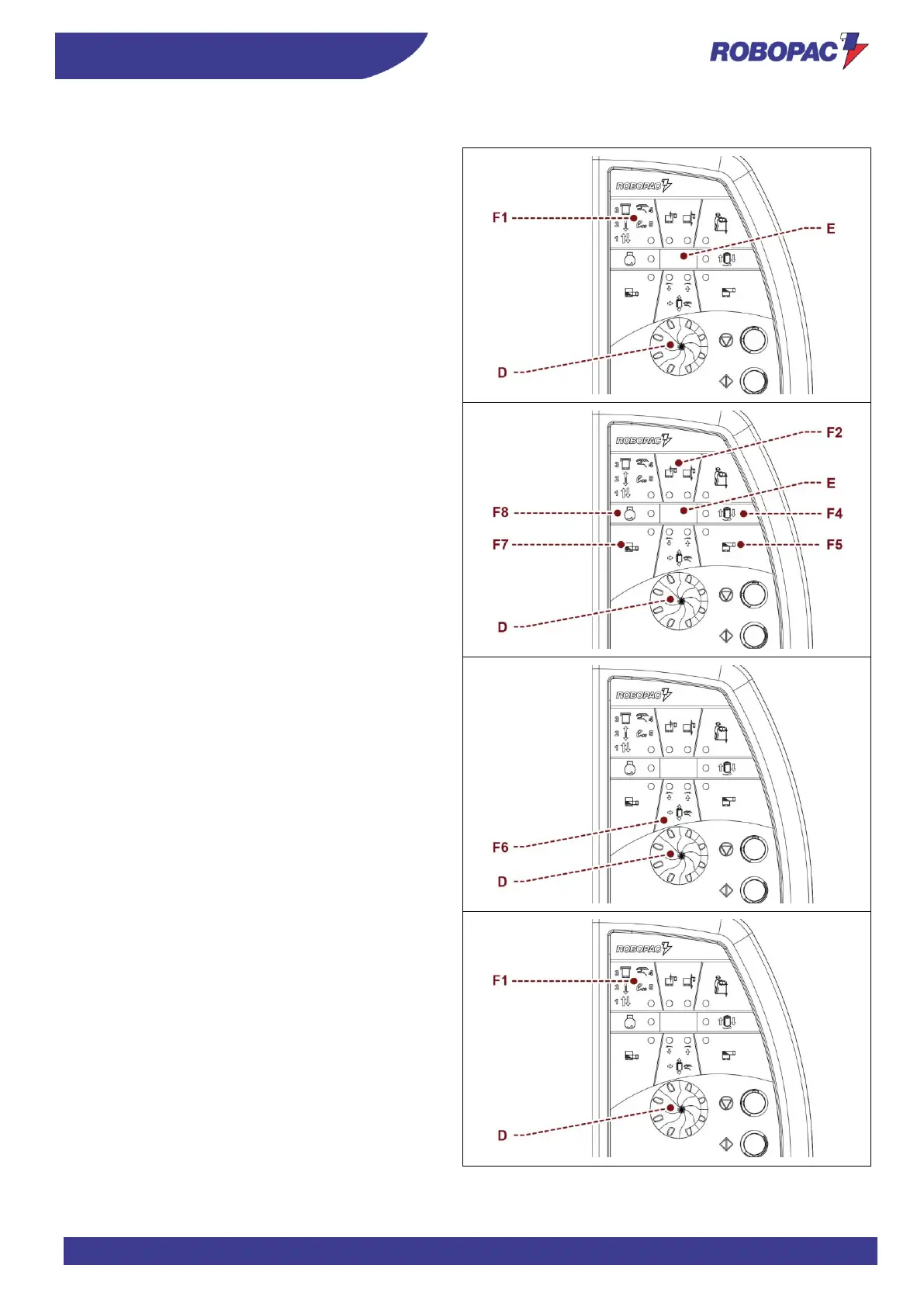
To select the wrapping cycle:
1. Turn the selector to the first function on the line on
the upper left (F1).
2. Press the selector (D).
The LED starts flashing.
3. Turn the selector to select the number of the work
cycle.
4. Press the selector to confirm the selection.
The identification number appears on the display
(E).
The machine is ready to start the cycle.
To change the production parameters:
1. Turn the selector to one of the functions (F2-F4-F5-
F7-F8).
2. Press the selector (D).
The LED starts flashing.
The set value appears on the display (E).
3. Turn the selector to change the value.
4. Press the selector to save the change.
The LED remains on steady.
To move the film carriage in manual mode:
1. Turn the selector to the function (F6).
2. Press the selector (D).
The LEDs start flashing.
3. Turn the selector to move the carriage.
- Clockwise: carriage moves up.
- Anticlockwise: carriage moves down.
4. Press the selector to quit the function.
The LED remains on steady.
To perform multiple reinforcing wrapping:
During the double cycle (F1 sel. 1) or single cycle (F1
sel. 2), press the selector (D) for at least 2 seconds
while the film carriage is in the upstroke or downstroke
phase to stop the film carriage and obtain reinforcing
wrapping.
To carry out several reinforcing wrappings at the same
point, press selector (D) a few times (maximum 5).
The carriage will resume moving once the set number of
wrapping operations have been completed.








 To Next Page