EVISION - HD101 & HD102 www.roevisual.com
V1.13, 2020-05-20 | Copyright © 2020 ROE Visual Co., Ltd. All Rights Reserved.
9 / 41
3 Introduction
3.1 About Manual
This manual provides introductions on the operations of the EVISION control system, for Processor HD101
& HD102. A read-through of this manual before operations is strongly recommended.
3.2 About EVISION System
EVISION establishes networks connecting processors, receiving cards and LED panels, providing fresher-
friendly UI and experience.
4 General Information
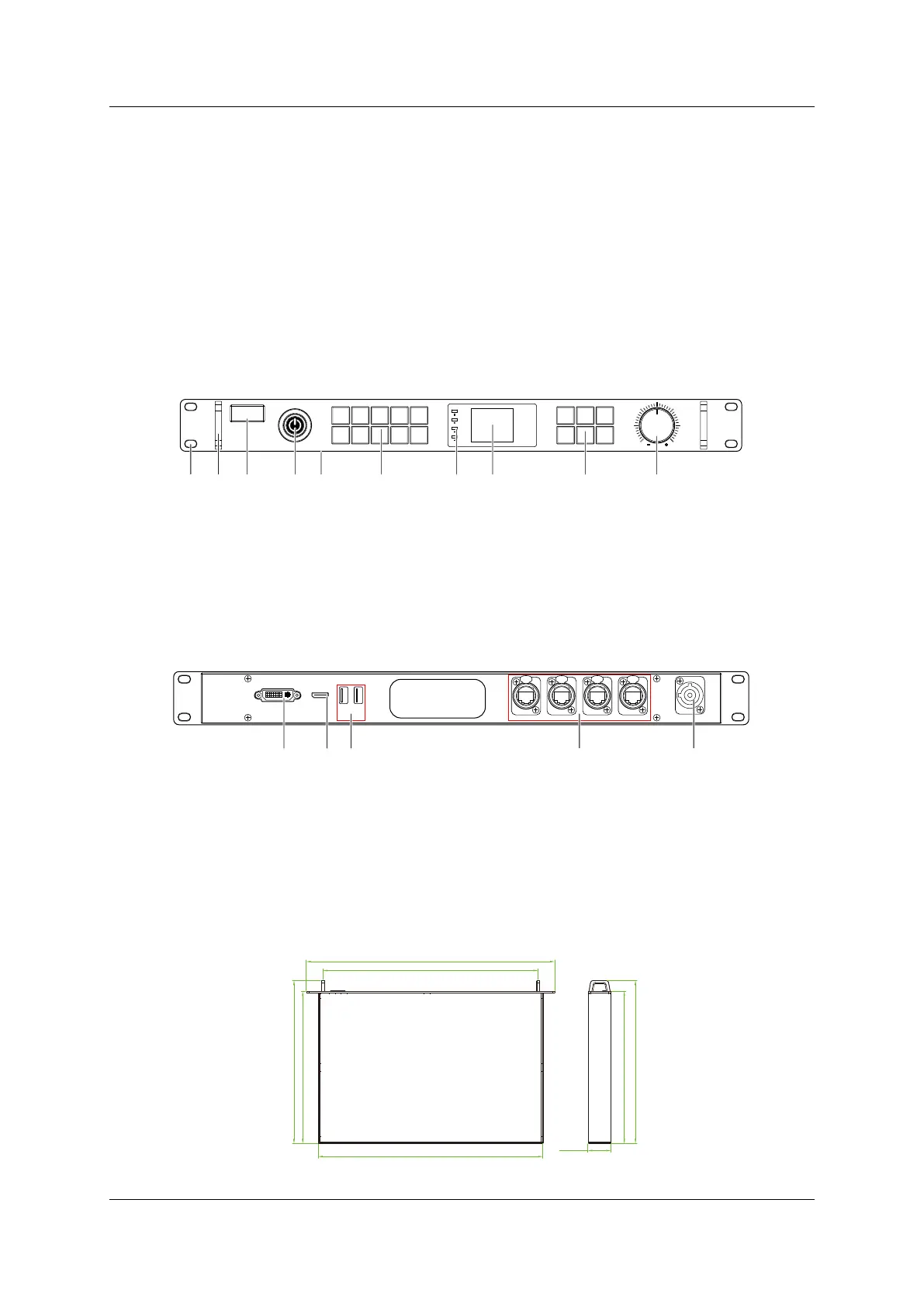
4.1 HD101
4.1.1 Front panel
Figure 4-1. HD101 front
4.1.2 Rear panel
Figure 4-2. HD101 rear
4.1.3 Dimensions
Dimension: L485 x W240 x H45mm, 1U.
Figure 4-3. HD101 dimensions
0 1 2 3 4
5 6 7 8 9
B lac k
OK
M enu
D V I
H DMI
Esc F n
EVI SION
HD101
A. Screw Hole
D. Power Button
B. Handle
C. Nameplate
E. Numeric Keys
F. Output Indicators
G. LCD Screen
H. Function Keys
J. Setting Knob
A B C D E F G JH
HD M I
US B1 USB2
DVI
PO RT1
P OR T2
PORT3
P ORT4
IN PUT 100-240V AC 50/60 Hz
HD101
M. USB Port 1 & 2
K. Input - DVI
L. Input - HDMI
K
L
M
N
O
O. Power Port
N. Output Port 1 - 4
(Neutrik NE8MC Series RJ45 Connector)



 To Next Page