EVISION - HD101 & HD102 www.roevisual.com
V1.13, 2020-05-20 | Copyright © 2020 ROE Visual Co., Ltd. All Rights Reserved.
26 / 41
6.13 Hot Backup
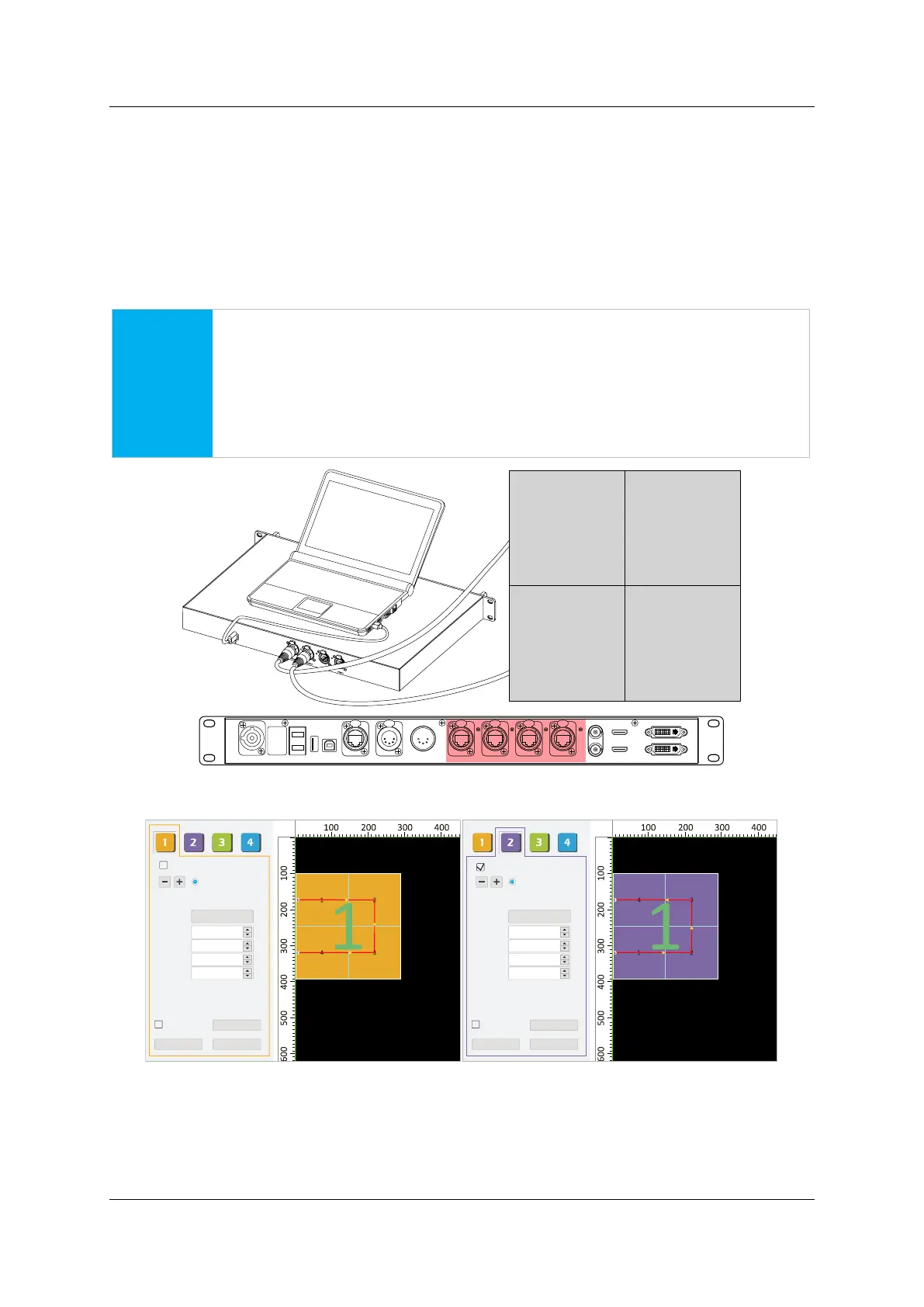
HD101 and HD102 both support hot backup, while ONLY HD102 provides the option to specify the
Backup Port on control system software.
Create an output data loop from one port to its next, pair port1-port2 or port3-port4 recommended as
shown in Figure 6-16. HD102 hot backup cabling.
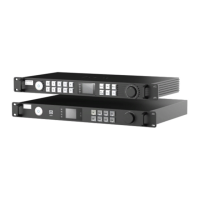
Setup mapping accordingly on both port1 and port2, as shown in Figure 6-17. Hot Backup using port1 &
port2.
Click Save Settings to confirm config, to establish a hot backup data loop.
NOTICE
Please pay attention to the mapping sequence of tiles. If using pair port1-port2, port2
should have the reversed mapping of port1. Apart from the sequence, other settings
like type, QTY and location should be the same.
For HD101, disconnect port2 when mapping port1, vice versa. Detailed steps can be
referred to below.
Figure 6-16. HD102 hot backup cabling
Figure 6-17. Hot Backup using port1 & port2 and port2 as a backup port
HDMI IN
USB
OUT P ORT1 PORT 2 P ORT3 P ORT4INPUT 100-240V A C 50/60 Hz DVI IN
DVI L OOPHDMI LO OP
RE F IN
RE F OUT
DMX I NDMX OUTNE T
USB
IN
FIB ER2
F IBE R1
LED Wall
Mapping Save Setting
Preview
288
288
1
3.4-MBI5153(NS).r
Tile Type
H Count
V Count
H Position
V Position
H Size
V Size
Hybird (port1)
3
0
100
3
Mapping Save Setting
Preview
288
288
1
3.4-MBI5153(NS).r
Tile Type
H Count
V Count
H Position
V Position
H Size
V Size
Hybird (port2)
3
0
100
3
Backup Port
Backup Port



 To Next Page