47
Other Features
Editing a macro
You can edit the contents of a function, change the order in which it
is executed, or copy/delete a function either while creating a macro
or after the macro is nished.
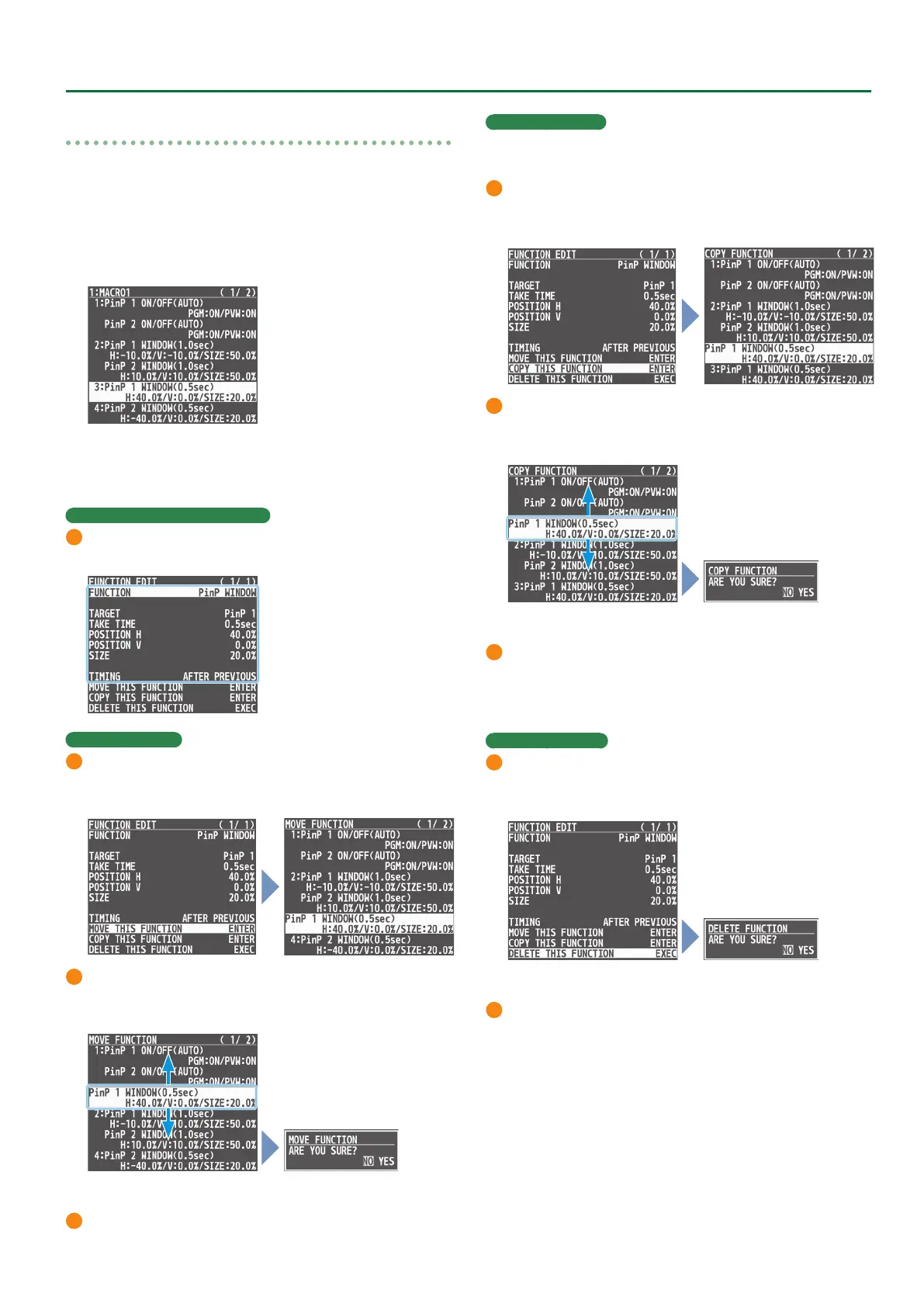
1. In step 3 of “Renaming a Macro” (p. 50), select the
function you want to edit in the list, and press the
[VALUE] knob.
The FUNCTION EDIT menu appears.
2. Edit, move, copy or delete the function.
Editing the contents of a function
1
Follow steps 4–9 in “Recording a Macro” (p. 46) to edit the
contents of the function.
Moving a function
1
Use the [VALUE] knob to select “MOVE THIS FUNCTION,” and
press the [VALUE] knob.
MOVE FUNCTION screen appears.
2
Use the [VALUE] knob to select where you want to move the
function, and then press the [VALUE] knob.
A conrmation message appears.
* If you decide to cancel, press the [EXIT] button.
3
Use the [VALUE] knob to select “YES,” and press the [VALUE] knob.
The function is moved, and the message “COMPLETE” appears.
Copying a function
* Copying is disabled if the number of recorded functions have
reached the limit (10).
1
Use the [VALUE] knob to select “COPY THIS FUNCTION,” and
press the [VALUE] knob.
The COPY FUNCTION screen appears.
2
Use the [VALUE] knob to select where you want to copy the
function to, and then press the [VALUE] knob.
A conrmation message appears.
* If you decide to cancel, press the [EXIT] button.
3
Use the [VALUE] knob to select “YES,” and press the [VALUE]
knob.
The function is copied, and the message “COMPLETE” appears.
Deleting a function
1
Use the [VALUE] knob to select “DELETE THIS FUNCTION,” and
press the [VALUE] knob.
A conrmation message appears.
* If you decide to cancel, press the [EXIT] button.
2
Use the [VALUE] knob to select “YES,” and press the [VALUE] knob.
The function is deleted, and the message “COMPLETE” appears.
3. Press the [MENU] button to close the menu.



 To Next Page