12
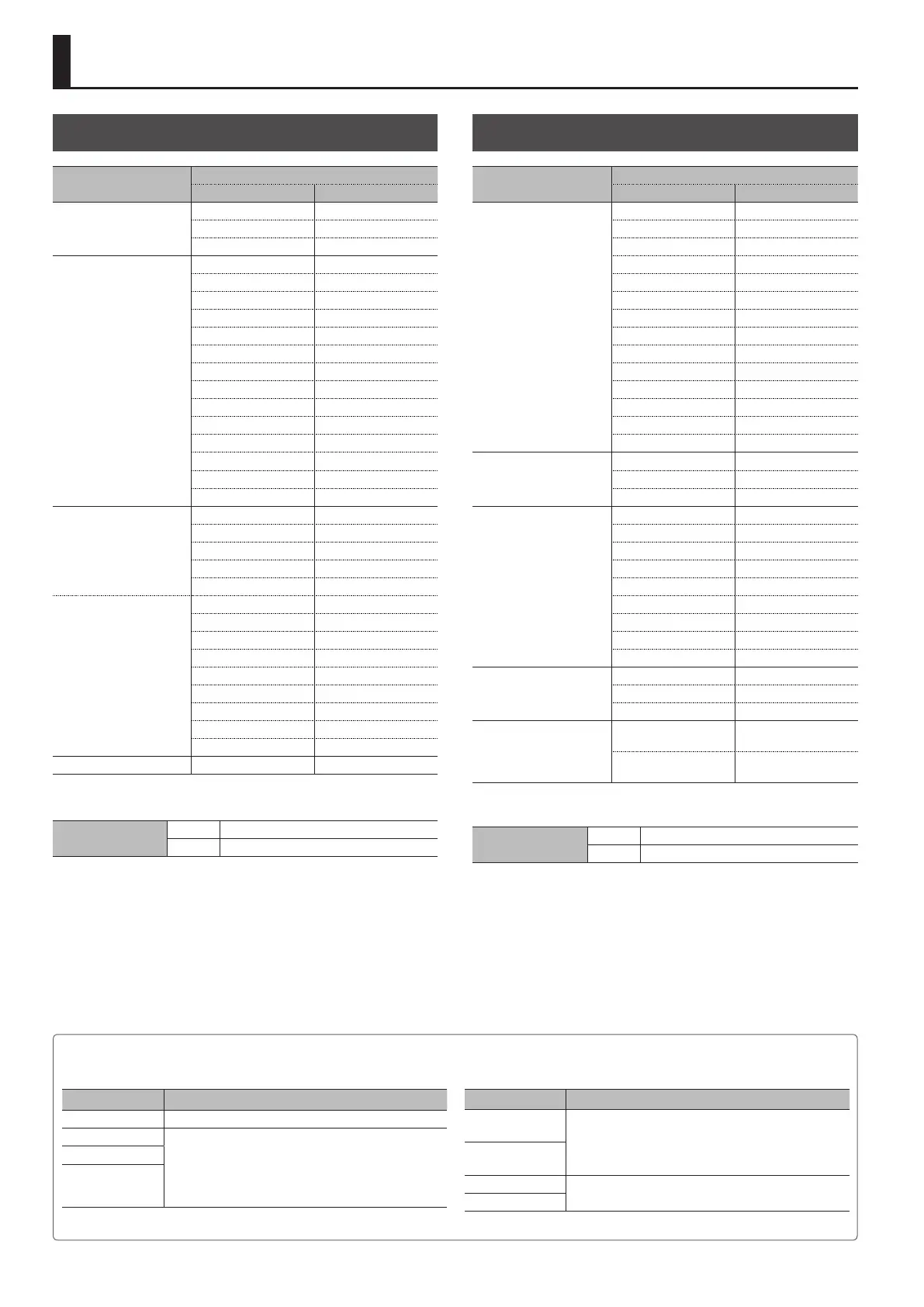
List of Supported Video Formats
Input Formats
Input connector
Frame rate
When set at “59.94 Hz” When set at “50 Hz”
HDMI IN 1–3
720/59.94p 720/50p
1080/59.94i 1080/50i
1080/59.94p 1080/50p
HDMI IN 4
480/59.94i 576/50i
480/59.94p 576/50p
720/59.94p 720/50p
1080/59.94i 1080/50i
1080/59.94p 1080/50p
640 x 480/60 Hz 640 x 480/60 Hz
800 x 600/60 Hz 800 x 600/60 Hz
1024 x 768/60 Hz 1024 x 768/60 Hz
1280 x 768/60 Hz 1280 x 768/60 Hz
1280 x 1024/60 Hz 1280 x 1024/60 Hz
1366 x 768/60 Hz 1366 x 768/60 Hz
1400 x 1050/60 Hz 1400 x 1050/60 Hz
1600 x 1200/60 Hz 1600 x 1200/60 Hz
1920 x 1200/60 Hz 1920 x 1200/60 Hz
RGB/COMPONENT 4
(component signal)
480/59.94i 576/50i
480/59.94p 576/50p
720/59.94p 720/50p
1080/59.94i 1080/50i
1080/59.94p 1080/50p
RGB/COMPONENT 4
(RGB signal)
640 x 480/60 Hz 640 x 480/60 Hz
800 x 600/60 Hz 800 x 600/60 Hz
1024 x 768/60 Hz 1024 x 768/60 Hz
1280 x 768/60 Hz 1280 x 768/60 Hz
1280 x 1024/60 Hz 1280 x 1024/60 Hz
1366 x 768/60 Hz 1366 x 768/60 Hz
1400 x 1050/60 Hz 1400 x 1050/60 Hz
1600 x 1200/60 Hz 1600 x 1200/60 Hz
1920 x 1200/60 Hz 1920 x 1200/60 Hz
COMPOSITE 4 480i 576i
* The refresh rates are the maximum value for each resolution.
Audio input format
HDMI Linear PCM, 24 bits/48 kHz, 2 ch
USB Linear PCM, 16 bits/48 kHz, 2 ch
Output Formats
Output connector
Frame rate
When set at “59.94 Hz” When set at “50 Hz”
HDMI OUT
480/59.94i 576/50i
480/59.94p 576/50p
720/59.94p 720/50p
1080/59.94i 1080/50i
1080/59.94p 1080/50p
640 x 480/60 Hz 640 x 480/75 Hz
800 x 600/60 Hz 800 x 600/75 Hz
1024 x 768/60 Hz 1024 x 768/75 Hz
1280 x 768/60 Hz 1280 x 768/75 Hz
1280 x 1024/60 Hz 1280 x 1024/75 Hz
1366 x 768/60 Hz 1366 x 768/75 Hz
1400 x 1050/60 Hz 1400 x 1050/75 Hz
1600 x 1200/60 Hz 1600 x 1200/60 Hz
1920 x 1200/60 Hz 1920 x 1200/60 Hz
RGB/COMPONENT
(component signal) (*1)
480/59.94p 576/50p
720/59.94p 720/50p
1080/59.94p 1080/50p
RGB/COMPONENT
(RGB signal)
640 x 480/60 Hz 640 x 480/75 Hz
800 x 600/60 Hz 800 x 600/75 Hz
1024 x 768/60 Hz 1024 x 768/75 Hz
1280 x 768/60 Hz 1280 x 768/75 Hz
1280 x 1024/60 Hz 1280 x 1024/75 Hz
1366 x 768/60 Hz 1366 x 768/75 Hz
1400 x 1050/60 Hz 1400 x 1050/75 Hz
1600 x 1200/60 Hz 1600 x 1200/60 Hz
1920 x 1200/60 Hz 1920 x 1200/60 Hz
PVW OUT
720/59.94p 720/50p
1080/59.94i 1080/50i
1080/59.94p 1080/50p
USB 3.0
720/29.97p
(uncompressed)
720/25p
(uncompressed)
1080/29.97p
(uncompressed)
1080/25p
(uncompressed)
(*1) No component output is made at 480i/576i or 1080i.
Audio output format
HDMI Linear PCM, 24 bits/48 kHz, 2 ch
USB Linear PCM, 16 bits/48 kHz, 2 ch
About Input/Output Format Settings
The input/output format is set as shown below.
Input connector Input formats
HDMI IN 1–3 This is set using the system format.
HDMI IN 4 This is automatically detected to match the connected
equipment.
You can also specify a desired input format.
For details, refer to “Setting the Input Format for Channel 4”
(p. 14).
RGB/COMPONENT 4
COMPOSITE 4
Output connector Output formats
HDMI OUT
This is set using the system format.
You can also specify a desired output format.
For details, refer to “Setting the Output Format for Main
Output” (p. 14).
RGB/COMPONENT
PVW OUT
This is set using the system format.
USB 3.0
* For information on how to set the system format, refer to “Setting the System Format” (p. 13).



 To Next Page