15
Video Input/Output Settings
Assigning a Video Source to Channel 4
By factory default, input on channel 4 is set to “HDMI” (video input
via the HDMI IN 4 connector). When you want to input video via a
dierent connector, change this setting.
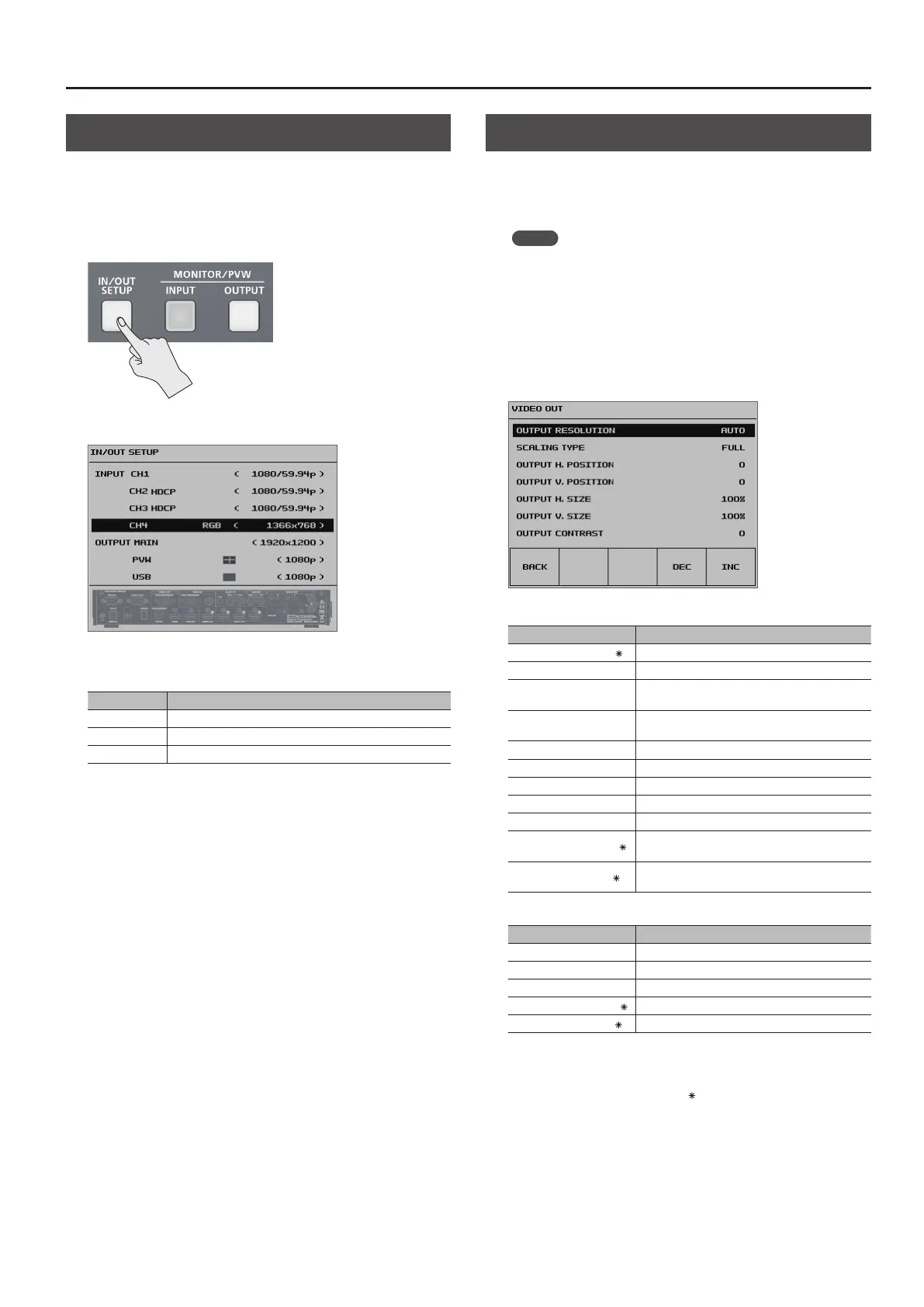
1. Press the [IN/OUT SETUP] button to display the setup screen.
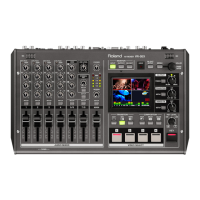
2. Select <CH4>.
3. Use the [VALUE] knob to specify the video source to input
on channel 4.
Value Explanation
HDMI Video is input via the HDMI IN 4 connector.
RGB Video is input via the RGB/COMPONENT 4 connector.
COMPOSITE Video is input via the COMPOSITE 4 connector.
4. Press the [IN/OUT SETUP] button to quit the setup screen.
Adjusting Output Video
You adjust the main output video (HDMI OUT connector and RGB/
COMPONENT output connector) or the preview output video (PVW
OUT connector) to match the equipment receiving output from the
VR-4HD.
MEMO
5 You can output a color bar, useful for adjusting the image quality
of a display. Use the [SYSTEM SETUP] button g <SYSTEM> g
<COLOR BAR OUTPUT> to set the value to “ON.”
1. Press the [SYSTEM SETUP] button to display the setup screen.
2. Select <VIDEO OUT> to display the VIDEO OUT menu.
3. Select the setting item.
You use the following items to adjust the main output video.
Setting item Explanation
OUTPUT RESOLUTION (
) This sets the output format (p. 14).
SCALING TYPE This sets the scaling type.
OUTPUT H. POSITION
This adjusts the display position in the horizontal
direction.
OUTPUT V. POSITION
This adjusts the display position in the vertical
direction.
OUTPUT H. SIZE This adjusts the size in the horizontal direction.
OUTPUT V. SIZE This adjusts the size in the vertical direction.
OUTPUT CONTRAST This adjusts the contrast.
OUTPUT SATURATION This adjusts the saturation.
OUTPUT BRIGHTNESS This adjusts the brightness.
OUTPUT COLOR SPACE (
)
This sets the color space for HDMI OUT connector
and RGB/COMPONENT output connector.
OUTPUT DVI-D/HDMI (
)
This sets the output mode for HDMI OUT
connector.
You use the following items to adjust the preview output video.
Setting item Explanation
PREVIEW CONTRAST This adjusts the contrast.
PREVIEW SATURATION This adjusts the saturation.
PREVIEW BRIGHTNESS This adjusts the brightness.
PREVIEW COLOR SPACE (
) This sets the color space for PVW OUT connector.
PREVIEW DVI-D/HDMI (
)
This sets the output mode for PVW OUT connector.
4. Use the [VALUE] knob to adjust the main output video or
the preview output video.
* For setting items indicated by a “ ” in the table above, you press the
[VALUE] knob to apply the setting.
5. Press the [SYSTEM SETUP] button several times to quit the
setup screen.


 To Next Page