Brief description
Measurement start up
Push buttons and displays
pag. 16
ST2 User’s Manual
TV Mode
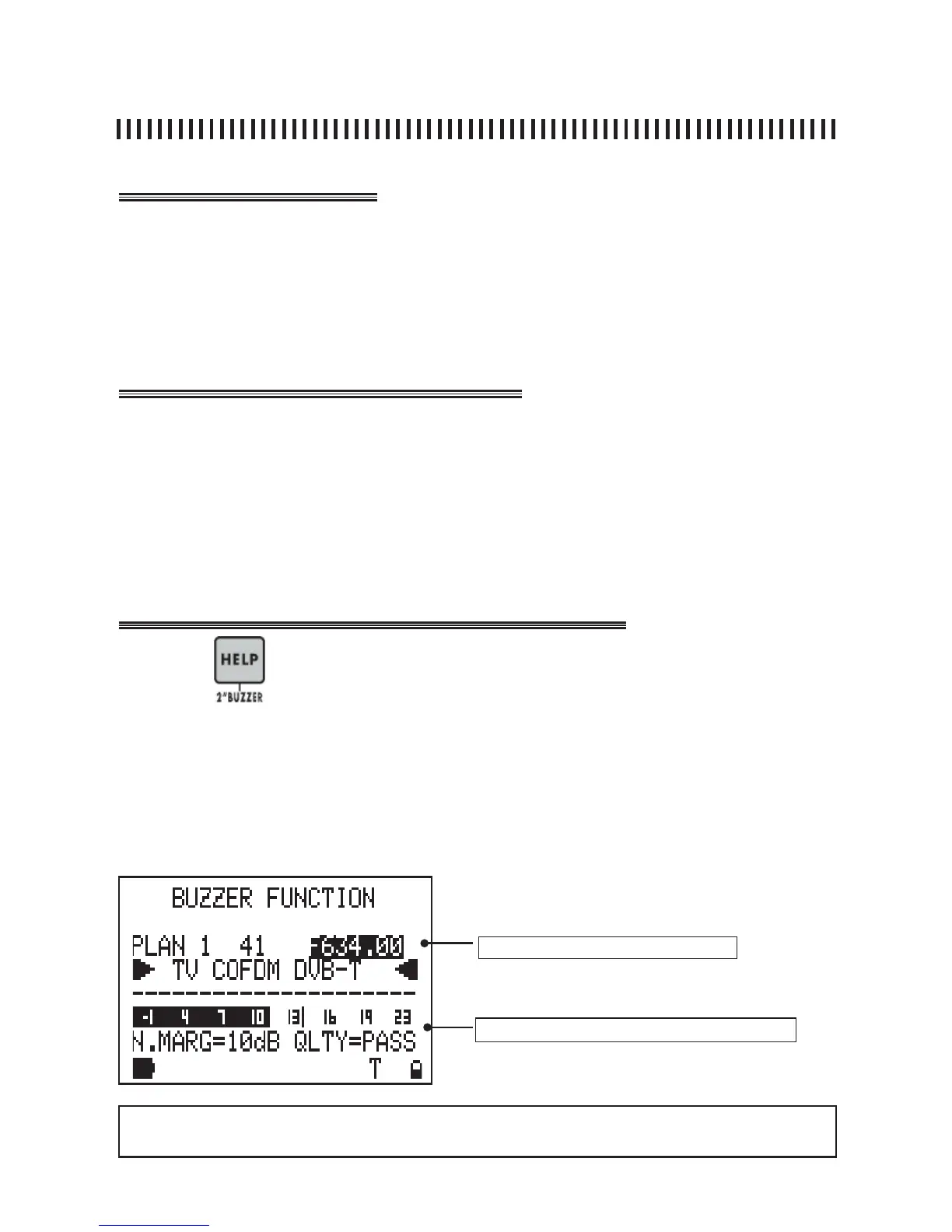
2.0 BUZZER (DIGITAL TV ONLY)
The buzzer is a beep sound which varies its tone according to the Noise Margin
of the signal received. This helps antenna alignment. Press the HELP [12] key
for 2 seconds to enable this feature. The meter will display the noise margin
measurement, the quality analysis (PASS, MARGINAL, FAIL) and the network data
(NIT tables). These measurements are shown only if the COFDM MUX is locked.
• Select the required Multiplex,
• Press the HELP [12] keys for 2”,
• The meter will show the BUZZER FUNCTION. This provides an audible buzzer
tone, related to the noise margin measurement.
• The Buzzer sound turns on only when the MULTIPLEX is locked.
• Press any key to disable this function.
Press the
for 2” to start the BUZZER FUNCTION.
The current channel of the active Memory Plan is shown on the fi rst line of
the display. The channel frequency value can be changed. If this is done the
frequency association to the channel name is lost and three horizontal lines are
shown. When the selected Multiplex is locked the meter activates the buzzer
and the relevant measurements are shown (see fi g. below) .
Frequency
active measurements when the MUX is locked
NOTE
• The buzzer function works only for digital TV channels



 To Next Page