Brief description
Measurement start up
Push buttons and displays
pag. 31
ST2 User’s Manual
TV Mode
9.0 AUTOSCAN: AUTOMATIC CHANNEL SEARCH
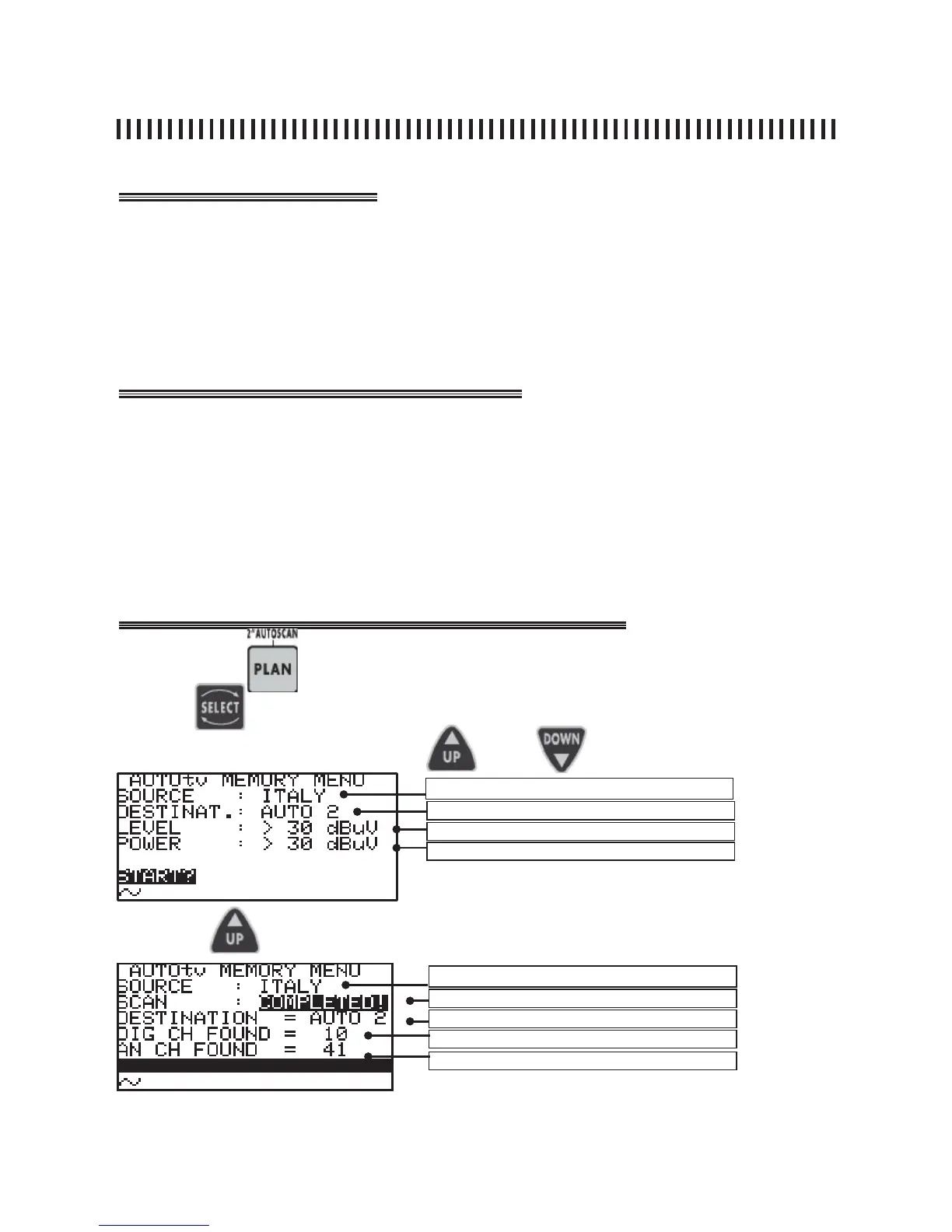
The Autoscan function allows the automatic search of analogue and
digital channels, which are above a settable level/power settable
threshold. The channels that are automatically found by this feature will
memorized in a plan called Auto1 upt o Auto 10.
• Press the PLAN [3] key for two seconds
• Press keys SELECT [10], UP [7] and DOWN [9] to choose the destina-
tion Memory Plan from Auto1 to Auto10 and the threshold values for
the level/power of the analogue/digital channels to be detected,
• Start the automatic search function moving the cursor to the START?
selection using the SELECT [10] key, then confi rm your selection by
pressing UP [7].
Press the
key for 2” to start the Autoscan feature
Fig. 9.1 Autoscan menu display
Use the
and
key to highlight the fi elds to be changed and modify the
to the required values using the
Press the key to start channel scanning
Fig. 9.2 Scanning Complete
NOTE
• During scanning the meter fi nds and recognises the digital and analogue channels.
Active standard channel plan
Destination channel plan
Analogue signal threshold level
Digital signal threshold level
Standard & Canalization
Scanning status
Destination memory plan
Total digital channels found
Total analogue channels found
keys.



 To Next Page