pag. 68
ST2 User’s Manual
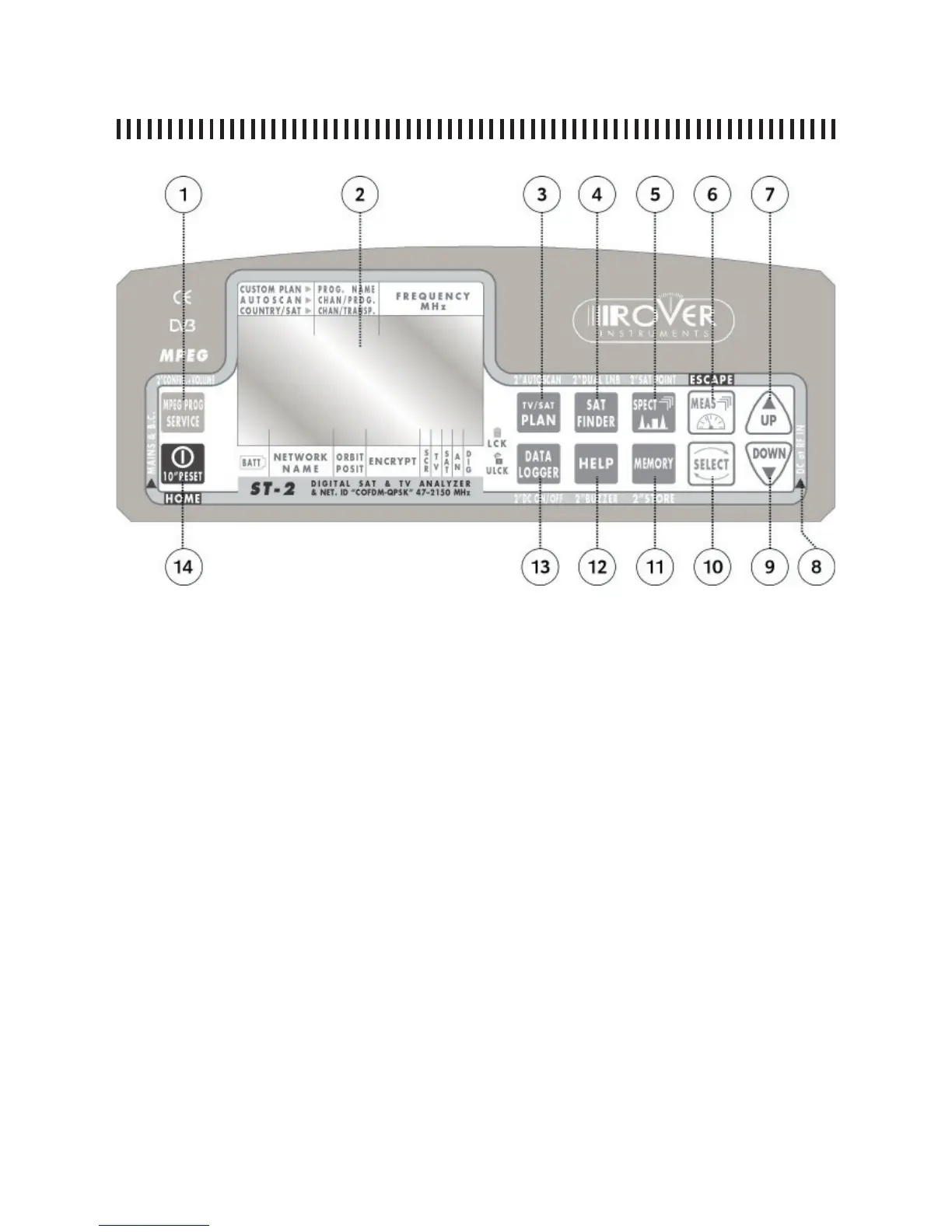
A6 - FRONT PANEL DESCRIPTION
1 MPEG (press for 2 seconds to access the confi guration menu)
2 Graphic display
3 PLAN (press for 2 seconds to access the AUTOSCAN function)
4 SAT FINDER (press for 2 seconds to access the DUAL LNB function)
5 SPECT (press for 2 seconds to access the SAT POINT function)
6 MEAS
7 UP (acts also as “Enter”)
8 DC at RF IN battery charge LED
9 DOWN (acts also as an “Enter”)
10 SELECT
11 MEMORY (press for 2 seconds to make a quick memorization of the tuned transponder)
12 HELP (press for 2 seconds to enable the BUZZER function)
13 DATA LOGGER (press for 2 seconds to turn ON/OFF the power supply to the RF input)
14 ON/OFF switch (press for 10 seconds to reset the meter)



 To Next Page