BTR-800, TR-800, TR-825 System Operation 51
Group/Channel Screen
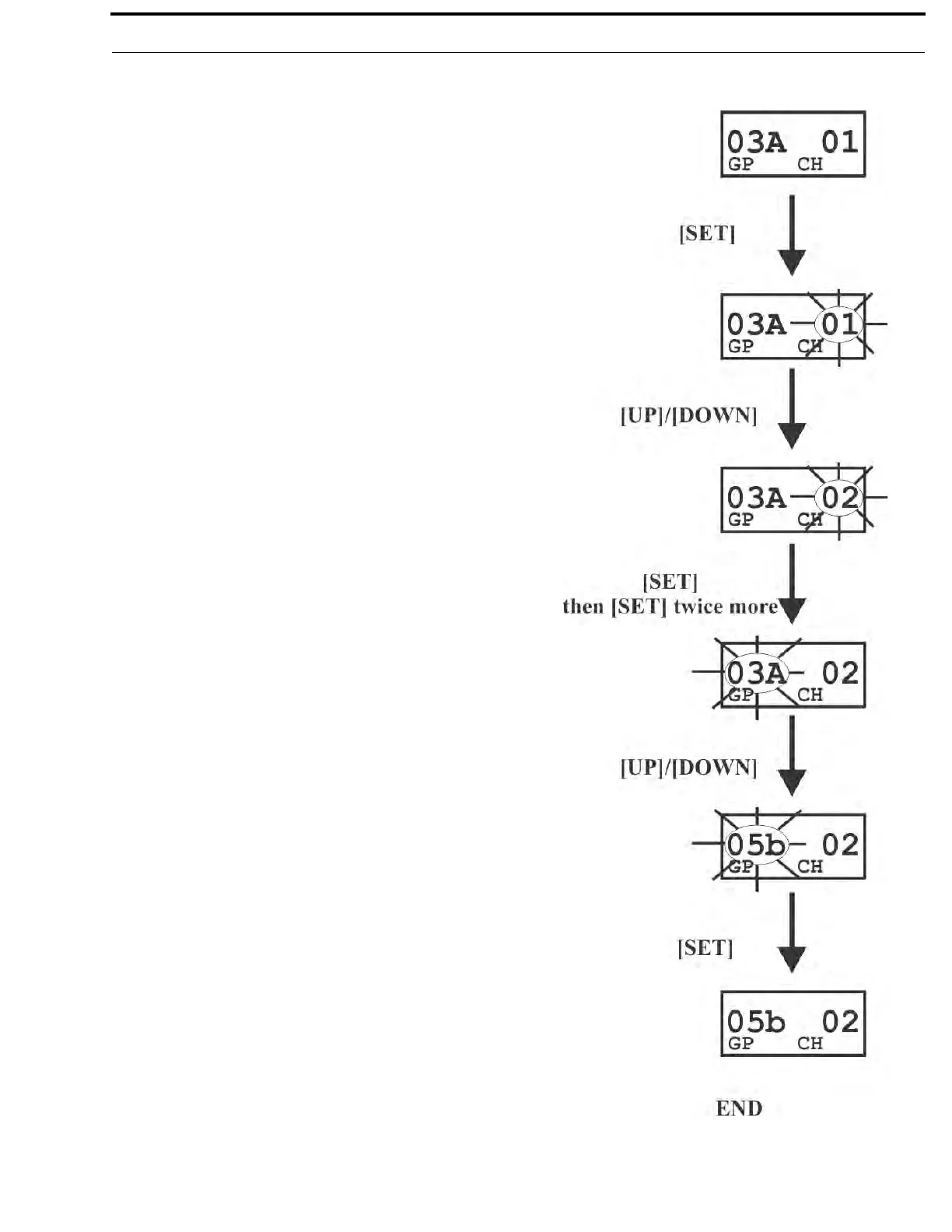
The Group/Channel screen allows the user to change the group
and select from a pre-determined number of transmit channels.
• The screen displayed after the beltpack power-up screens.
• Press [SET] to edit the channel number. The channel
number will start flashing.
• Use the [UP]/[DOWN] arrow buttons to change the channel
number
• Press [SET] to place the beltpack on the channel selected.
Once set is pressed, the beltpack transmitter will move to
that frequency and nothing will be flashing. Now press
[SET] twice to enter group edit.
• Use the [UP]/[DOWN] arrow buttons to change the group
number.
• Press [SET] to place the beltpack on the group selected.
Once set is pressed, the unit returns to the group/channel
display with nothing flashing.
• Pressing [SET] once more will start the editing sequence
over again. Pressing [MENU] during the group edit will end
editing and send the user back at the group/channel screen
without any changes. This applies to channel editing too.



 To Next Page