BTR-800, TR-800, TR-825 System Operation 59
TR-825 Menu Structure
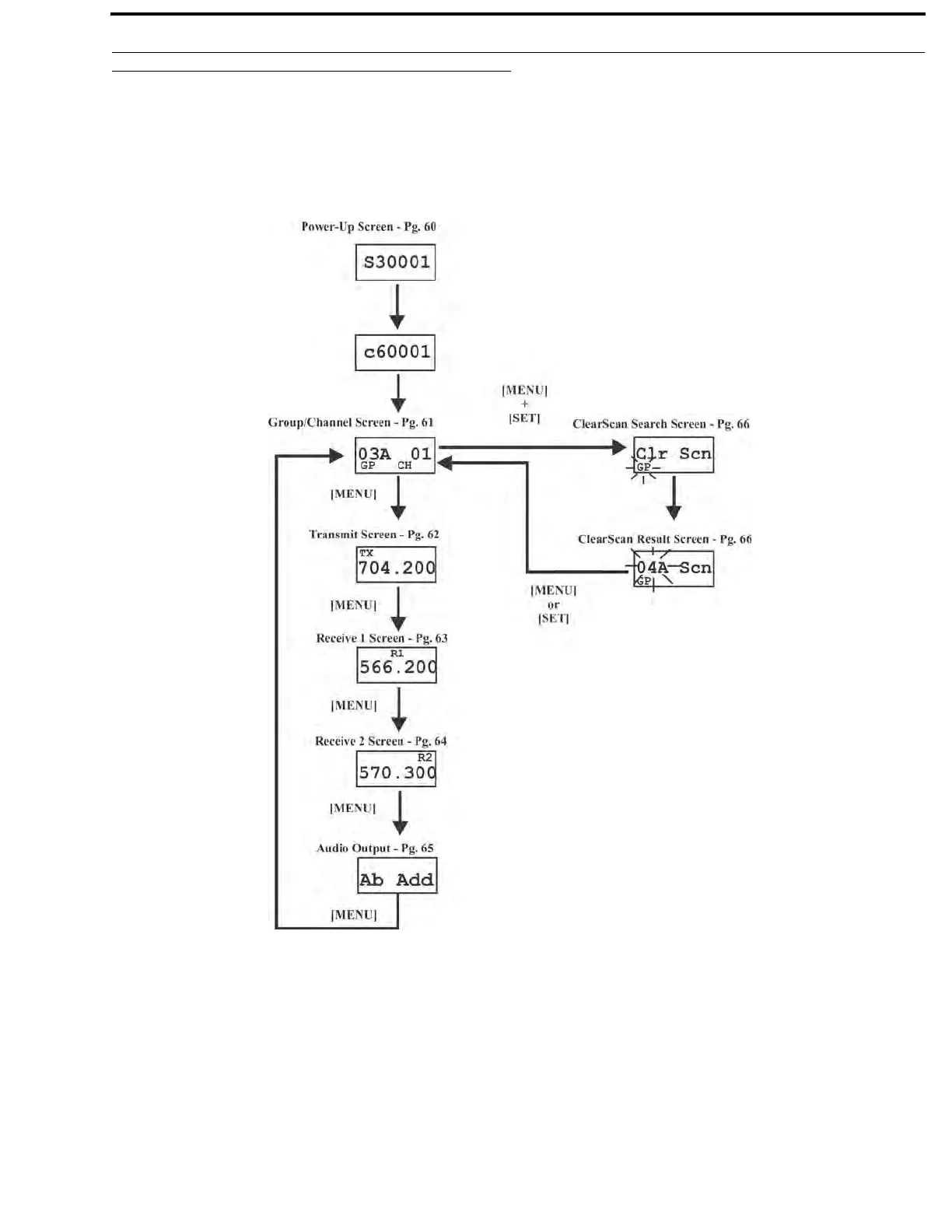
Beltpack Menu Structure
The following contains the main beltpack menu structure and
references the pages in which further detail of that menu may be
found.
All beltpack features and special key sequen
ces can only be
done from the group/channel screen.
Beltpack Feature Enable/Disable Menus
Audio Output.......................................................page 65
Stage Announce (SA)........................................... page 67
Wireless Talk Around (WTA) ............................... page 68
Audio Channel A.................................................page 69
Audio Channel B.................................................page 70
Other Special Key Sequences
Lockout ............................................................... page 71
1st Use Default ................................................... page 71
Factory Default................................................... page 71
NOTE: Pressing [MENU] within a screen after ac
tion has
occurred escapes from that action and places the
user at the current screen. Any editing that had
been done since [SET] had been pressed is
aborted.
FIGURE 39. Power-Up Screen



 To Next Page