RDC6563F Standalone Fiber Cutting Control System User Manual V2.0 43
SHENZHEN RUIDA TECHNOLOGY CO., LTD
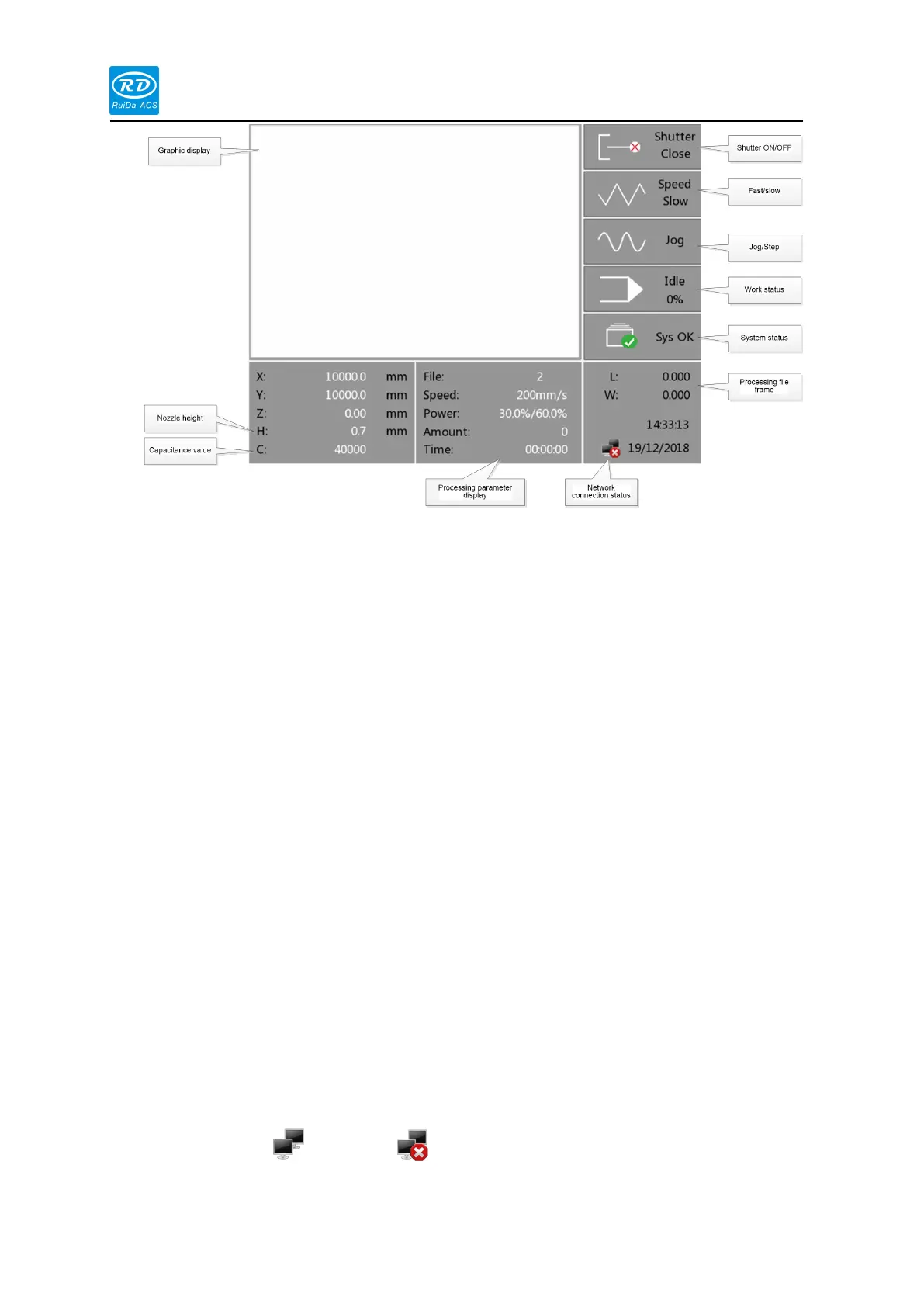
Graphic display area:This area is used for describe the processed file image during file
preview display and processing.
Processing parameter display area: Display the file name, maximum speed and
maximum power of the current processing file, the current file processing number,
processing time.
Current coordinate X/Y: Displays the coordinate value of the current position of the
laser head.
Current coordinate Z:Display the coordinate value of the current Z axis cutting head
Nozzle height H: Display the current nozzle height from the metal plate
Capacitance value C: Display the capacitance reference between the current nozzle
and the metal plate
Shutter on/off:Display current laser shutter enable status。
Fast/slow:Display current manual speed mode
Jog/Step:Display current manual moving axis motion mode
Working status:Used for display the current working status of the system: idle, pause,
finished, run
Processing progress:Display current processing progress
System status:Display current system status, display alarm information if there is an
alarm.
Processing file frame:Display the range of the processing file, L is long, W is wide
Network connection status:Used for displaying the status of the mainboard connected
to the network, when using network communication and establishing a connection,
This area is ,otherwise is



 To Next Page