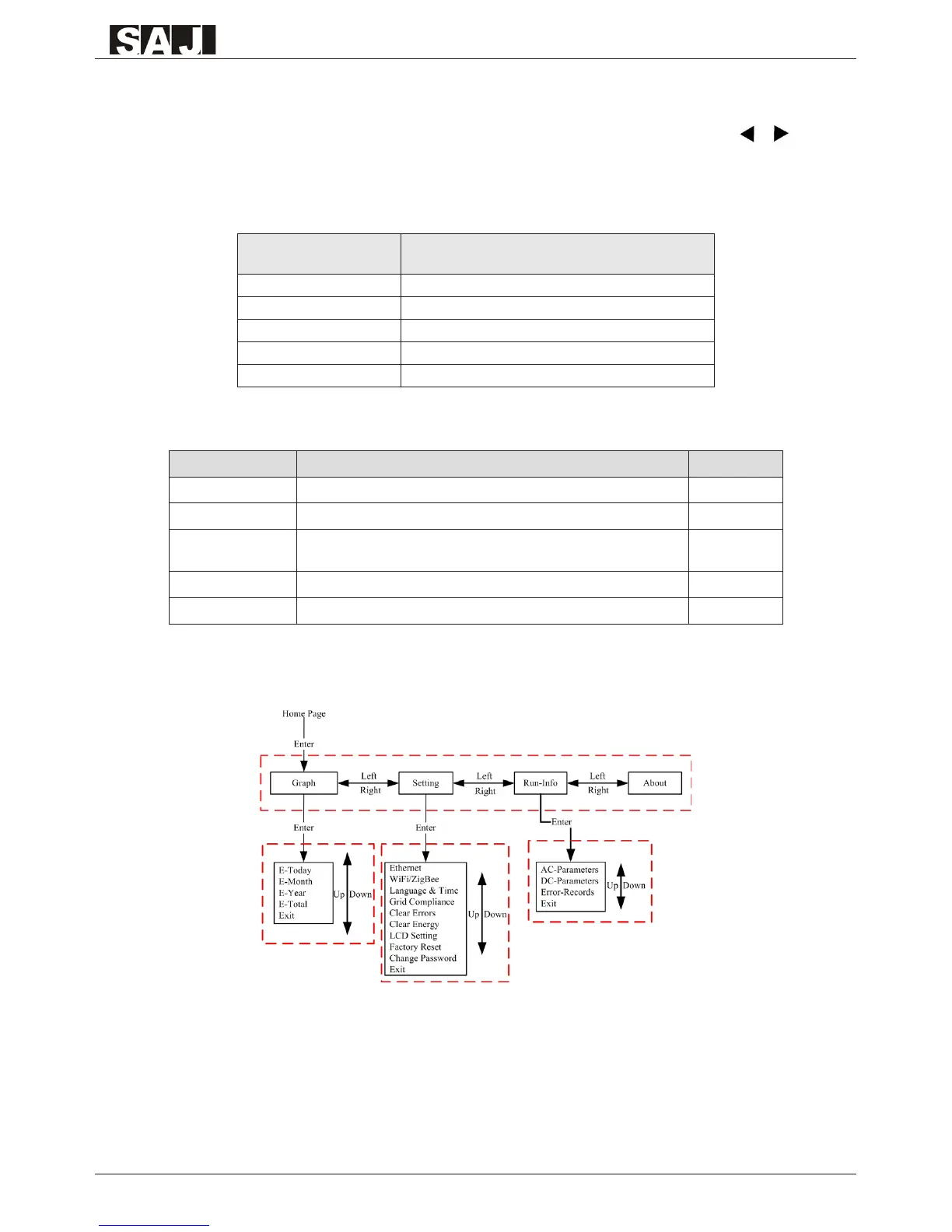
6.4 LCD Menu Structure
Menu structure is shown as Figure 6.4.Menu can be selected by pressing the ‘▲’, ‘▼’, ‘ ’, ‘
’ and conrmed by pressing ‘Enter’, then LCD main display area will display the information
accrodingly. “Exit” option in every submenu exit selected menu stat
Inverter State Explanation
Init The inverter is on self-checking
Wait The inverter in stand-by state
Normal The inverter in normal (function) operation
Error A fault occurs during operation
Update The state of updating rmware
Table 6.2 Inverter status description
Data name Explanation Unit
Power The inverter generated power W
E-Today The generated energy of current day kWh
E-Total
The total energy generated by the inverter and total generated
energy of the year.
kWh
T-today The operating time of current day h
T-total Total hours of operation time h
Table 6.3 Auxiliary display area items description
Figure 6.4 Menu structure



 To Next Page
 Loading...