15
Λ
4x12 Tapped
screw (2)
Bolt (4) Air blocking kit (1)
Wireless remote
controller
(1)
Battery (2)
Remote control
holder
(1)
Owner’s
instructions (1)
Owner’s
instructions (1)
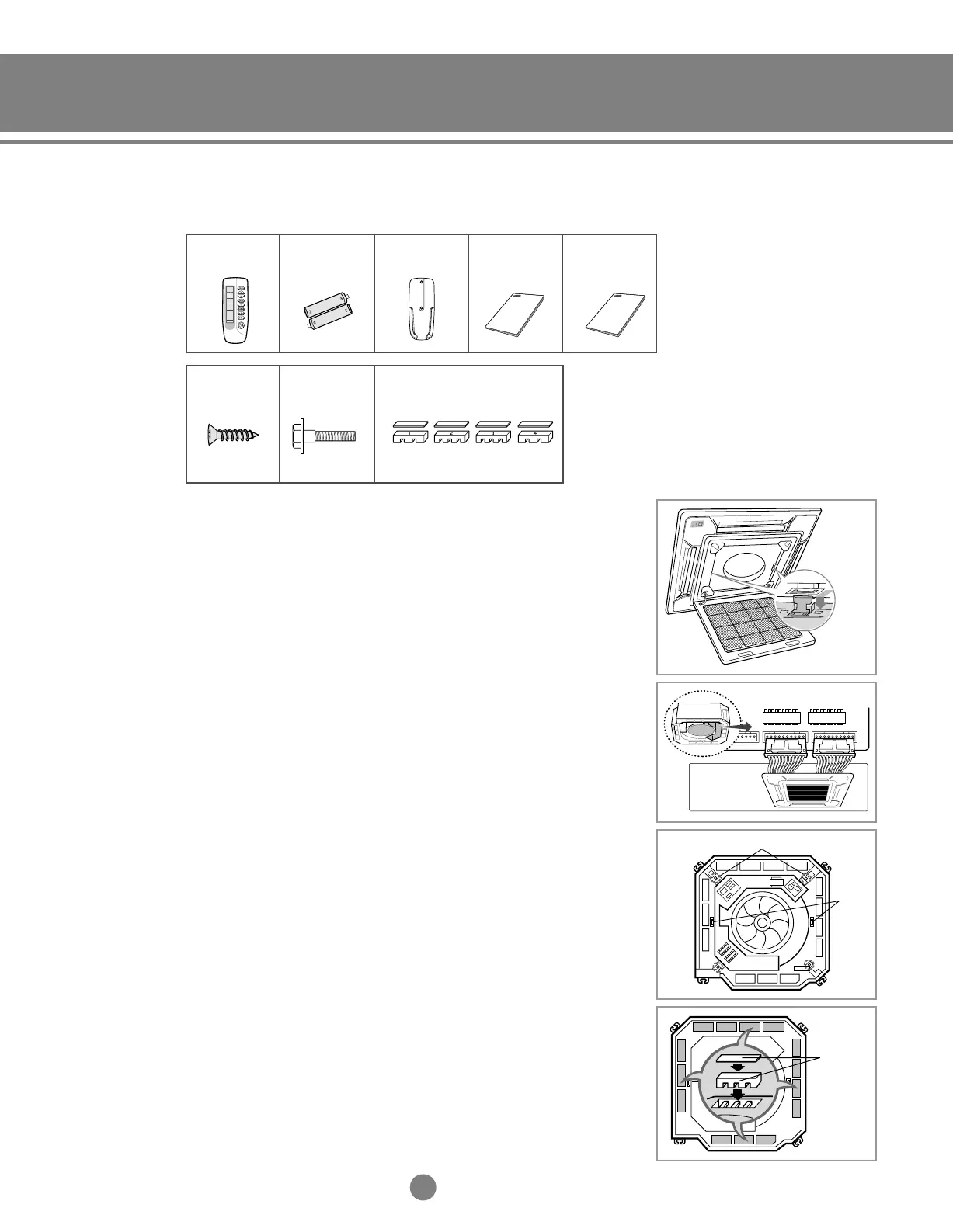
(2) Installation
1)
Open the electrical component box cover by removing the screws.
2)
Install the panel using two hooks on the both sides of the indoor unit.
3) Connect the cables of the panel to the PCB as shown.
4)
Close the electrical component box cover and tighten the screws.
5) Secure the panel to the indoor unit using the bolts(4EA).
◆ There are four types of air blocking kits. Block the air
outlet(s) with one or more kits depending on the situation,
then install insulation to block the airflow completely.
Hook and Eye
Eye
Panel fixing holes
Air blocking
kit
Panel
Must be separately purchased
2-2. 4-way cassette type
(1) Accessories
5-1.Installation_TM_E_06890 2/27/03 10:15 AM Page 15




 To Next Page