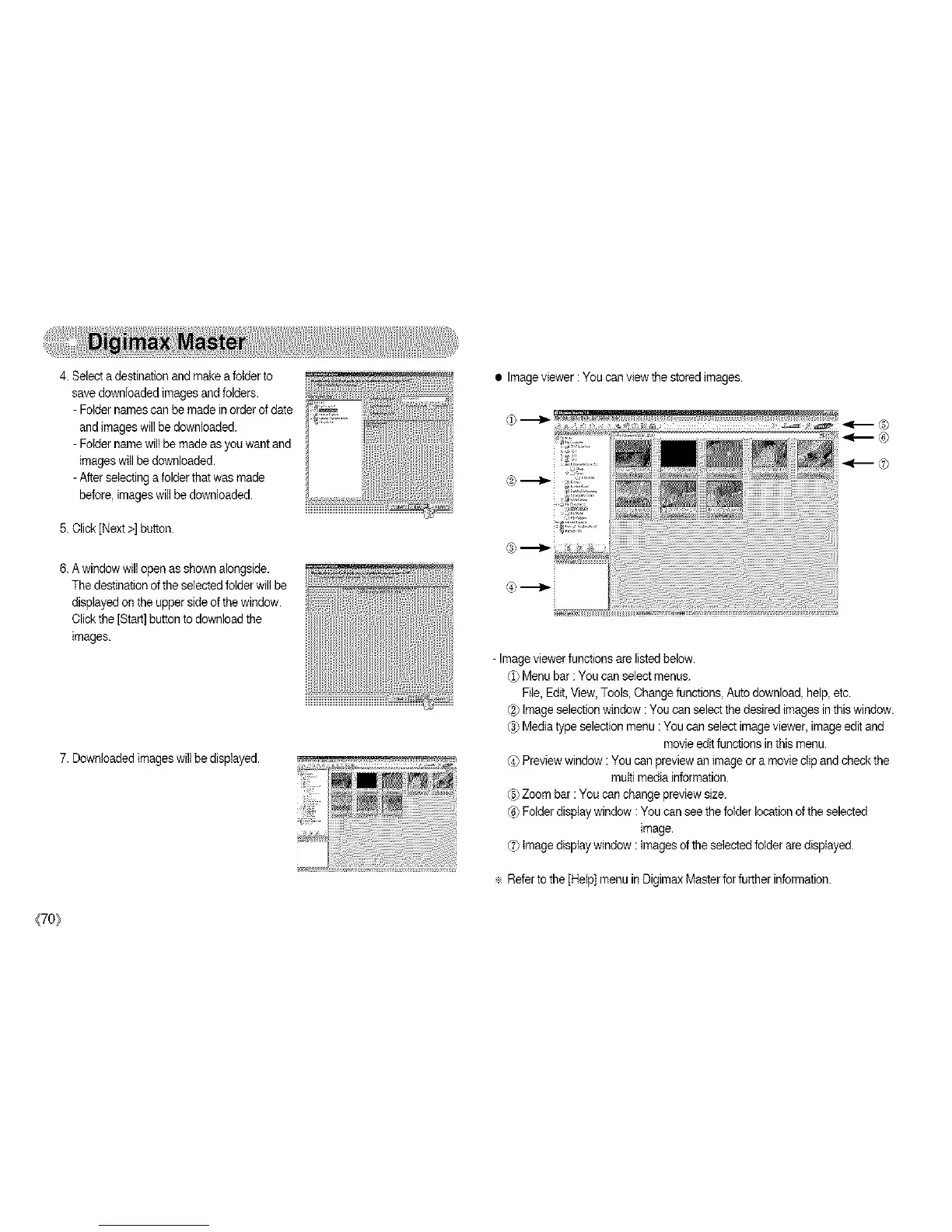
4.Selectadestinationandmakeafolderto
savedownloadedimagesandfolders.
- Fotdernames can be made in orderof date
andimages will be downloaded.
- Foldername willbe madeas you want and
images willbe downloaded.
- After selectinga folderthat was made
before, imageswill be downloaded.
5. Click[Next>] button.
6. Awindow willopen as shown alongside.
The destinationofthe selectedfolder will be
displayedon the upper side ofthe window.
Clickthe [Start]button todownload the
images.
7. Downloaded imageswill be displayed.
• Imageviewer :You can view the stored images.
-Image viewer functionsare listedbelow.
¢1)Menu bar : You can select menus.
File, Edit,View, Tools, Changefunctions, Auto download, help,etc.
¢2_Image selectionwindow : You can select the desired images in thiswindow.
(_ Media type selection menu :You can select imageviewer, imageedit and
movieedit functionsin this menu.
(4)Preview window : You can preview an image or a movieclip andcheck the
multi media information.
@ Zoom bar :You can change preview size.
¢6)Folder displaywindow : You can seethe folder location ofthe selected
image.
(_7)Image display window : Images ofthe selected folderare displayed.
Referto the [Help] menuin Digimax Master forfurther information.
{70_



 To Next Page