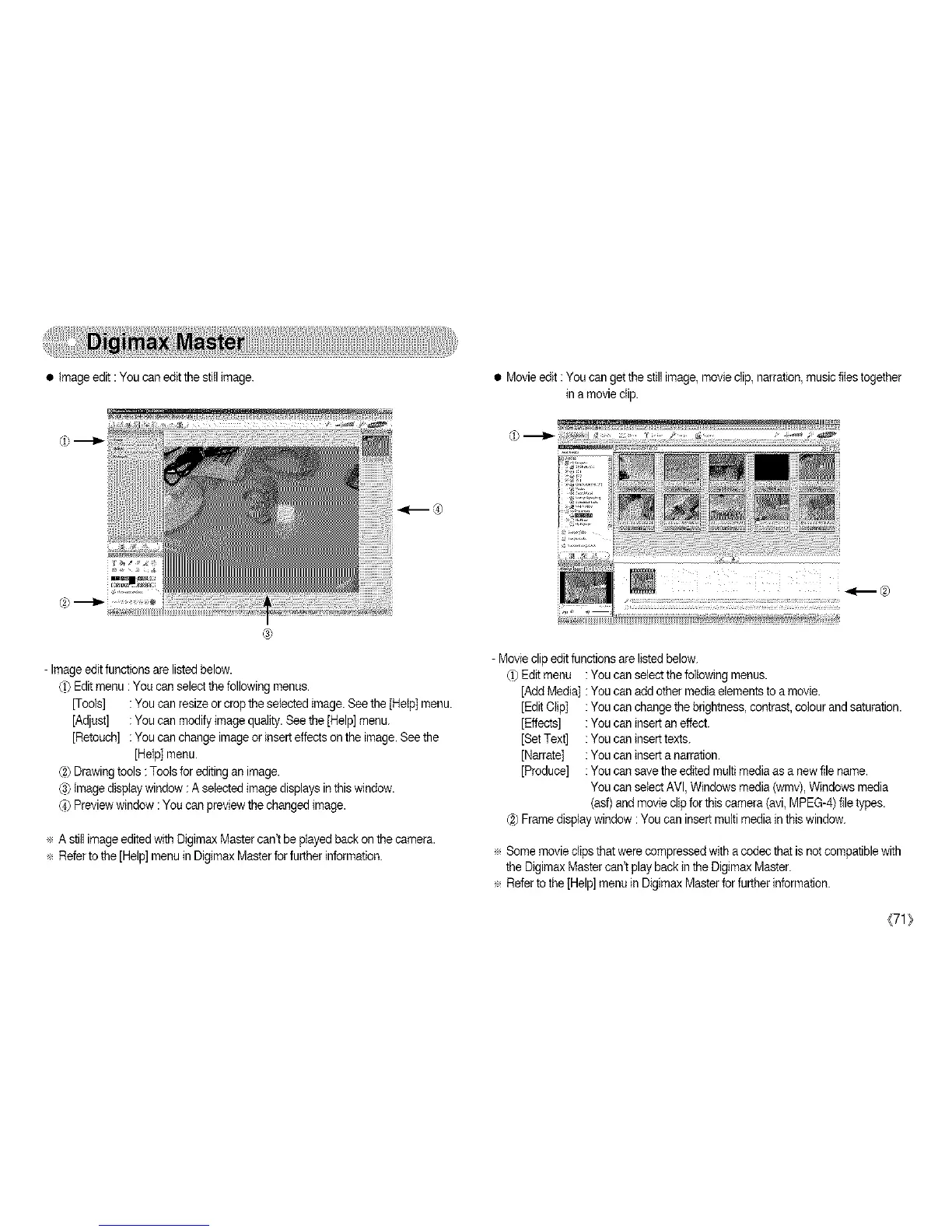
• Image edit : You can edit the still image. • Movieedit :You can get thestill image, movieclip, narration,music flies together
in amovie clip.
- Image editfunctions are listedbelow.
_) Editmenu : You can selectthe following menus.
[Tools] : You can resizeor cropthe selected image. Seethe [Help] menu.
[Adjust] : You can modify imagequality. See the[Help] menu.
[Retouch] : You can change imageor insert effects on the image. Seethe
[Help] menu.
(2)Drawingtools : Tools forediting an image.
C3)image display window :A selected imagedisplays in this window.
_) Previewwindow : You can previewthe changed image.
÷ A still image editedwith Digimax Mastercan't be played back on the camera.
÷ Referto the [Help] menu in Digimax Masterfor further information.
- Movieclip edit functions are listed below.
d) Editmenu : You can select the followingmenus.
[Add Media] : You can add other mediaelements to a movie.
[EditClip] : You can change the brightness,contrast,colour and saturation.
[Effects] : You can insert an effect.
[Set Text] : You can insert texts.
[Narrate] : You can insert a narration.
[Produce] : You can save the edited multi mediaas a new file name.
You can select AVl, Windows media(wmv), Windows media
(asf)andmovie clip for this camera (avi,MPEG-4) file types.
(2)Frame displaywindow :You can insert multi mediain this window.
÷ Some movieclips that were compressedwith acodec that isnot compatiblewith
the Digimax Mastercan't play back in the Digimax Master.
÷ Refer tothe [Help] menu in Digimax Masterfor furtherinformation.
(71_



 To Next Page