OfficeServ 7400 INSTALLATION
TECHNICAL MANUAL PART 7 MAY 2010
7.33
7.2.1 Connecting MOH/BGM Equipment
The OfficeServ 7400 system offers Music on Hold. The system provides internal tone/music and
external music sources per C.O. or extension lines as the music source.
Two external music sources are offered. Connect the music sources to the MISC port of the
LP40 board. The MIS optional daughterboard should be installed on the LP40 board.
IMPORTANT NOTICE: In accordance with US copyright law, a license may be
required from the American Society of Composers, Authors and Publishers (ASCAP)
or another similar organization if copyrighted music is transmitted through the Music
on Hold feature. Samsung Telecommunications America hereby disclaims any liability
arising out of failure to obtain such a license.
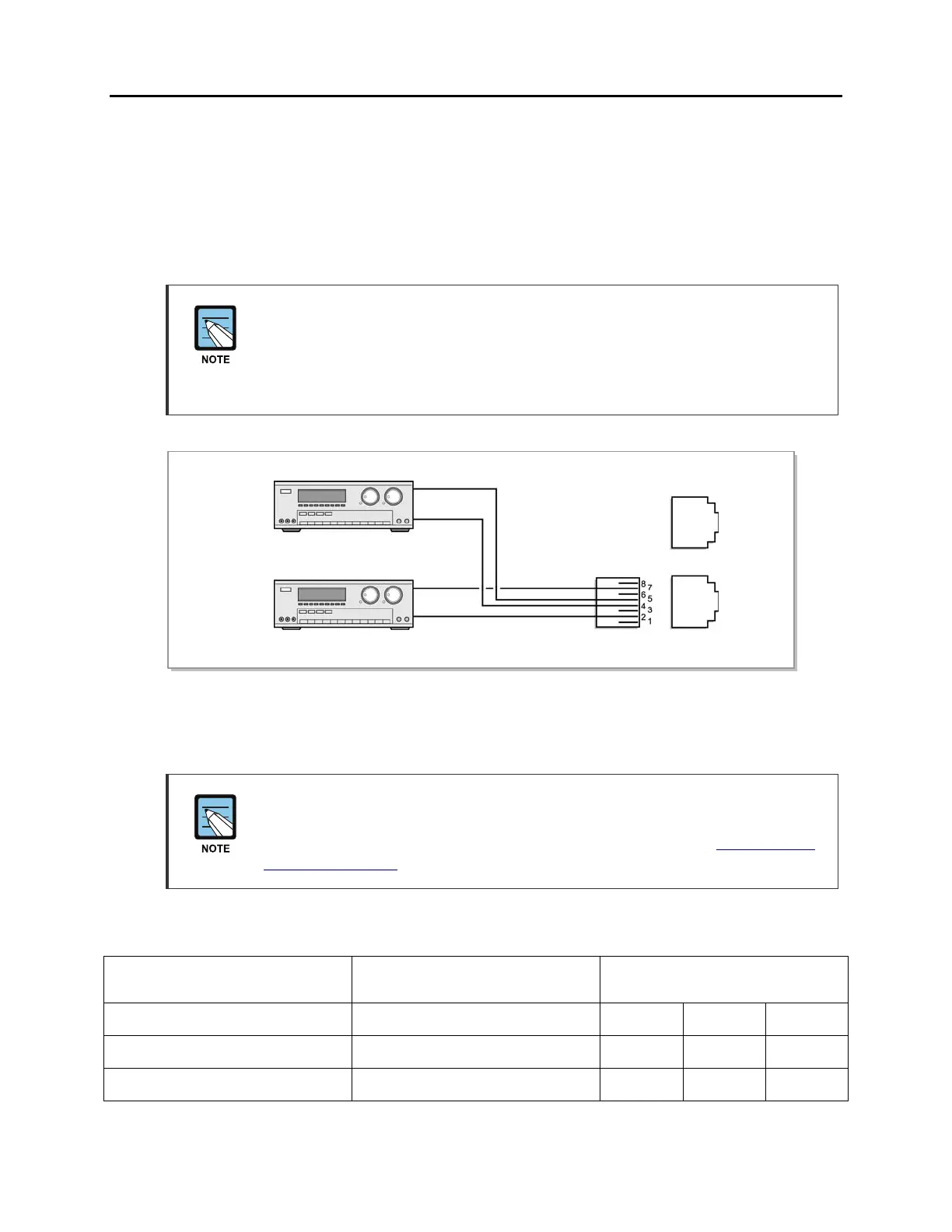
Figure 7.31 Connecting MOH/BGM Sources
MISC 1 and MISC 2 ports are located on the front panel of the LP40.
MMC
Select music sources for C.O. lines in MMC 408 and music sources for extensions in
MMC 308. For detailed instructions on the MMC programs, refer to OfficeServ 7400
Programming Manual.
The following ports are assigned to the external MOH inputs on the MIS daughtercard:
HARDWARE
ITEM
MISC
FUNCTION # in MMC 724
DEFAULT
DN (Ports)
CAB1 CAB2 CAB3
MOH/BGM Ext. Source #1 01 372 374 376
MOH/BGM Ext. Source #2 02 373 375 377
MOH/BGM source #2
MISC 1
MISC 2
MOH/BGM source #1
PINS 4 & 5
PINS 2 & 7















 To Next Page