OfficeServ 7400 INSTALLATION
TECHNICAL MANUAL PART 7 MAY 2010
7.34
7.2.2 Connecting External/Additional Page Equipment
Instead of an internal speaker, external broadcasting equipment, such as amps or speakers,
and additional equipment that can broadcast page (ring) signals outside a building can be
connected to the OfficeServ 7400 system.
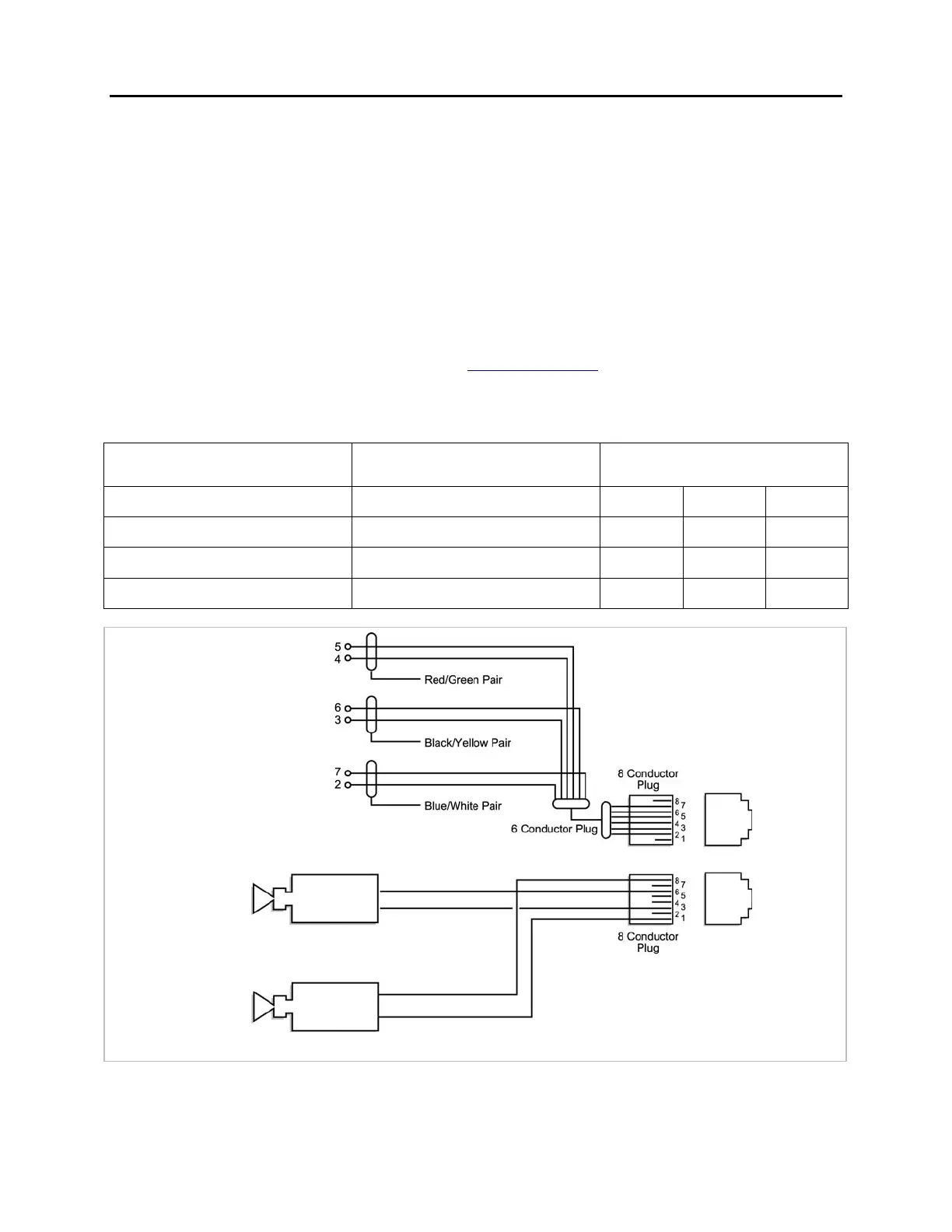
Connect external/additional paging equipment to the MISC 1 and MISC 2 ports of the LP40
board. The MIS optional daughterboard should be installed on the LP40 board. The power
of the external/additional paging equipment should be connected separately.
The MIS daughterboard provides a voice pair and a two dry contact pairs to be used with
customer-provided paging equipment. Connect the customer-provided paging equipment to
the page output pins of a MIS daughterboard (see Figure 7.32).
The Page Zone Relay ports assigned to each dry contact pair are listed in the following table.
Assign the DN number to the selected page zone using Default DN (Ports).
HARDWARE
ITEM
MISC
FUNCTION # in MMC 724
DEFAULT
DN (Ports)
CAB1 Cab2 Cab3
Page Tip & Ring (Voice) 03 361 364 367
Contact Pair #2 06 362 365 368
Contact Pair #3 07 363 366 369
Figure 7.32 Connecting External/Additional Page Equipment
MISC 1
MISC 2
Dry contact #1
(For common bell)
Dry contact #3
(For external page)
External Amplifier for Paging
mplified Speaker for Loud Bell Output
Dry contact #2
(For external page)
Page Tip & Ring (Voice)
PINS 3 & 6
Loud Bell Output (Tone)
PINS 1 & 8















 To Next Page