Installation and Operation Manual
It is available to use a sonar function when this equipment is connected to an depth
transducer.
Please refer the following process to use Sonar.
1 Press button longer and set system section.
2 Please add the page and select Sonar.
3 Press button and press button on the main
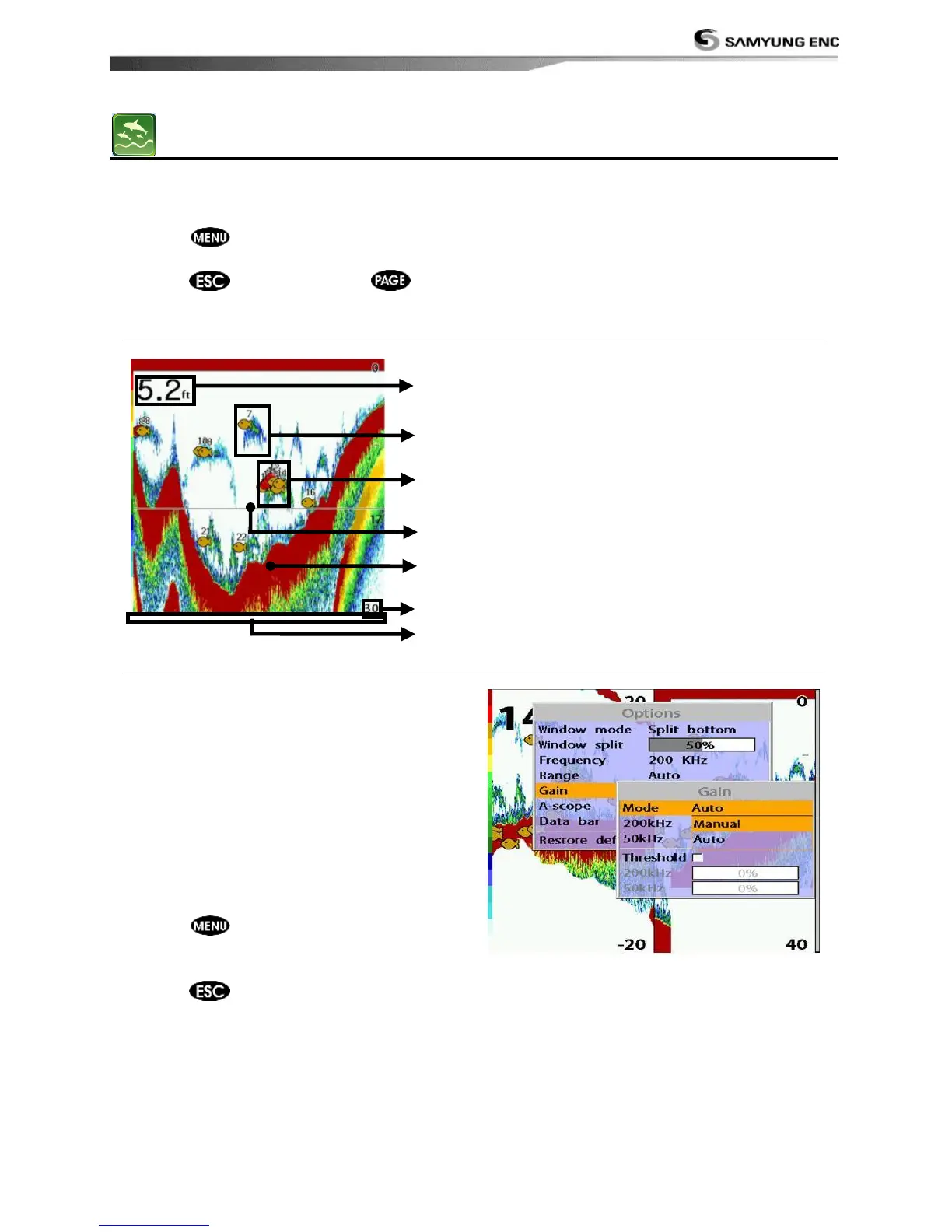
3-5-1 Interpreting the display
① Depth
② Single fish : Fish symbols with depth.
③ School of fish
④ Depth line
⑤ Bottom : Hard bottoms such as rock
and coral shown as wide bands. Soft
bottoms such as mud, weed and sand
show as narrow bands.
⑥ Range of display
⑦ Data from right to left.
There are two options you can select.
• Auto-mode: This is the most commonly
used option. In this mode, settings are
automatically adjusted for the best
display of fish and bottom according to
environment.
• Manual Mode: Use this option for manual
setting. The option might bring you best
result for your purpose.
To change a mode;
1 Press then select Gain.
2 Select Mode then choose Manual or Auto
mode.
3 Press to exit until returning to the
chart window.
*NF430 is a 200KHZ only.



 To Next Page