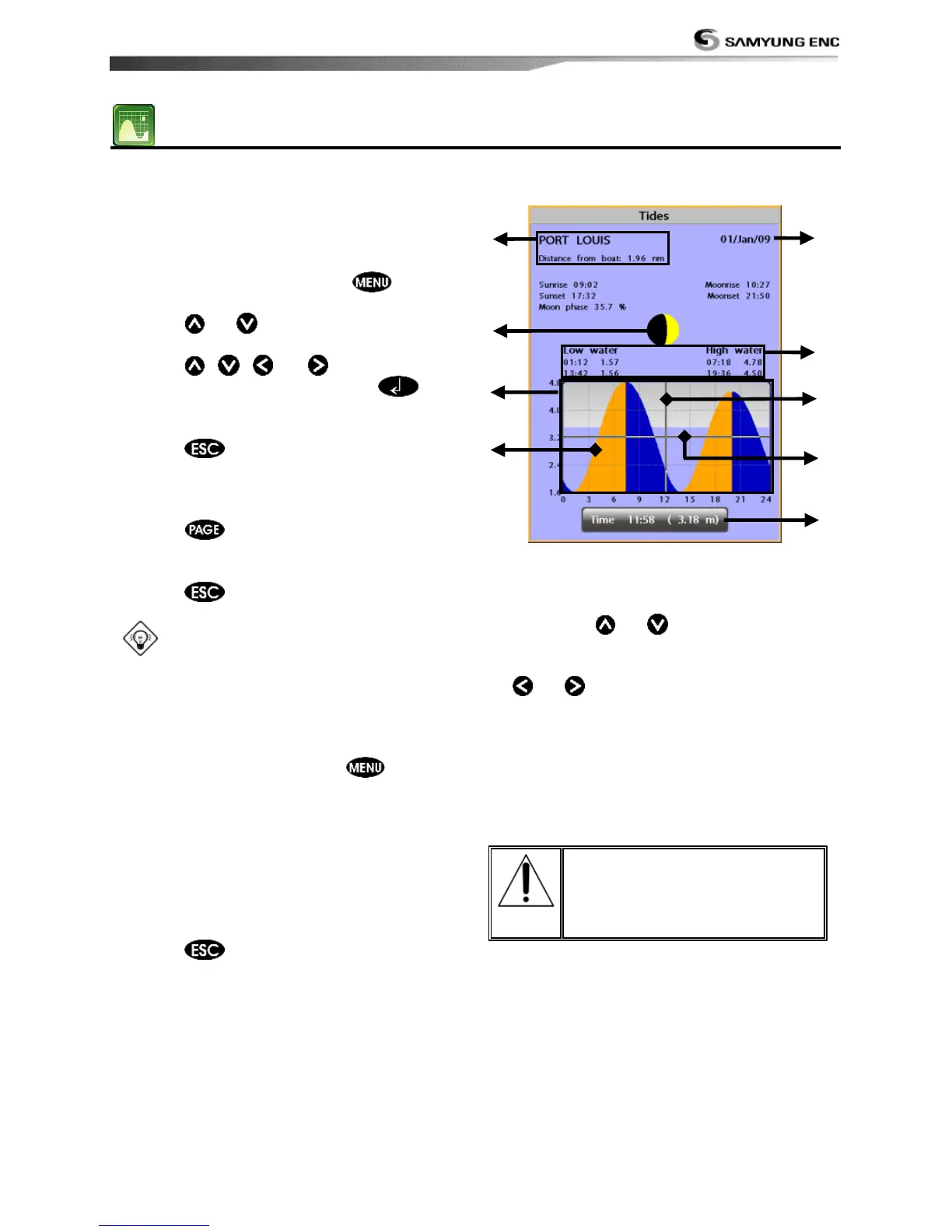
The Tides window is useful for boaters that
are concerned about the height of the water
or by fisherman that wish to know the tide
and moon phase of a specific date.
Displaying a tide information from the
chart window
1 In the Chart window, press .
2 Select Find and Tide station.
3 Press or to move cursor and select
a tide station
4 Press , ,
or to the position of
selected tide station and press .
5 Select Tide height station to display the
information
6 Press to exit.
Displaying tide station information in
the tides window
1 Press and select Tides window.
2 Select Tide height station to display the
information.
3 Press to exit.
Tip: The unit only displays the tide
information nearest your boat in the tides
windows.
Choosing the date of the tide
information.
1 In the Tides window, Press and
select one of the following options.
- Set date: manually set a date.
- Today: automatically set the date of
today.
- Next day: automatically set the date of
today.
- Prev day: automatically set the date of
yesterday
2 Press to return to the window
The tides window shows data for the
chosen date
① Current time and chosen date for display.
② Data for the chosen date.
③ Tide height cursor, a horizontal dotted
line. Press or to move cursor up
and down.
④ Time cursor, a vertical dotted line. Press
or to move cursor sideways.
⑤ Time of cursor and tide height at that
time.
⑥ Tide station name and distance from boat.
⑦ Moon phase for moon at the current time
on the chosen date.
⑧ Tide chart.
⑨ Tide height.



 To Next Page