22
16
Thepreparationdisplaywilldisappear
after30seconds.
(Seepage53forLampcontrolstatus.)
Lampcontrolstatus
Turning On the Projector
Connect the projector’sAC power cord into an AC
outlet.ThePOWERindicatorlightsred. Openthelens
cap(seepages10,60).
Press the POWER ON/SYAND-BY button on the top
controlorontheremotecontrol.ThePOWERindicator
lightsgreenandthecoolingfansstarttooperate.The
preparation display appears on the screen and the
countdownstarts.
2
3
1
4
Afterthecountdown,theinputsourcethatwasselected
thelasttimeandthelampcontrolstatusicon(seepage
53)appearonthescreen.
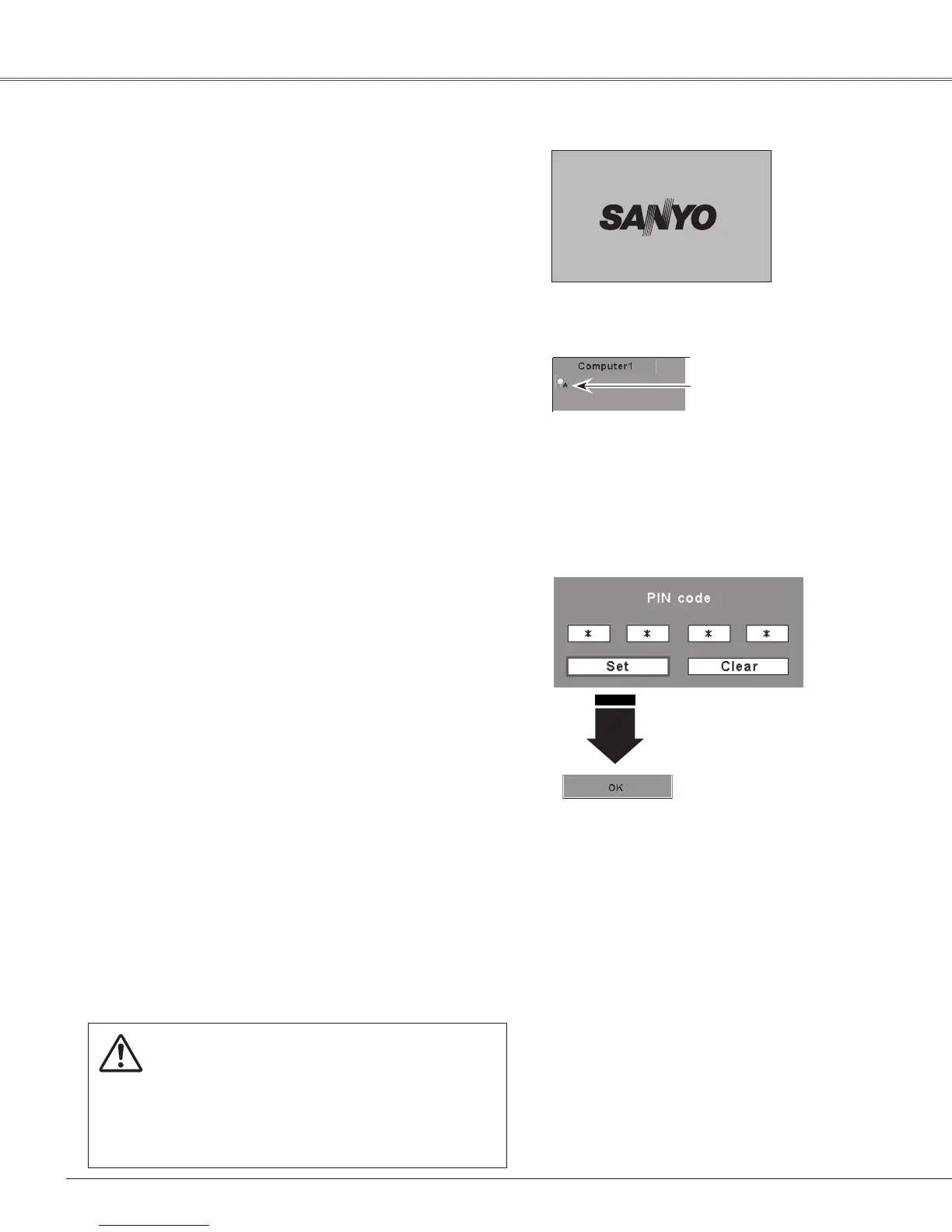
If the projector is locked with a PIN code, PIN code
input dialog box will appear. Enter the PIN code as
instructedbelow.
Complete peripheral connections (with a computer,
VCR,etc.)beforeturningontheprojector.
What is PIN code?
PIN (Personal Identification Number) code is a security
code that allows the person who knows it to operate the
projector.Setting a PIN codepreventsunauthorizeduseof
theprojector.
APINcodeconsistsofafour-digitnumber.RefertothePIN
codelockfunctionintheSettingMenuonpages54–55for
lockingoperationoftheprojectorwithyourPINcode.
Enter a PIN code
Use the Point ▲▼ buttons to enter a number. Press the
Point ► button to fix the number and move the red frame
pointertothenextbox.Thenumberchangesto“.”Ifyou
fixedanincorrectnumber,usethePoint◄button to move
the pointer to the number you want to correct, and then
enterthecorrectnumber.
Repeatthissteptocompleteenteringafour-digitnumber.
After entering the four-digit number, move the pointer to
“Set.” Press the SELECT button so that you can start to
operatetheprojector.
If you entered an incorrect PIN code, “PIN code” and the
number ( ) will turn red for a moment. Enter the
correctPINcodealloveragain.
CAUTION ON HANDLING PIN CODE
IfyouforgetyourPINcode,theprojectorcanno
longer be started. Takea special care in setting
a new PIN code; write down the number in a
column on page 76 of this manual and keep it
at hand. Should the PINcode be missing or
forgotten,consultyourdealerorservicecenter.
Selected Input Source and Lamp Control
AftertheOKicondisappears,
youcanoperatetheprojector.
PIN Code Input Dialog Box
Notes:
•When the Logo select function is set to
“Off,” the logo will not be shown on the
screen(p.50).
•When the “Countdown off” or “Off” is
selected in the Display function, the
countdownwillnotbeshownonthescreen
(p.48).
•Duringthecountdownperiod,alloperations
areinvalid.
•IfthePINcodenumberisnotenteredwithin
threeminutesafterthePINcodedialogbox
appeared, the projector will be turned off
automatically.
•The“1234” isset asthe initialPIN codeat
thefactory.
•When the Input Search function is set to
“On2”, the input signal will be searched
automatically(p.51)
Note:
•The Filter warning and Lamp replacement
iconsmayappearonthescreendepending
ontheusagestateoftheprojector.
Basic Operation


 To Next Page
 Loading...