LIGHT-MEASURING MODE SETTING
You can select from 3 types of light-measuring modes.
Multi-section light-measuring:
Light is measured by sampling from multiple areas of the entire shooting
screen.
Center-weighted light-measuring:
Light is measured only in the central portion of the shooting screen.
Spot light-measuring:
You can compose the picture and capture the image after first measuring
the light only at the center spot of the LCD monitor.
1
Display a Shooting Setting Screen (see page 39).
2
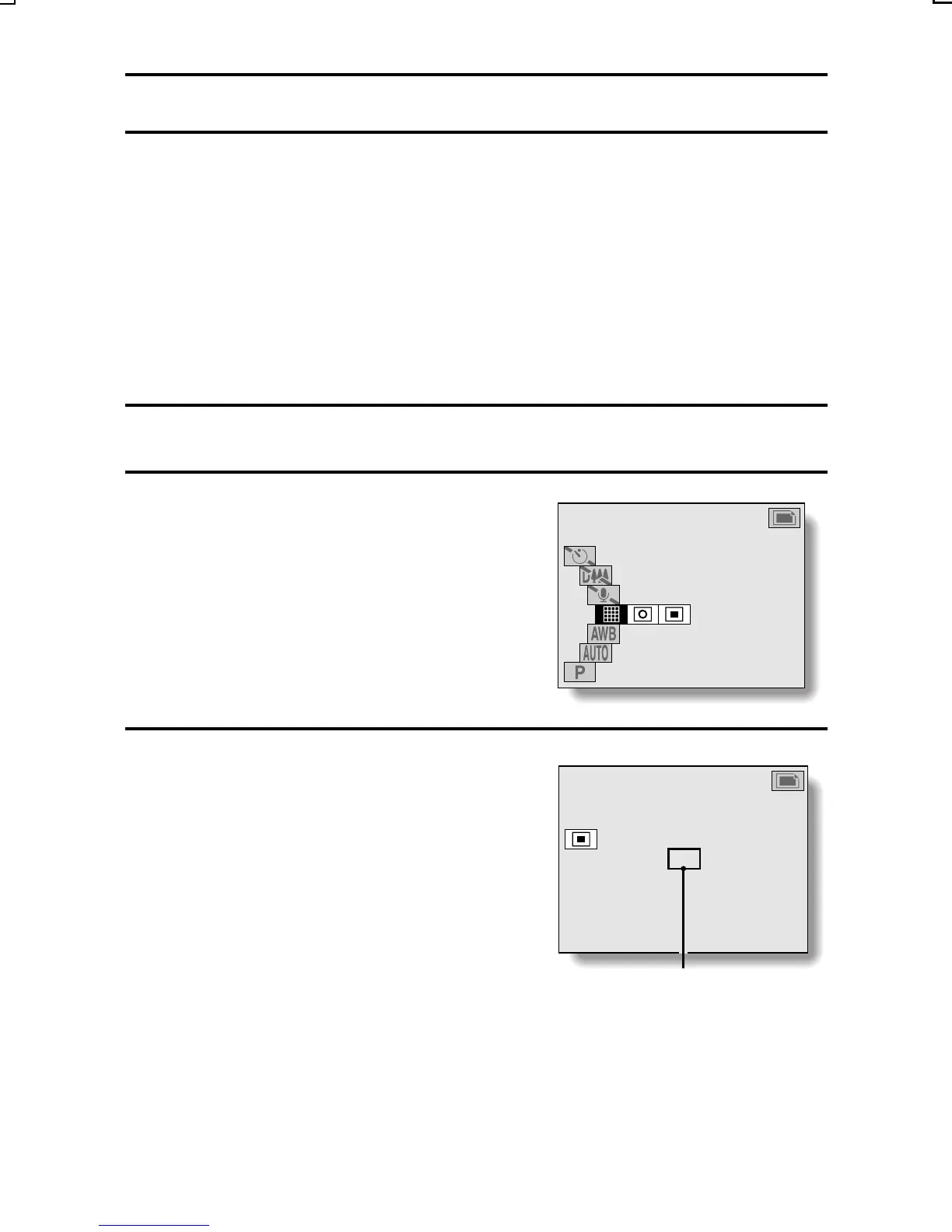
Select a light-measuring mode from
the light-measuring mode (EXP
MEASURE) menu.
V: Multi-section light-measuring
X: Center light-measuring
W: Spot light-measuring
3
Press the SET button
œ This completes the light-measuring
mode setting.
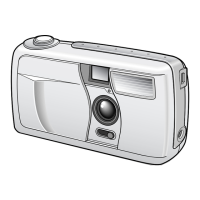
œ When spot light-measuring is
selected, the spot mark K
appears in the center of the LCD
monitor.
EXP MEASURE
14
14
3.1
1/50
Spot mark
SX215/EX, U (VPC-MZ2 GB) Mon. March 25/2002
English
109



 To Next Page