SETTING THE RESOLUTION
If the resolution is increased, the image quality will improve, but the remaining
number of images that can be taken will decrease. Select the resolution
according to the desired image quality and purpose.
1
Display a Shooting Setting Screen (see page 39).
2
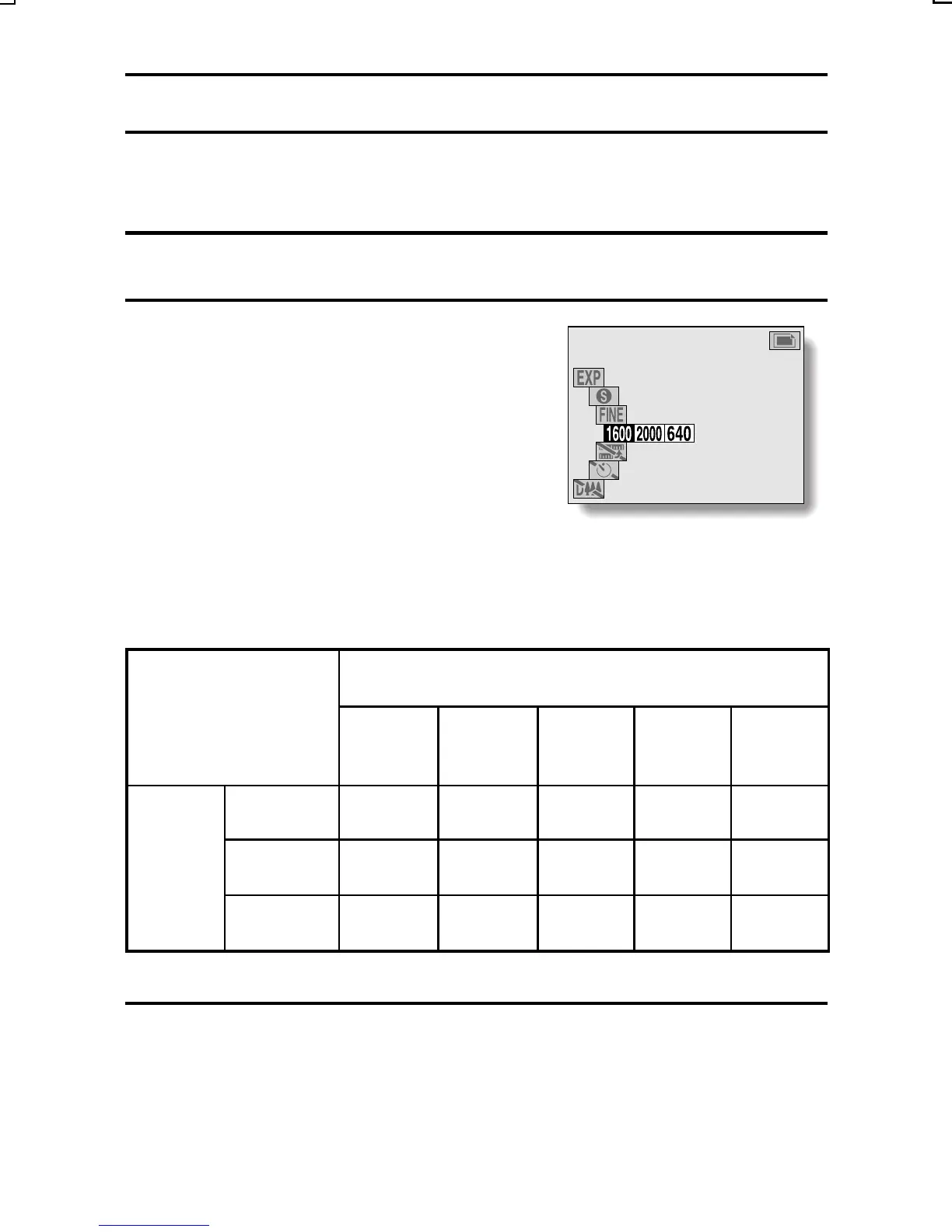
Select the desired resolution from
the resolution menu.
Ò: 1600 x 1200 pixels
Ó: 2000 x 1496 pixels
4: 640 x 480 pixels
2: 320 x 240 pixels
0: 160 x 120 pixels
Example: Still image shooting
mode
œ The possible resolution settings for each shooting mode are as follows:
Resolution (units: pixels)
[Icon displayed on LCD monitor]
2000 x
1496
Ó
1600 x
1200
Ò
640 x
480 4
320 x
240 2
160 x
120 0
Shooting
mode
Still image
Yes Yes Yes
Not
available
Not
available
Sequential
shot
Not
available
Yes Yes
Not
available
Not
available
Video clip Not
available
Not
available
Yes Yes Yes
3
Press the SET button.
œ The selected resolution is set.
RESOLUTION
14
SX215/EX, U (VPC-MZ2 GB) Mon. March 25/2002
English
95



 To Next Page