SETTING THE OPERATIONAL SOUNDS
(BEEPS)
This setting allows you to set whether or not a beep sound is heard when the
shutter release button, SET button, or MODE button is pressed.
1
Display the Shooting or Playback
Option Setting Screen (see page 39).
2
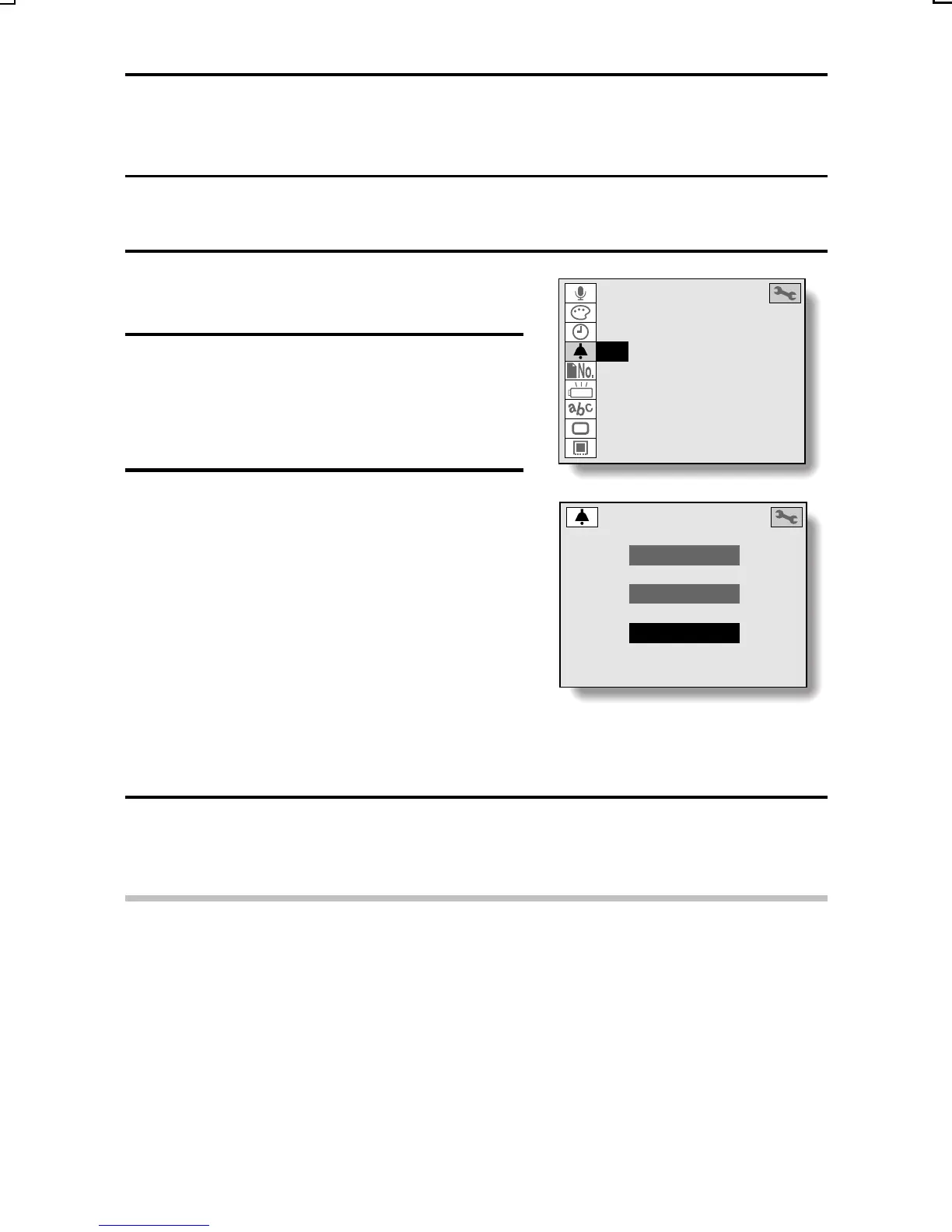
Select the beep icon H, and press
the SET button.
œ The Beep Sound Setting Screen
appears.
3
Select the desired setting.
ALL: A beep is heard when any of the
buttons is pressed.
SHUTTER: A beep is heard when the
shutter release button is
pressed.
OFF: The beep sound is turned off.
œ To cancel the setting, press the
MODE button. You are returned to
the screen in step 1.
4
Press the SET button.
œ This completes the beep sound setting.
HINT
œ The beep volume cannot be adjusted.
AUDIO REC
COLOR ADJUSTMENT
CLOCK SET
BEEP
FILE NUMBER RESET
DISCHARGE
LANGUAGE
TV SYSTEM
REFORMAT
BEEP
ALL
SHUTTER
OFF
SX215/EX, U (VPC-MZ2 GB) Mon. March 25/2002
English
167


 To Next Page
 Loading...