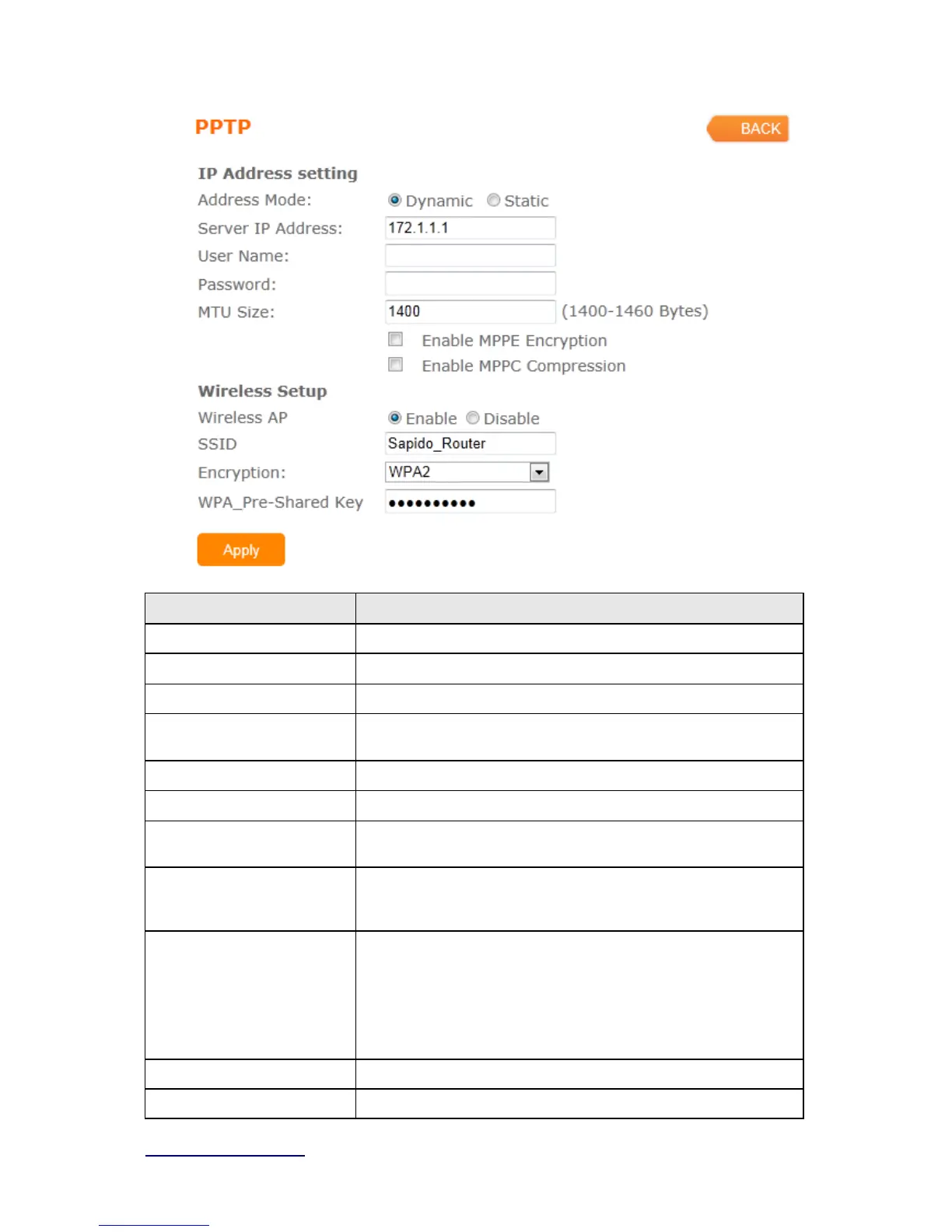
Item Description
Address Mode Select "Dynamic" or "Static"
IP Address Input your IP address or domain name
Gateway Input ISP Default Gateway Address.
Server IP Address Input your server IP address provided by your ISP. If you don’t
know, please check with your ISP.
User Name Input PPTP account provided by your ISP.
Password Input the password provided by your ISP.
MTU Size Maximum Transmission Unit. Usually provide by computer
operation systems (OS). Advanced users can set it manually.
Enable MPPE Encryption Microsoft Point-to-Point Encryption (MPPE) provides data security
for the PPTP connection that is between the VPN client and VPN
server.
Enable MPPC Compression Microsoft Point-to-Point Compression (MPPC) is a scheme used to
compress Point-to-Point Protocol (PPP) packets between Cisco
and Microsoft client devices. The MPPC algorithm is designed to
optimize bandwidth utilization in order to support multiple
simultaneous connections. The MPPC algorithm uses a
Lempel-Ziv (LZ) based algorithm with a continuous history buffer,
called a dictionary
Wireless AP Turn on/off wireless
SSID Service Set identifier, users can define to any or keep as default.



 To Next Page