Schindler 3100/3300/6300 J 43402603 / 01 90/269
Copyright © 2017 INVENTIO AG
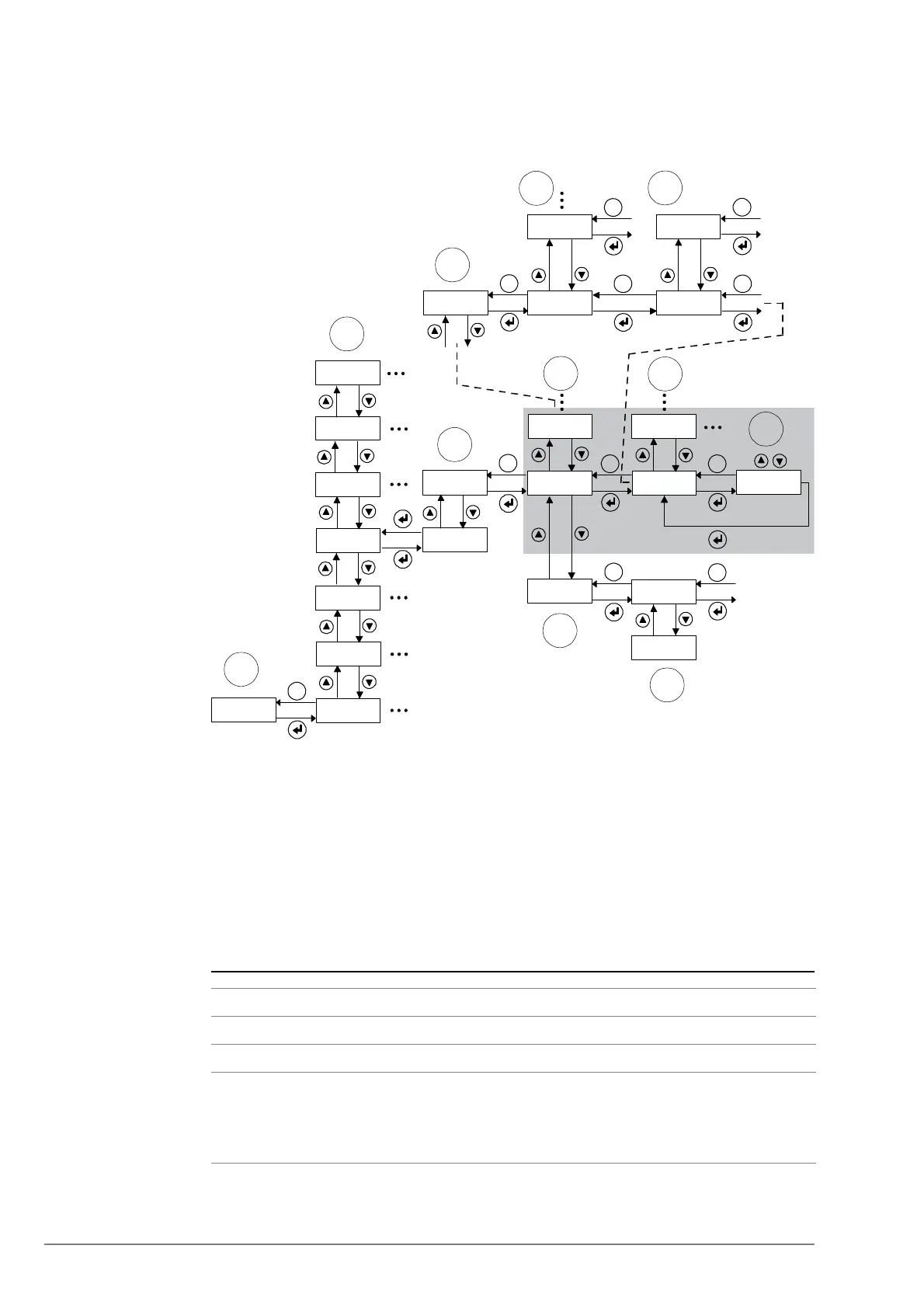
4.9.2.2 Access to Control Parameters (Menu 40)
Main Menu 40 Configuration (Parameter Setup)
Main Menu 40 - Configuration [228593; 26.07.2017]
Meaning of the
Abbreviation
1 Menu entry point (indicating car position xx)
2 Main menus (10, 20, 30, etc.)
3 Activation of main menu 40 (configuration menu CF)
4 Configuration groups (within configuration menu CF only)
5 Special case within main menu 40: configuration groups CF40, CF41
6 Floor level (CF40, CF41 only)
7 Door side (only in case of independent doors, CF40, CF41 only)
8 Parameter (within selected configuration group)
9 Value (of the selected parameter)
10 Special case within main menu 40: LOP configuration (CF00)
11 Floor level (CF00 only)
_ _ _ _ xx
70 _ _ _ x
60 _ _ _ x
50 _ _ _ x
40 _ _ _ x
30_ _ _ x
20_ _ _ x
10_ _ _ x
40_ _ _ 0
40_ _ _1
CF_ _02
CF_ _ 01
PA_ _01
PA_ _02
VL_ x y z
ESC
ESC
ESC ESC
00016926
CF_ _ 00
L_ _ _ 01
CF_ _ 40
ESC
ESC
L_ _ _ 00
ESC
LE _ _ _0
LE _ _ - -
ESC
1
2
3
4
10
11
5
6
8
9
ESC
S_ _ _ _ 1
ESC
S_ _ _ _ 2
ESC
7
Menu Element Description
CF
Configuration group, applies to main menu 40 only
PA Submenu: Parameter
L Submenu: Level
– Applies to CF40 and CF41 only
– “L00” → All floor levels, “L01” → Floor level 1, “L02” → Floor level
2, etc.



 To Next Page