CV-LS Dashboard
D20980.022 Rev C CV-LS User Manual Page 54
Connections
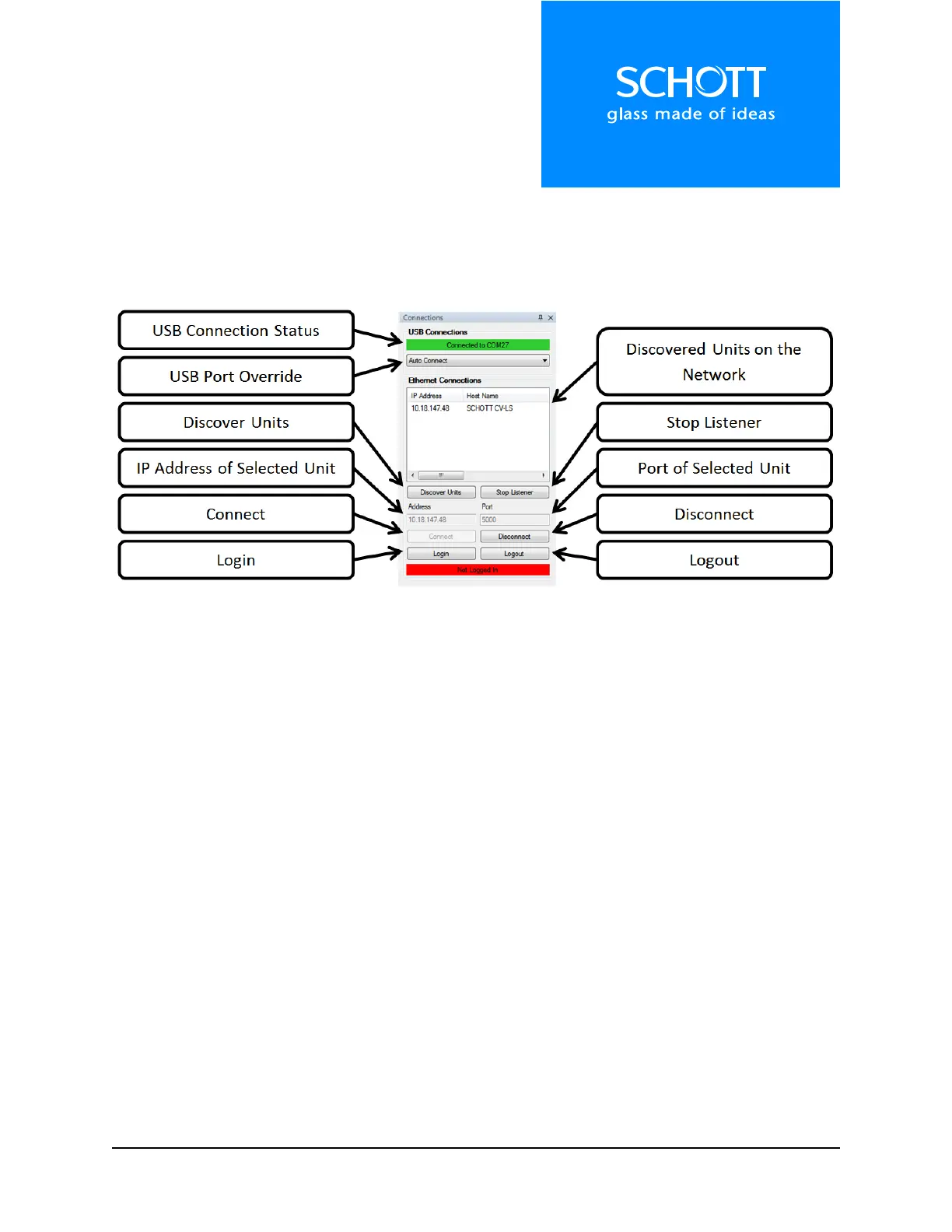
The Connections section, which is specific to the Dashboard Application, is shown below in Figure 5. This
section is used to connect the Dashboard to units, either over USB, UART, or Ethernet. If a unit is found
on the network, its IP Address can be double-clicked to open the Web Interface for that unit.
Figure 5: Connections
The Dashboard will automatically connect to the first unit plugged into USB. If a second unit is plugged
into the computer, control can be switched to the second unit by changing the “USB Port Override” from
“Auto Connect” to the port number of that unit. This method can also be used to connect to a unit over
RS232.
The Ethernet Connections section uses a broadcast UDP packet on port 30303. Units on the network
may only be listened for by one application on a computer at a time. To connect to multiple units on the
network in separate applications, click “Stop Listener” in one application after connecting to a unit.
Then, click “Discover Units” in the next window.



 To Next Page