Installing the PGD Application 15
SCOTT SAFETY 087-0065 REV B
Connecting the Device
to a PC
This section describes how to connect the device to a PC.
Required items:
This assumes that you have already installed the PGD application and IR programmer
driver on your PC. See “Installing the USB driver” on page 13 for the driver
installation.
• Protégé Single Gas monitor
• A PC
• The IR programmer and its USB Cable
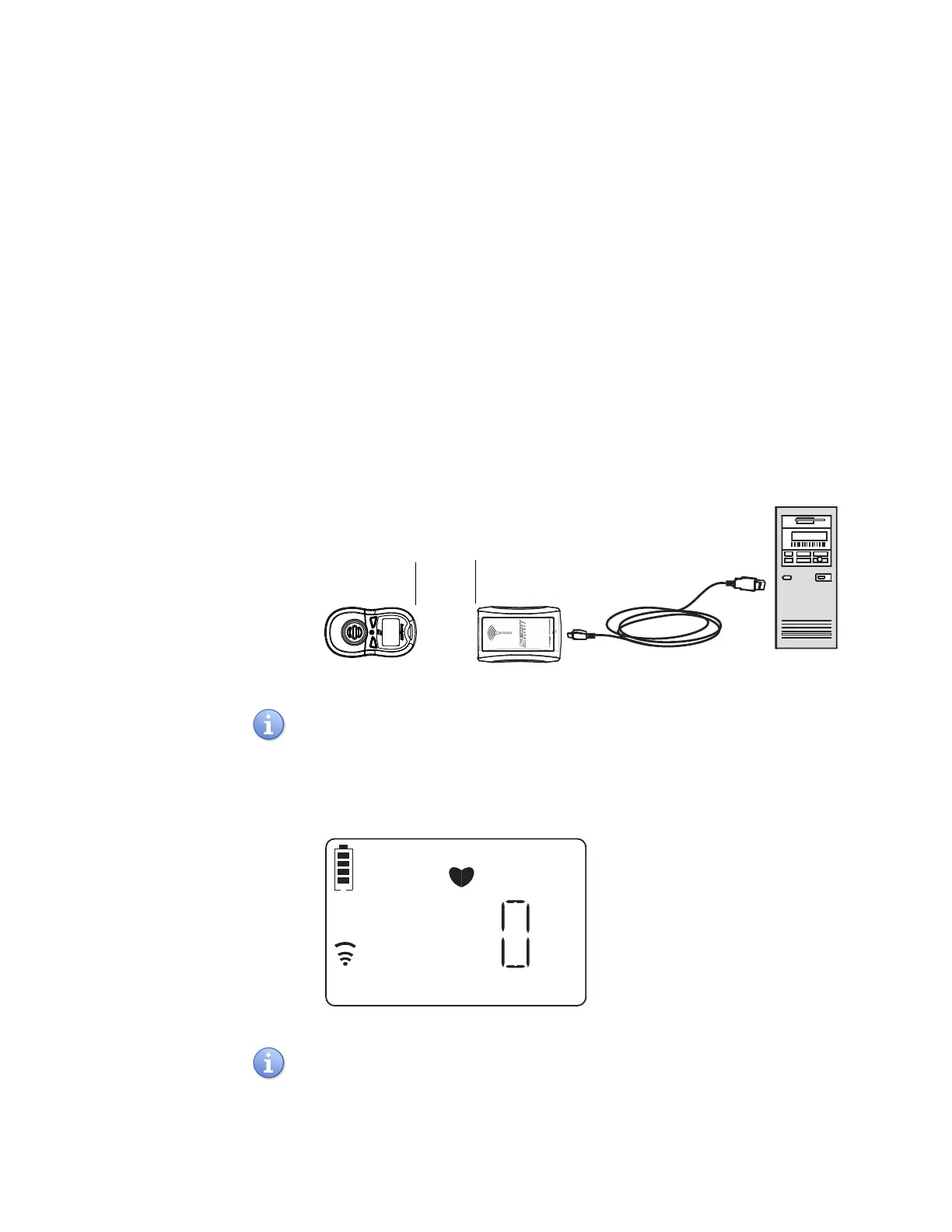
1 Plug the USB Cable into the PC USB port and the other end into the IR
programmer.
2 With the monitor powered on, place it face up or face down, within 1.9” to 3.6” in
front of the IR programmer. See “Default Settings” on page 17 Ensure the two IR
ports have a direct line of sight. See Figure 6.
Figure 6 Connecting the IR programmer to a PC
When face down, ensure monitor is level, or it will not be able to communicate with
the IR programmer. When face up, check for the Infrared Data Transfer Icon to
appear. This confirms communication between the monitor and the IR programmer
(Figure 7).
Figure 7 IRDA Indication
The monitor IR is in the sleeping mode to save power prior to activating its IR commu-
nication function, and it takes less than a minute to establish the communication with
the PGD Application software.


 To Next Page