34 CHAPTER 5: MAINTENANCE
087-0065 REV B SCOTT SAFETY
Warning: Read, understand and follow the instructions, including labels and MSDS
provided by the manufacturer of the calibration gas. Failure to do so may result in
injury or death.
O
2
and LEL sensor are not required to perform span calibration.
The device has an automatic second timer that is enabled when performing
calibration.
1 Refer to “Connecting the Gas Cylinder to Monitor” on page 33 to connect the gas
cylinder to the monitor.
2 Press and hold the right button, a screen appears stating Zero Calibration. Wait
until the Zero Calibration completes and goes to the Span Calibration. Or press the
right button or wait for 60 seconds to exit.
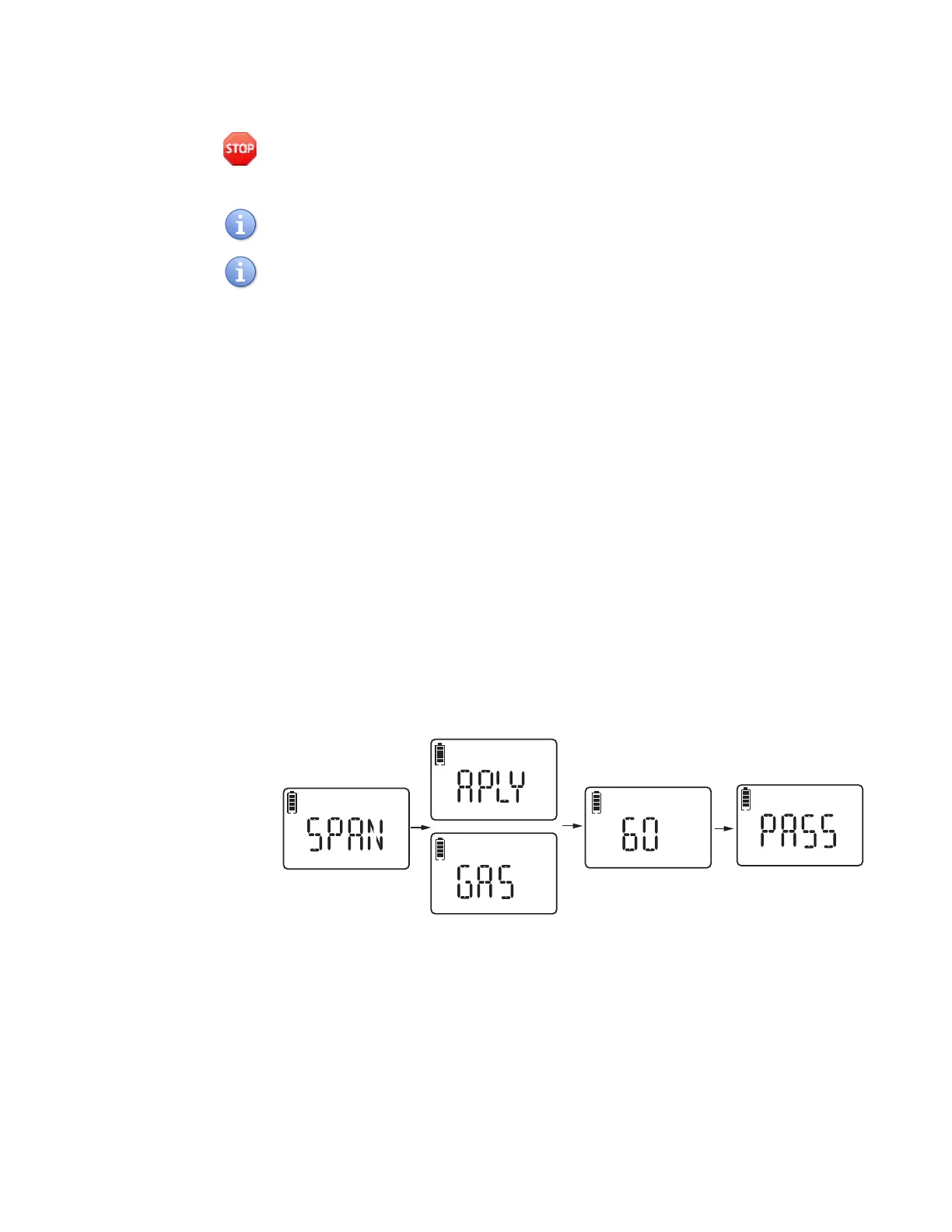
3 Press the left button to confirm the span calibration, and the screen displays APLY
GAS (Apply Gas) (Figure 15).
4 Apply gas from the regulator and attach the Calibration Adapter to the device
(Figure 14).
5 Press the left button and the device start to countdown (Figure 15).
6 Wait for the display to read SPAN PASS (Figure 15).
7 Verify the device responds to target gas and activates 1 green LED flash every 5
seconds, 1 sounding beep every 5 seconds, and 1 vibration every 5 seconds. Press
the right button or wait 60 seconds to go to Exit screen.
8 Press left button or wait for 60 seconds to return to normal reading screen.
Figure 15 Span Calibration
9 After an unsuccessful calibration, the monitor LCD reads FAIL. Verify the device
activates 1 red LED flash per second, 1 sounding beep per second and 1 vibration
per second. Press right button or wait 60 seconds to go to Exit screen.
10 Press left button or wait for 60 seconds to return to normal reading screen.
11 Turn off gas cylinder and remove Calibration Adapter. The device automatically
returns to gas monitoring mode.
H2 S
CAL
H2 S
CAL
H2
S
CAL
CAL
H2 S
CAL
H2 S


 To Next Page