38 CHAPTER 5: MAINTENANCE
087-0065 REV B SCOTT SAFETY
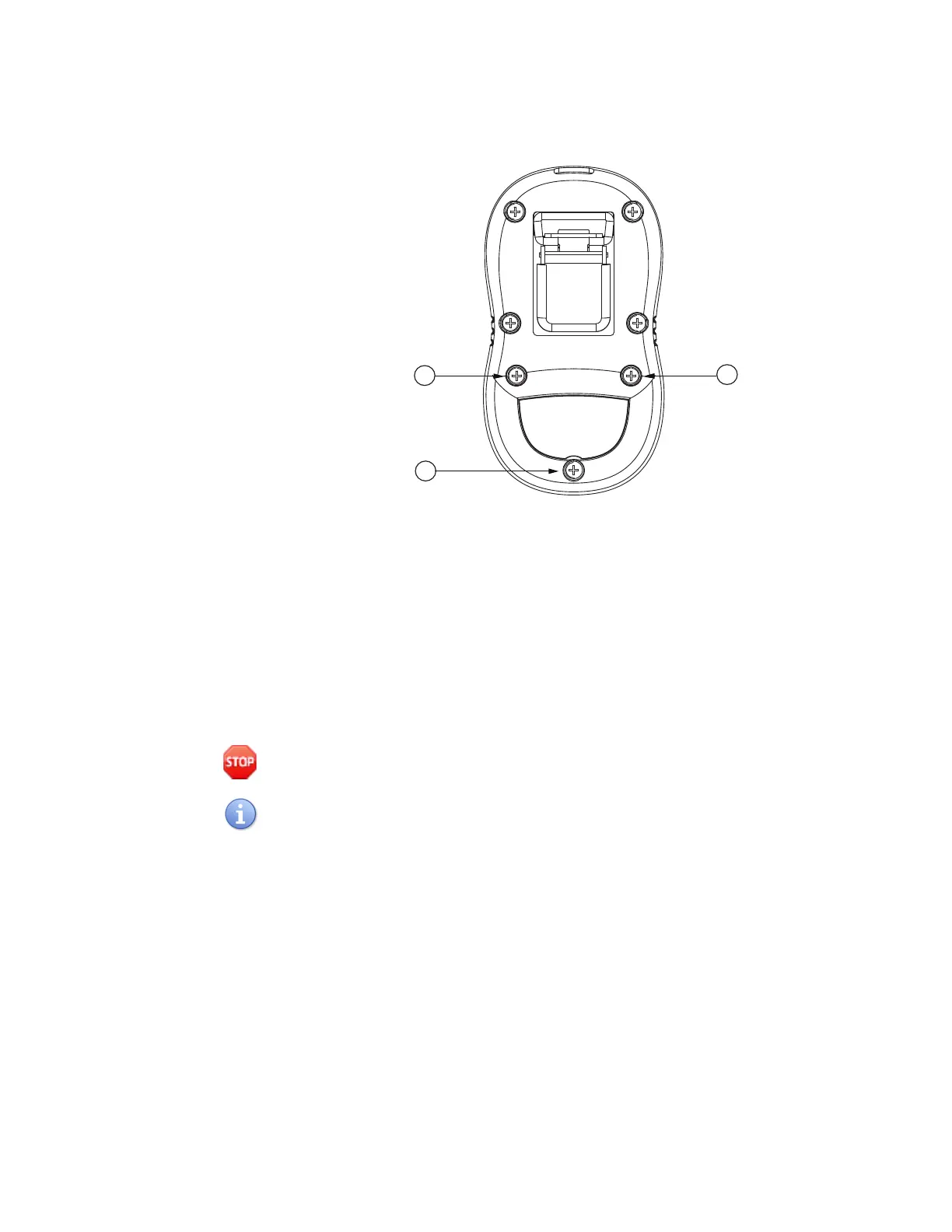
Figure 18 Screw Sequence
6 Use the Portable Gas Detection Application to set or verify settings for the newly
installed sensor. See the software user guide.
7 Perform Zero and Span Calibrations of the device in accordance with calibration
procedures. See Zero Calibration and Span Calibration.
Replacing the Lithium
Battery
This section describes how to replace lithium battery.
Warning: Do not replace battery while in a hazardous location. Failure to follow this
warning could lead to serious injury or death.
It is not necessary to remove the belt clip to access the battery.
1 Set or verify the device is turned off.
2 Unscrew and remove the three (3) M2.5 × 12 screws from the back of the device
using a Philips screw driver (Figure 19).


 To Next Page