COMPASS (Compass Settings)
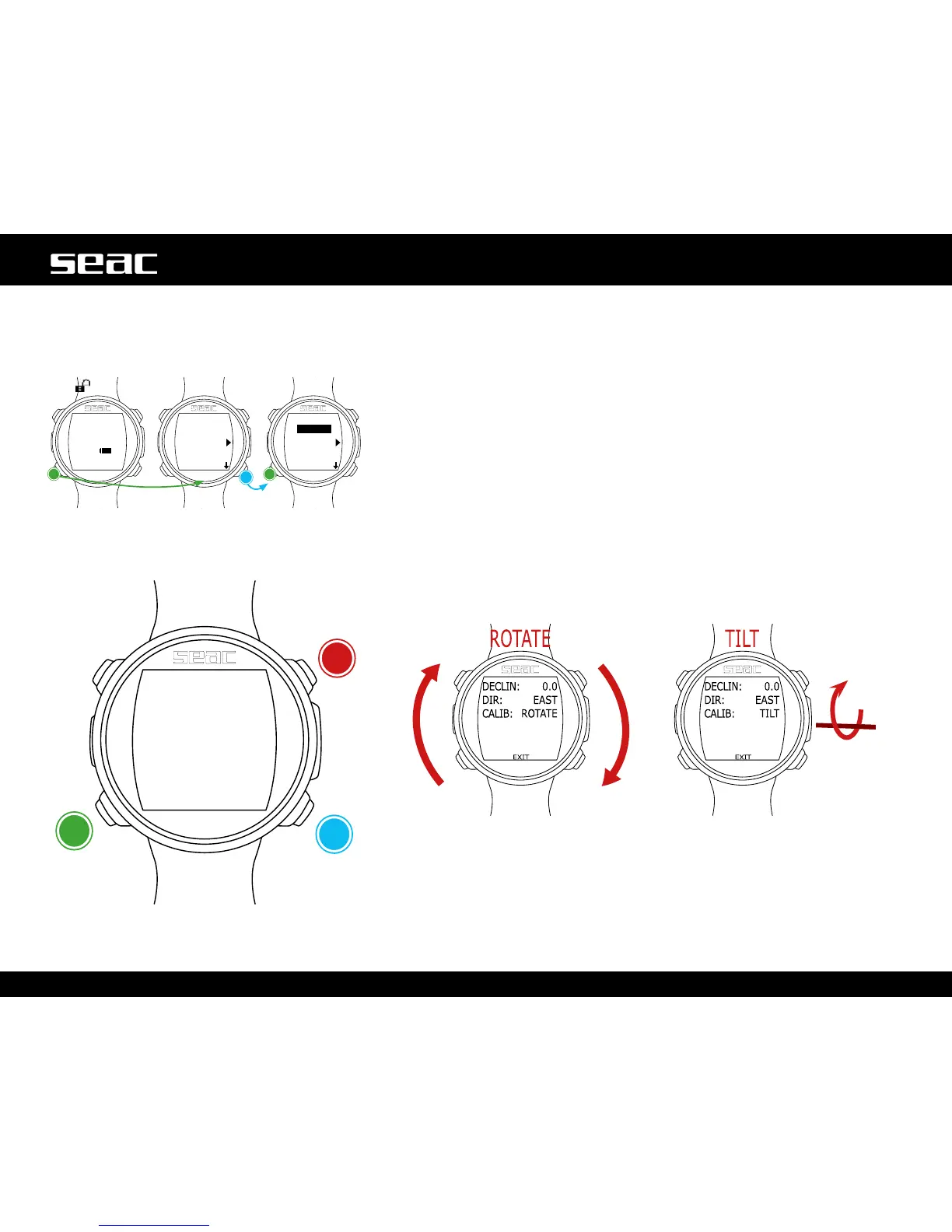
Compass settings can be changed from the COMPASS Menu.
DECLIN: Declination is used to compensate for the difference between
geographic north and magnetic north. You can obtain this information from
special websites.
(If you don't know how to set the DECLIN value, leave it at 0.0).
DIR: (EAST or WEST) The direction is used to indicate the direction of the
declinationofearth'smagneticeld.(Ifyoudon'tknowhowtosettheDIRvalue,
leave it set to EAST).
CALIB: (Calibration) Press B or D to start calibrating the compass. To calibrate
correctly, stay away from sources of magnetic elds (computers, televisions,
light poles, etc.).
Rotateonaatsurface,slowlyand
constantly.
Rotate on the horizontal axis, slowly
and constantly.
To exit, select EXIT (or wait 60 seconds without pressing any button).
JACK
unlocked
Conrm
ConrmNext
value



 To Next Page