第 44 页
this function is enabled, then video blind is invalid.
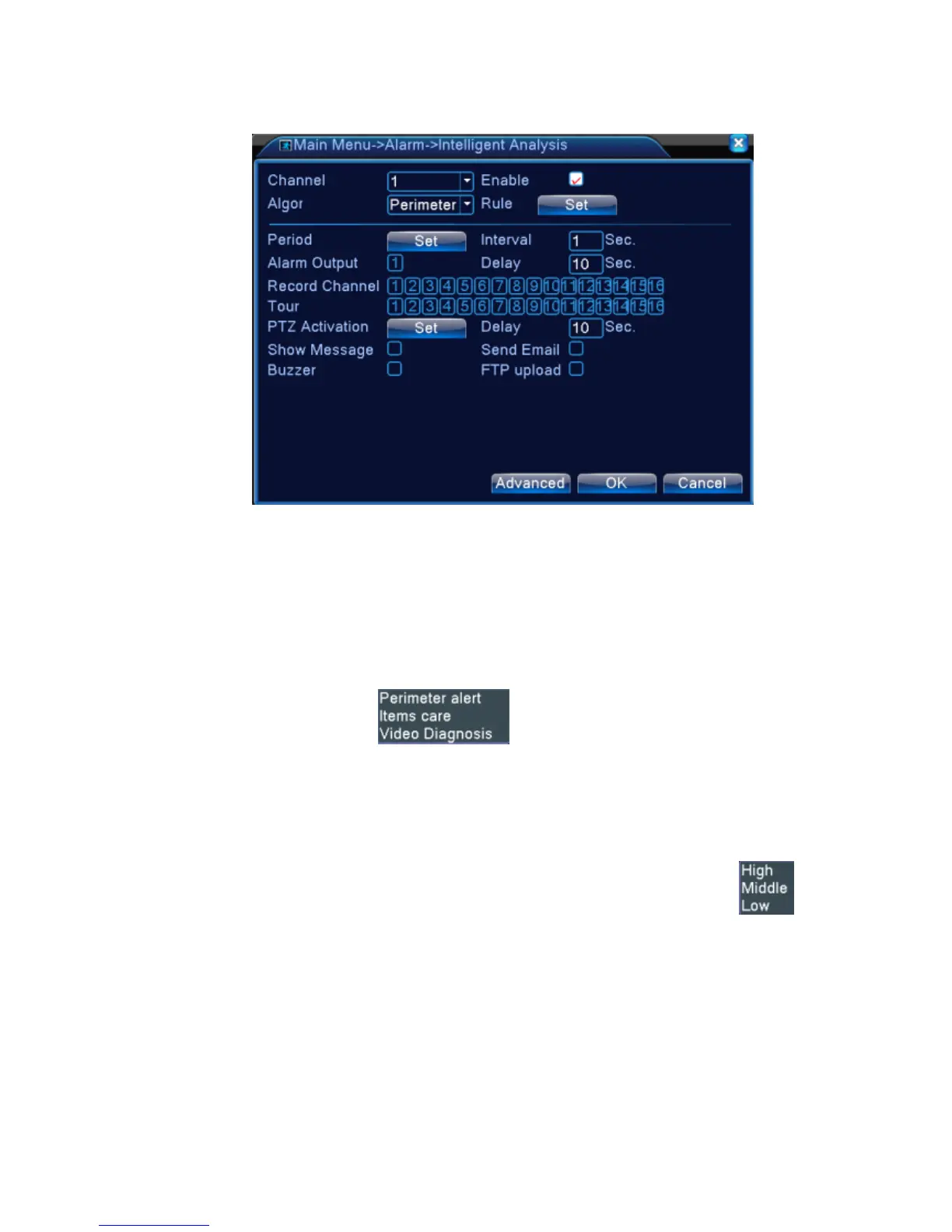
Pic 4.12 Intelligent analysis setting page
【Channel No.】only shows by “1”,at present, only the 1
st
channel with maximum resolution of 1080P in
the full analog(DVR) mode and hybrid(HVR) mode
【Enable】tick it to enable the video analysis function, then can go for further setting,
【Algorithm rule】at drop-down box to choose the algorithm rule of detection,
【Rule】choose different algorithm rules, the related setting page is different.
Cordon:
Show traces tick it to enable, when alarm triggers, there will be red box around moving objects.;
Sensitivity , base on different requirement, there are 3 options in the drop-down box ;
Minimum image distance range between 0~30 %,the more flexible the less image distance.;
Alert way there are 2 kinds:cordon and warning area. Cordon:Can set 3 prohibited directions:
bidirectional prohibited, from top to bottom (from left to right), from bottom to top (from right to left),
when the setting cordon is too slope, show with from left to right / from right to left, otherwise will be
from top to bottom / from bottom to top, when the moving object meet preset cordon rules, the alarm
will be triggered; Warning area: can set 3 kinds of prohibited directions: bidirectional prohibited,



 To Next Page