28
Control and display elements
Type 024.16.720
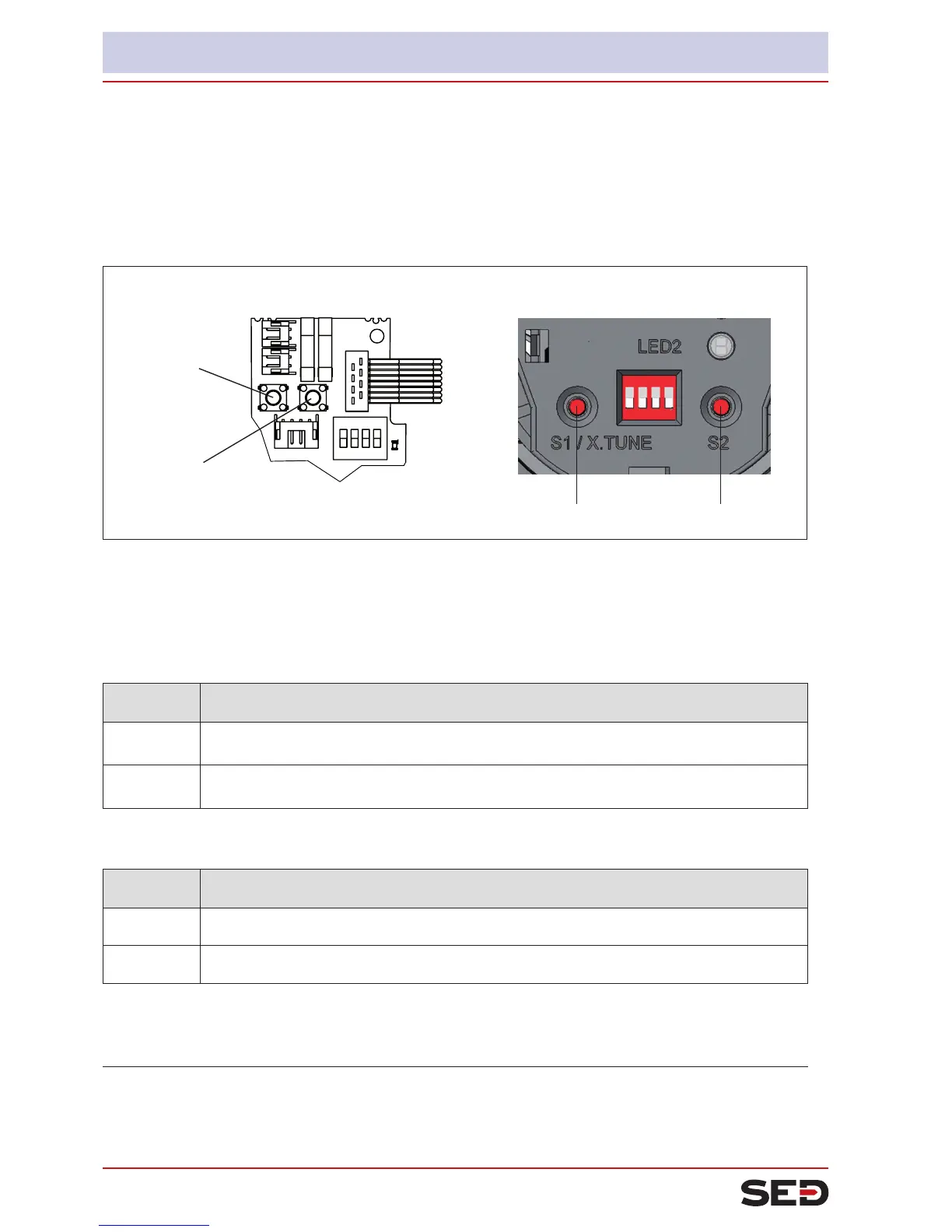
8.3. Congurationofthekeys
Thecongurationofthe2keysvariesdependingontheoperatingstatus(AUTOMATIC/MANUAL).
The description of the operating statuses (AUTOMATIC / MANUAL) can be found in the chapter entitled “8.1.
Operating status“.
Key 2
Key 1
Key 1
Key 2
Version 1 Version 2
Fig. 10: Description of the buttons
→ To operate the buttons, for
Version 1: unscrew the body casing
Version 2: unscrew the transparent cap
MANUAL operating status (DIP switch 4 set to ON):
Key Function
1 Aerate
1)
(manually open / close the actuator)
2
2 Deaerate
1)
(manually open / close the actuator)
2)
Table 6: Conguration of the keys for MANUAL operating status
AUTOMATIC operating status (DIP switch 4 set to OFF):
Key Function
1
Press for 5 seconds to start the X.TUNE function
2 -
Table 7: Conguration of the keys for AUTOMATIC operating status
1)
No function if the binary input was activated with the “Manual/Auto change-over” via the communications software .
2)
depending on the operating principle of the actuator.


 To Next Page