30
GB
Installation/Connection
5.3. Electrical connection
Caution!
• Risk of injury through an electric shock.
• Terminal connections must be carried out by an authorised electrician.
• Disconnect all connecting cables throughout the system before carrying
out installation or maintenance.
• Ensure that the device cannot be accidentally switched on.
Preparation
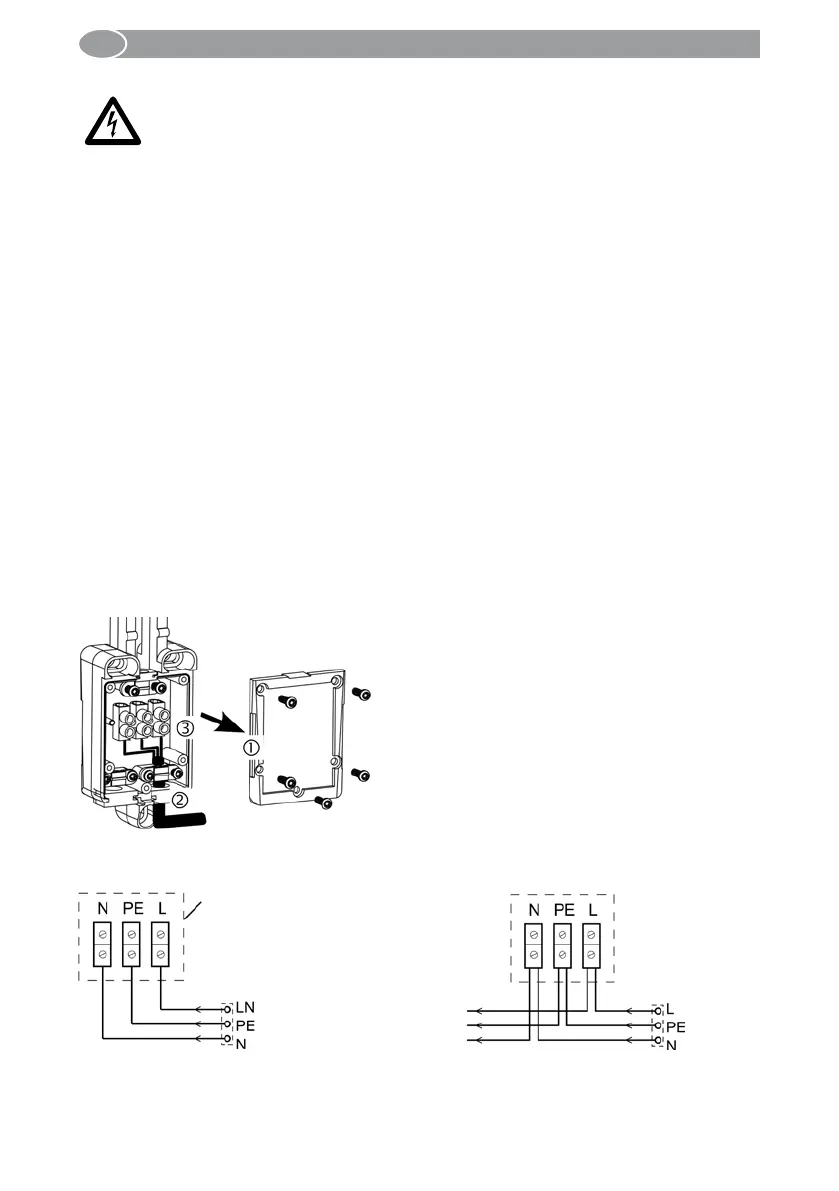
1. Unscrew 5 fixing screws and open the cover of the power supply box ①.
2. Drill through one of the two wire protecting sleeves ②, put the mains supply line
through.
3. Connect the commeo Sensor WS/WSRF to the mains voltage (230 V, 50/60 Hz) and
install according to the terminal designation ③.
4. Secure the power cord under the safety bar.
5. Put on the cover and tighten the fixing screws with max. 1.2 Nm.
Note:
The maximal wire cross-section is 1.5 mm².
The terminals may be double occupied, each terminal 2 x 1.5 mm² (max.).
Another cable can additionally be led out of the housing of the sensor, e.g. for the con-
nection of a commeo motor ③ (loop through mains voltage).
Terminal diagram/terminal view
Power supply box with simple mains supply lead
Power supply box with simple mains supply lead and mains routing
Towards the
commeo
motor
230 V
50/60 Hz
230 V
50/60 Hz
Power supply box
on the commeo
Sensor WS/WSRF
Warning!



 To Next Page