10U
22
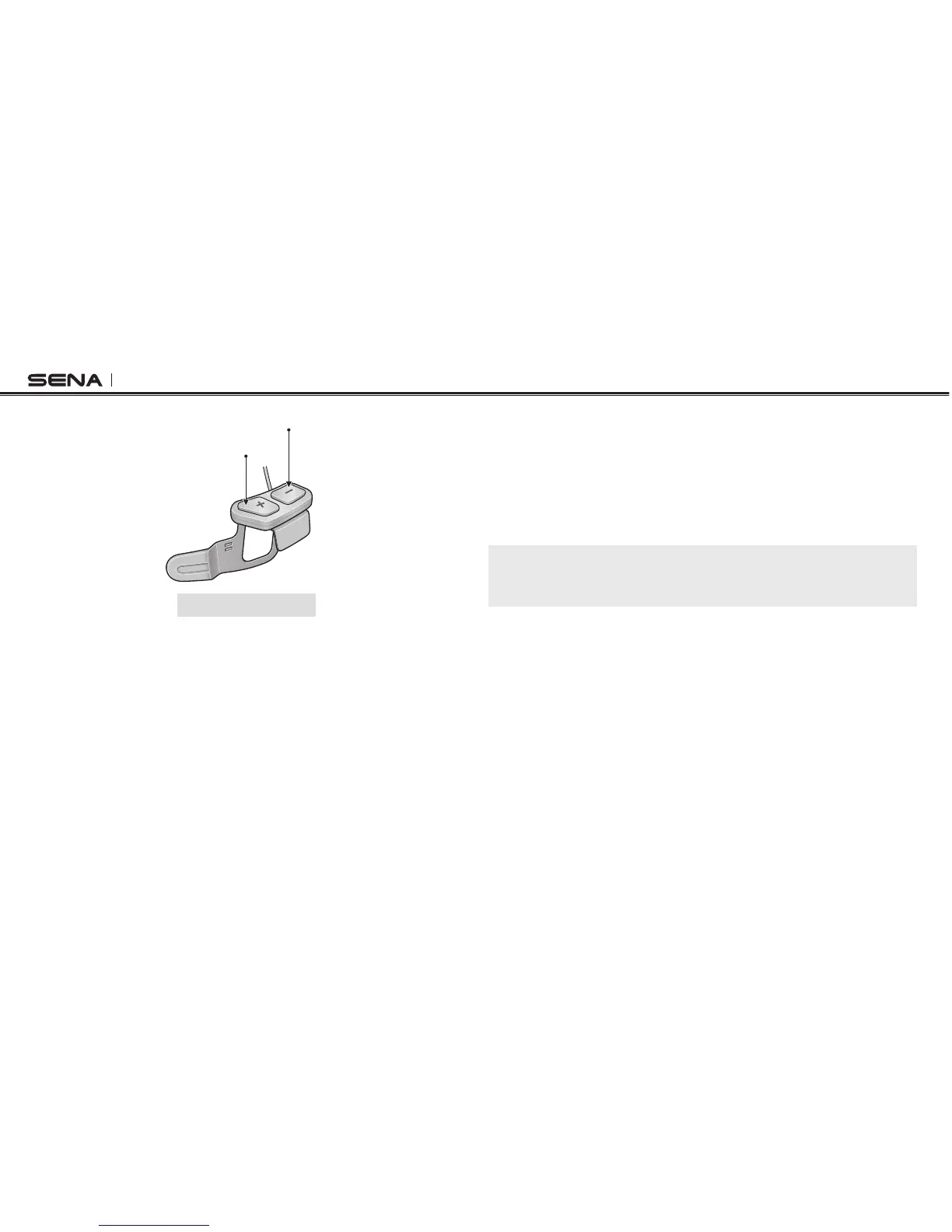
(+) Button
(–) Button
10U Headset Buttons
4.2 Powering On and Off
4.2.1 Headset
To power on the headset, press the (+) Button and the (−) Button at the
same time while hearing ascending beeps and a voice prompt, “Hello”. To
power off the headset, press the (+) Button and the (−) Button at the same
time while hearing descending beeps and a voice prompt, “Goodbye”.
4.2.2 Handlebar Remote
To power on the device, tap the Front Button and the blue LED will appear.
To power off the device, press and hold the Front Button and the Joystick
for two seconds until the red LED blinks.
4.3 Charging
You can charge the headset and the Handlebar Remote by connecting
the supplied USB power & data cable into a computer’s USB port or USB
wall charger. You can use any standard micro USB cable to charge the
units. The charging LEDs turn red while they are charging and turn blue
when they are fully charged. It takes about 2.5 hours to be completely
charged.
Note:
Please make sure to take off your 10U-installed helmet while charging. The
headset automatically turns off during charging.
4.4 Checking the Battery Level
4.4.1 LED Indicator
When the headset or the Handlebar Remote is powering on, their red LED
ashes rapidly indicating the battery level.
4 ashes = High, 70~100%
3 ashes = Medium, 30~70%
2 ashes = Low, 0~30%



 To Next Page