10U
43
English
11.4 Scan and Save
“Scan” is the function that automatically searches station frequencies,
starting from the current frequency and up. To use the scan function,
please follow the procedures below:
1. Double tap the Rear Button. Then the current station frequency moves
upward to nd other station frequencies.
2. If the tuner nds a station, it stays at the station frequency for 8
seconds, then scanning to the next station frequency.
3. Scan function stops when you double tap the Rear Button again.
4. To save a station while scanning frequencies, tap the Rear Button
when at that station. You will hear a voice prompt from the 10U, “Save
preset (#)”. The station will be saved as the next preset number.
5. All stations preset during “Scan”, will overwrite previously set stations.
11.5 Temporary Preset
With the temporary preset function, you may temporarily preset stations
automatically without changing the existing preset stations. Tap the
Rear Button three times to automatically scan for 10 temporary preset
stations. The temporary preset stations will be cleared when the system
is powered off.
11.6 Region Selection
You can select the proper FM frequency region from the Sena Device
Manager. With the region setting, you may optimize the seek function to
avoid unnecessary frequency ranges (Factory default: worldwide).
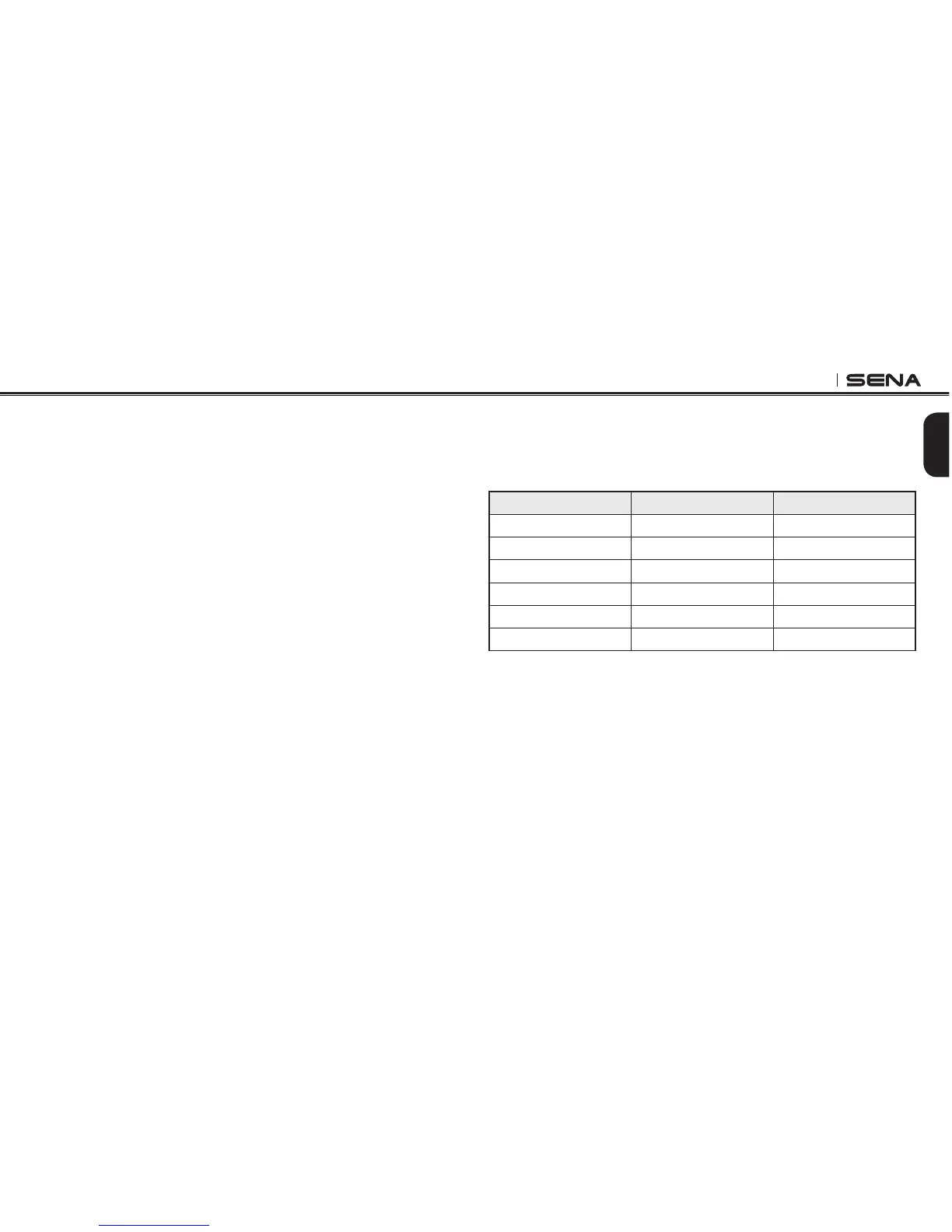
Region Frequency range Step
Worldwide 76.0 ~ 108.0 MHz ± 100 kHz
Americas 87.5 ~ 107.9 MHz ± 200 kHz
Asia 87.5 ~ 108.0 MHz ± 100 kHz
Australia 87.5 ~ 107.9 MHz ± 200 kHz
Europe 87.5 ~ 108.0 MHz ± 100 kHz
Japan 76.0 ~ 90.0 MHz ± 100 kHz



 To Next Page