10U
53
English
15.3 Fault Reset
When the 10U is not working properly or is in faulty status for any reason,
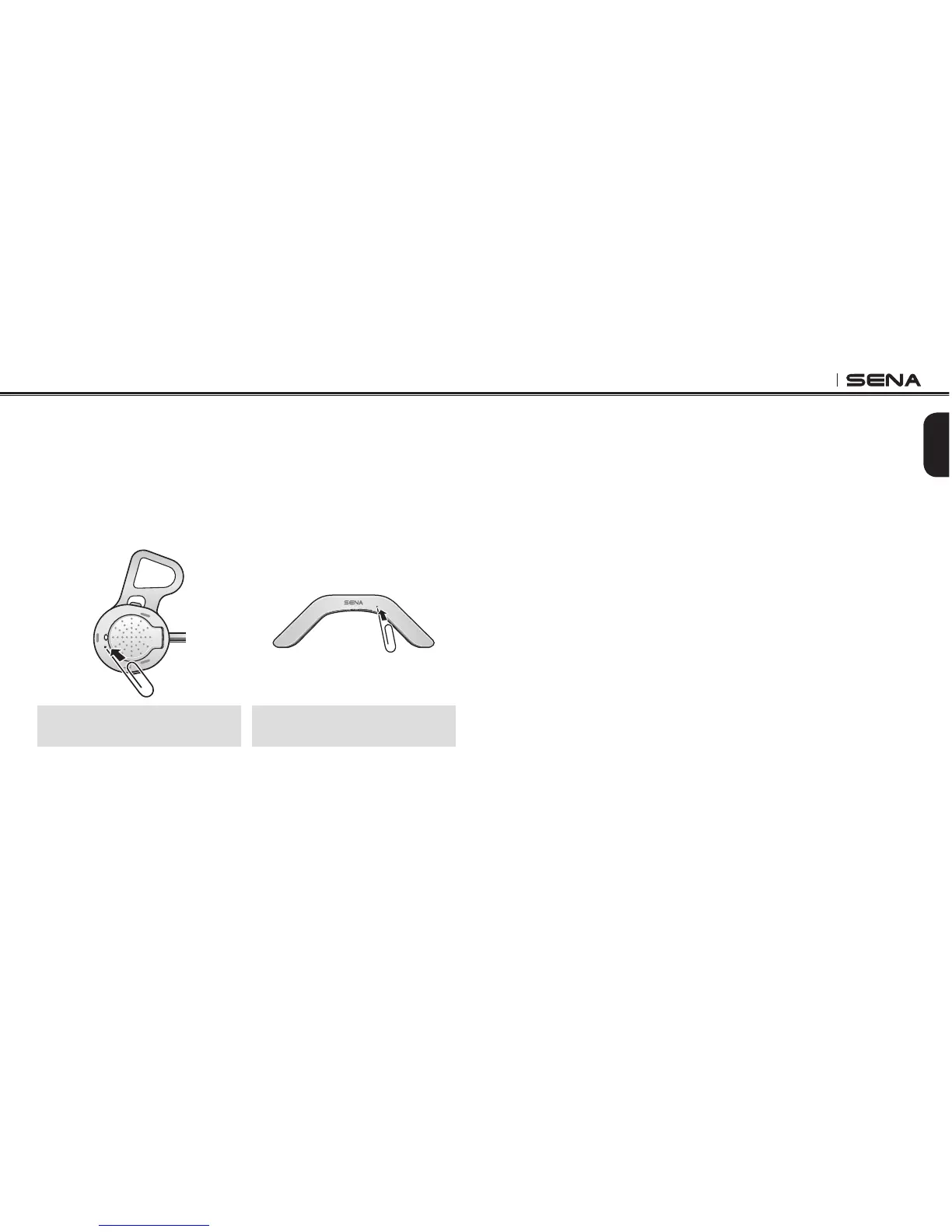
you may reset by pushing the pin-hole reset button as shown in the
picture below. Insert a paper clip into the reset pin-hole and press the
reset button for a second with light pressure. The 10U will be switched
off. Restart the system and try again. This will not restore the headset to
factory default settings.
10U for Shoei GT-Air and Neotec
(Left Speaker)
10U for Schuberth C3/C3 Pro
and Arai full-face helmets
15.4
Factory Reset
15.4.1 Headset
If you want to restore the headset to factory default settings, use the
Factory Reset in the conguration menu. The headset automatically
restores the default settings and turns off. Please refer to section 13.12,
“Factory Reset” for more details.
15.4.2 Handlebar Remote
If you want to restore the Handlebar Remote to factory default settings,
press the Front Button, the Rear Button, and the Joystick simultaneously
for 1 second. The Handlebar Remote automatically restores the default
settings and turns off.



 To Next Page