10U
56
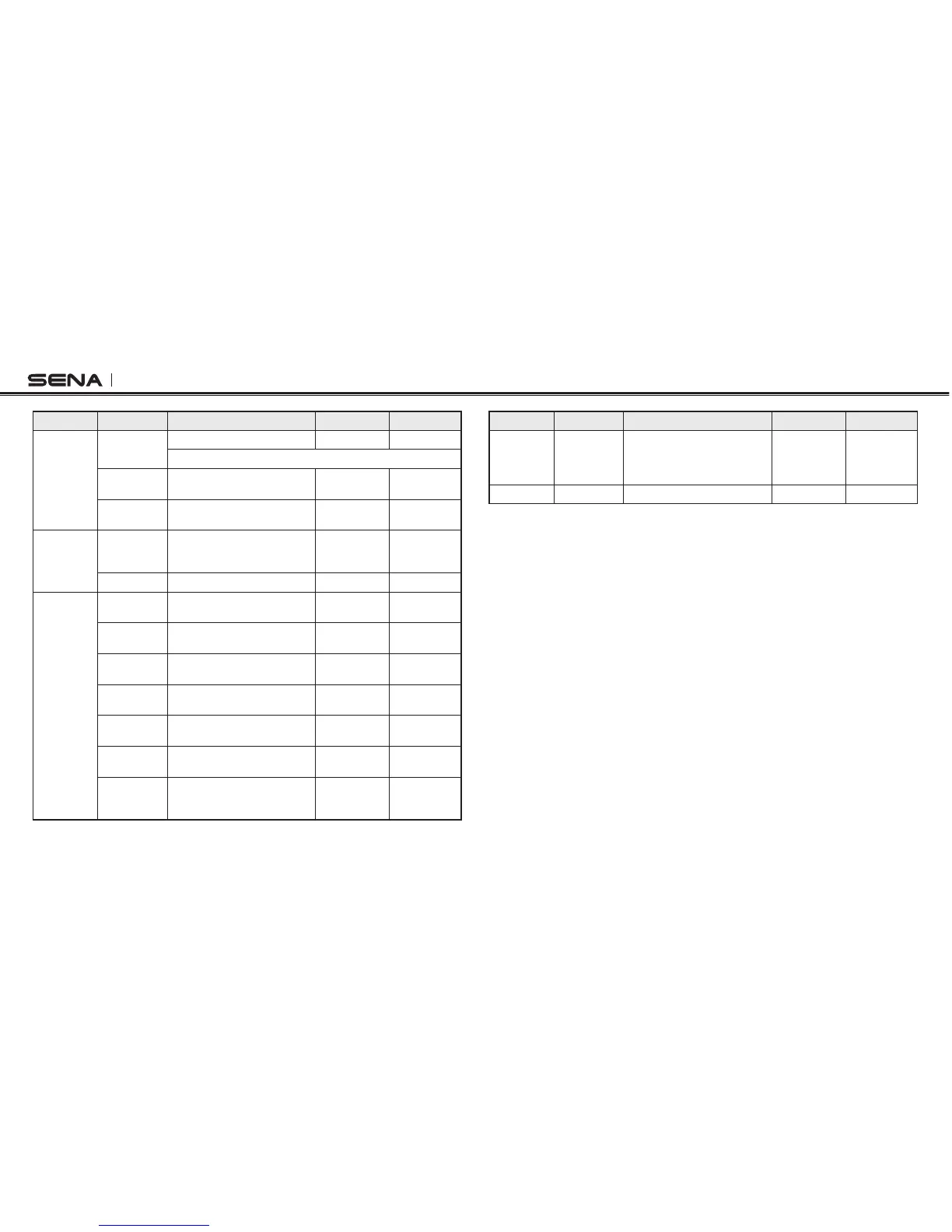
Type Function Button Command LED Beep
Intercom
Intercom
pairing
Press the (–) Button for 8 seconds Red flashing Multiple beeps
Tap the (–) Button of any one the two headsets
Start / End
each intercom
Press the (–) Button for 1 second – –
End all
intercoms
Press the (–) Button for 5 seconds Blue flashing
Midtone
double beeps
Music
Play/Pause
Bluetooth
music
Press the (+) Button for 1 second –
Midtone
double beep
Track forward Press the (+) Button for 2 seconds –
FM radio
FM radio on
Press the (+) Button for 5
seconds
–
Midtone
double beeps
FM radio off
Press the (+) Button for 5
seconds
–
Midtone
double beeps
Select preset Press the (+) Button for 1 second –
Midtone single
beep
Seek stations
up
Press the (+) Button for 3 seconds –
High tone triple
beeps
Scan up FM
band
Press the (–) Button for 5 seconds –
Stop scanning Press the (–) Button for 5 seconds –
High tone
double beeps
Save preset
while
scanning
Press the (+) Button for 1 second –
High tone
double beeps
Type Function Button Command LED Beep
Configuration
Enter into
configuration
settings
mode
Press the (+) Button for 10 seconds –
High tone
double beeps
Reset Fault reset Press the Reset Button – –



 To Next Page