OmniHub CMP201– User Manual
Page 38 of 103
3.3.5.3 Modules Service Configuration
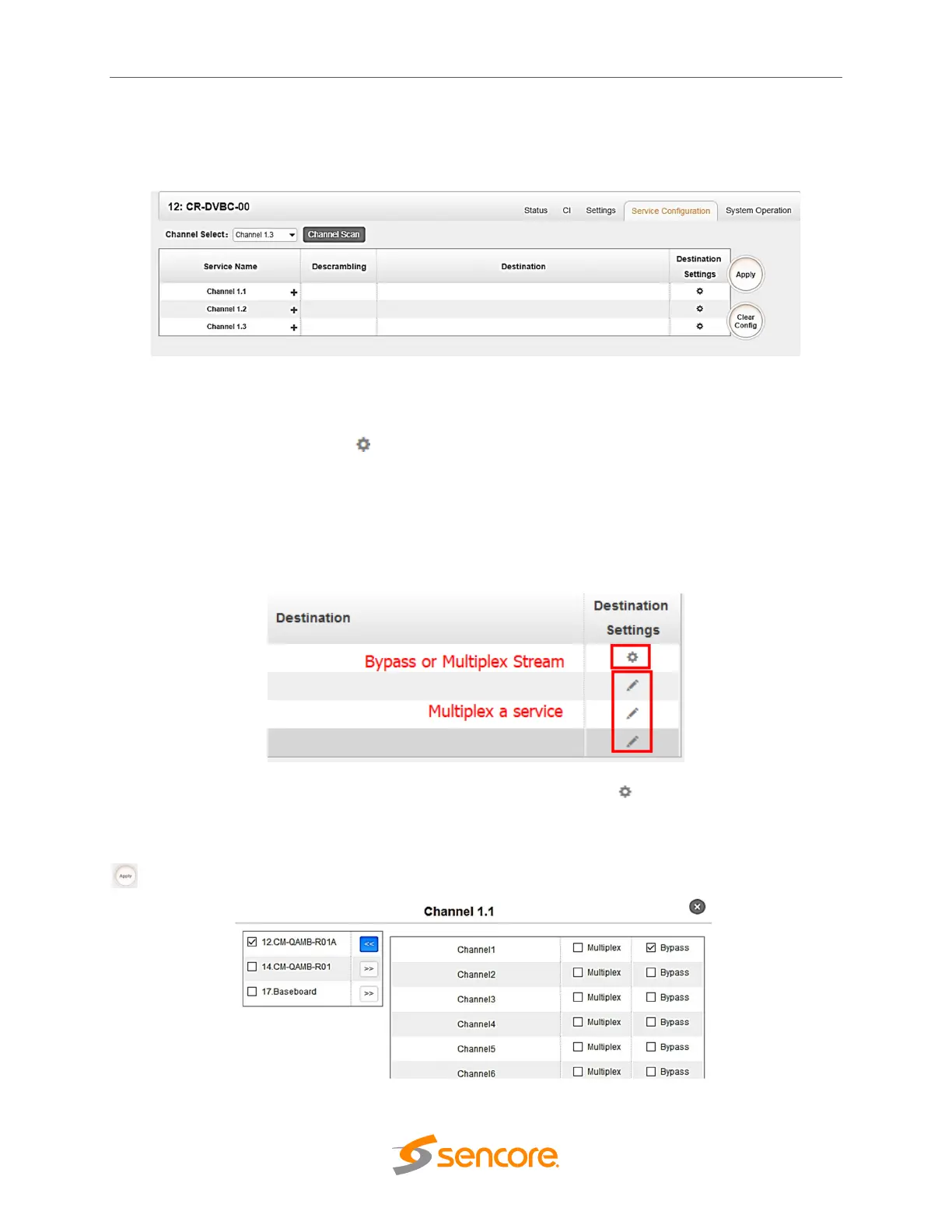
To route a whole stream or service/s from the 8VSB towards the output channel (stream), use
the Service Configuration tab. Two types of routing are possible:
1. Bypass mode routes whole input transport stream towards IP or RF output. Bypass
mode activation cause output channel will be occupied only by this stream. Any attempt
of routing other stream/service towards this channel will show error. This can only be
done when you click the icon on the TS. Bypass cannot be on the single service only.
2. Multiplex mode is the counter part of bypass mode. This mode allows the administrator
to perform the following operations:
a. Routing single service towards output channel will results in SPTS creation
b. Routing services towards single output channel will results in MPTS creation
c. Routing service/s AND stream/s towards single output channel will results in MPTS
creation
To use Bypass OR Multiplexing mode on stream level click the (cog) icon. There will have
always a BaseBoard selection for the IP output and other Output option depending on the
module inserted. Select the correct Output and Channel you want to output the Stream. Put a
tick on Multiplex or Bypass on the Channel you want to output. Do not forget to click the Apply
button on the right side to make the change takes effect.



 To Next Page