SP395 SoundPro Audio Integrator Form7492 Operation Manual
17
Menu Overview
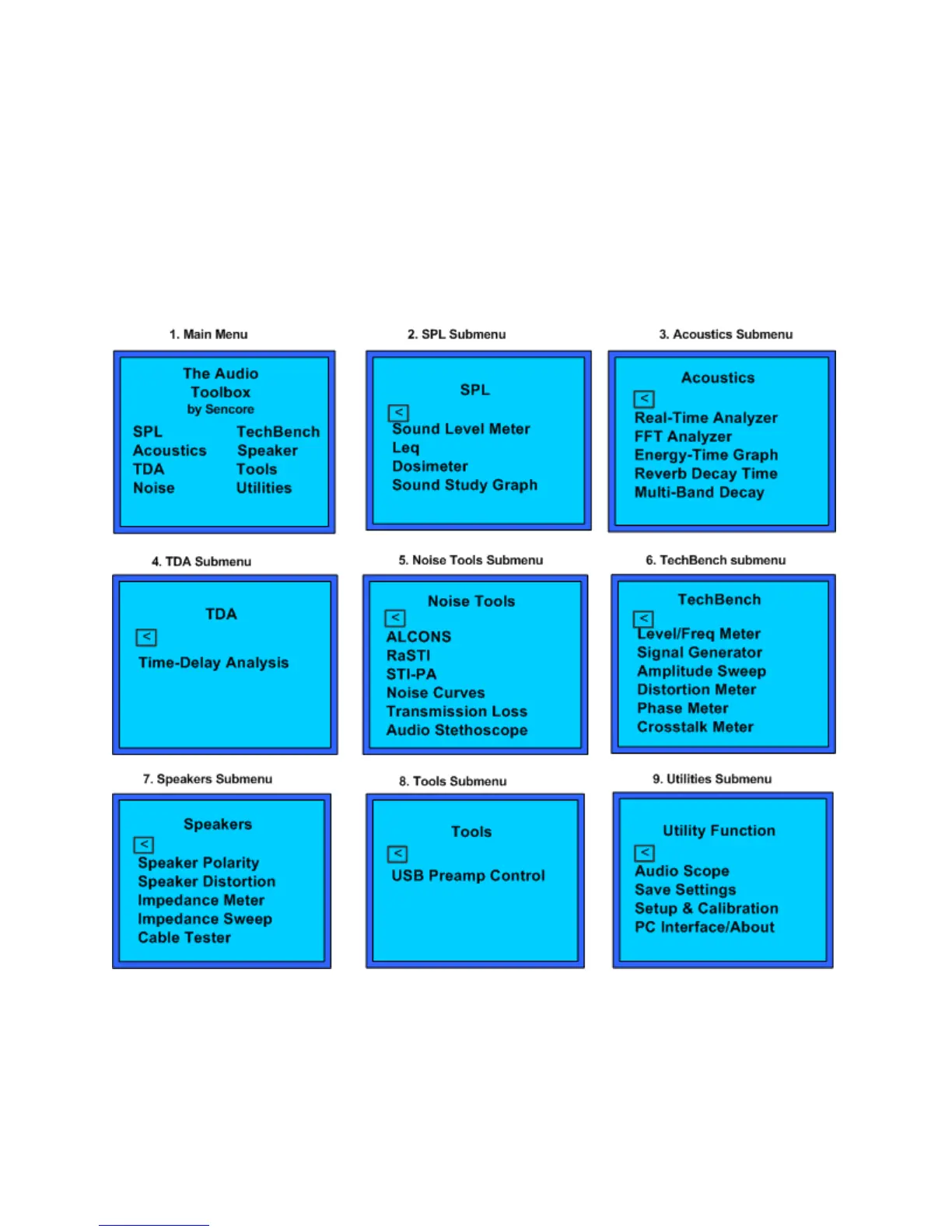
All user selections to configure the Audio Integrator are performed with indications in the
display screen. The Audio Integrator includes a main menu with eight categories of tests in
which to choose from. Choosing a category in the main screen results in a submenu. The
submenu lists all the tests available in that category.
Note: Some of the tests shown in the submenu screens may not be included in your Audio
Integrator. These test features may be purchased as Software Additions to your
instrument.
1. Main Menu: Opening menu screen listing eight categories of Audio Integrator tests.
2. SPL Submenu: Appears when the SPL selection is made in the main menu. This
submenu lists the sound level measurements available for selection using the Audio
Integrator.
3. Acoustics Submenu: Appears when the Acoustics selection is made in the main menu.
This submenu lists the acoustic analyzing tests available for selection using the Audio
Integrator. Note: The Multi-Band Decay tests is available as a firmware option. It
appears in submenu but cannot be implemented without purchasing an unlock code.



 To Next Page