SP395 SoundPro Audio Integrator Form7492 Operation Manual
21
The Audio Integrator provides an indication when the input level is approaching or overdriving
the input preamplifier. The range number in the top tool bar of the menu blinks. When you see
this select a higher gain setting in the top toolbar for that channel.
Menu Toolbars
The Audio Integrator uses “toolbars” to provide access to often-used features and controls.
Toolbars along the top edge and bottom edge of the screen provide user selections which are
common to many of the test functions. For example, you can adjust input gain, turn phantom
power on and off, and control the generator output and the headphone monitor from any screen
using the top SP395. It is important that you understand the use of the toolbars to properly
operate the SP395. Individual items which can be selected and changed are referred to as fields
in this manual.
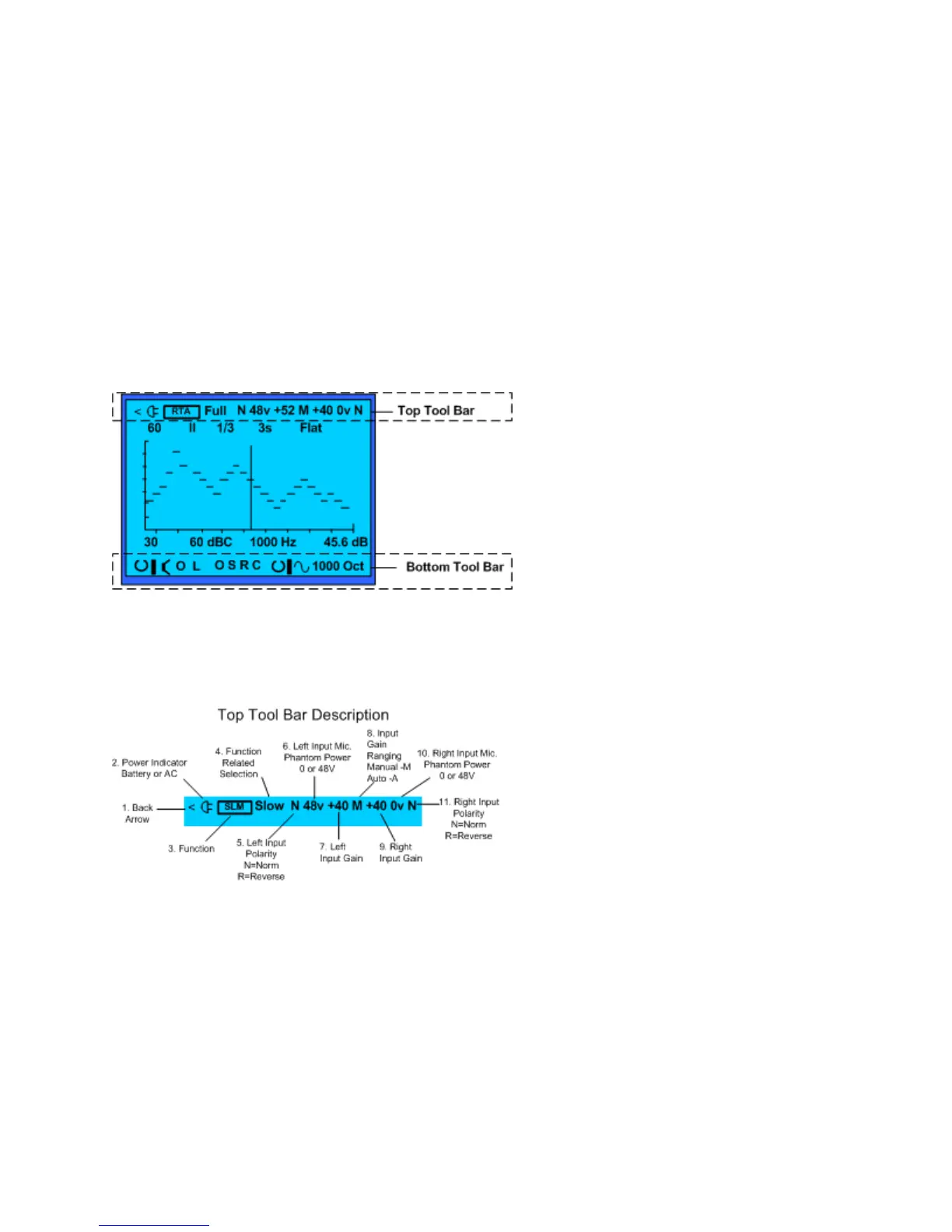
Toolbars along the top edge and bottom edge
of the screen provide user selections which are
common to many of the test functions
.
Top Tool Bar
The top toolbar provides a function identification field and is used to control the SP395 inputs.
You can manually select input gain, turn on phantom power, or invert the phase of either channel
independently. You can also enable auto-gain scaling for both inputs.
The Top Tool Bar provides function
identification and selections for the L & R
inputs.
Top Toolbar Icons
1. Back Arrow. Clicking on this icon exits the currently running function and returns to the
function menu.
2. Battery Indicator. When operated on the internal battery, this field shows the relative
battery level, or remaining charge, in the battery. When operated in AC mode, this field
shows the AC power symbol.
3. Screen Title. This is the abbreviated name of the function that is currently running.
4. Function related selection – Not on all menus
5. Left Input Polarity The N/R icon changes the left input from normal (N) polarity to
reverse (R) polarity.
6. Left Input Phantom Power Click to select the icon, then turn clockwise to enable
phantom power (48v), or counter-clockwise to disable phantom power (0v).



 To Next Page