SP395 SoundPro Audio Integrator Form7492 Operation Manual
54
Time Delay Analysis - TDA Run Screen
The TDA function includes a Setup menu screen and a Run menu screen. When you enter the
TDA function, the Setup screen is displayed first automatically. After you have made the proper
TDA setup, switch to the Run screen. You can switch directly between the Setup Screen and the
Run Screen within the Setup/Run field. To Run the TDA test, click on the word “Setup.” The
Run screen displays the sweep graph and has the fields that you use to run the TDA test, make
measurements, and store the graphs to memory. All Run screen fields and control fields are
described below.
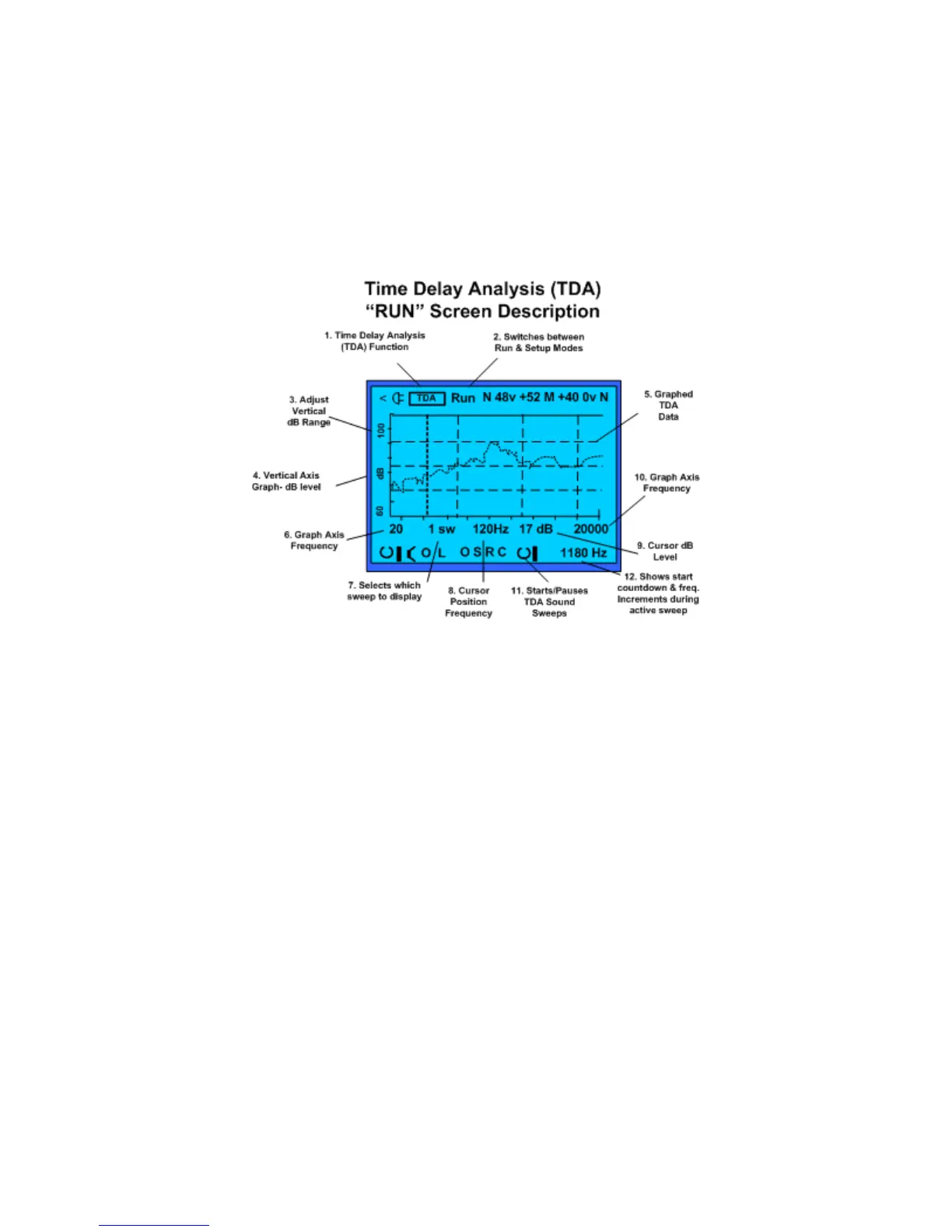
Time Delay Analysis (TDA) run or test screen.
TDA Run Screen and Control Fields:
1. Test Function – identifies the current test function MB-RT60 (Multi-band RT60).
2. Setup/Run – switches between the TDA Setup Screen and the TDA Run screen. The
TDA Setup Screen provides selection for configuring the TDA test. The TDA Run screen
provides the test results.
3. Graph Window – This field selects the upper limit or maximum level of the graph
establishing the vertical graph range.
4. Vertical Scale dB – Not selectable. Indicates 40 dB range of measurement graph.
5. TDA Measurement Graph – test data graphed 1/12 octave vs. dB.
6. Graph x axis scale – Indicates the lower limit or minimum frequency range of the graph.
Not selectable or variable.
7. Sweep Number – This field selects which sweep to display from the current sweep set.
The number of sweeps is determined on the Setup page.
8. Cursor Position – Selects the cursor for measurement and moves it to the desired
frequency on the graph for level analysis.
9. Cursor Level – Indicates the dB level at the selected cursor position on the graph.
10. Graph x axis scale – Indicates the upper limit or maximum frequency range of the graph.
Not selectable or variable.
11. Run/Stop – To start the TDA test, click the generator On/Off icon. To cancel a running
test, click the icon again.
12. Audio Sweep Countdown/Frequency Information Field – This field shows the
countdown before a sweep begins and the generator frequency as a sweep is running.
After the sweeps are completed, it shows the millisecond offset of the currently displayed
sweep.



 To Next Page