SP395 SoundPro Audio Integrator Form7492 Operation Manual
66
The SP395 Noise Criteria Test automatically measures the SPL noise levels at the standard
octave band frequencies and compares them to ANSI standard NC curves (Appendix C), RC, or
PNC standards. The display shows the NC rating, the weighted noise energy level in the
individual octave bands, and the band that is limiting the NC rating. Reducing the noise in this
band may allow you to achieve a lower NC rating. You should perform NC measurements under
typical and worst case conditions, including having the room's ventilation system running and
outside noises such as street traffic corresponding to the typical listening times.
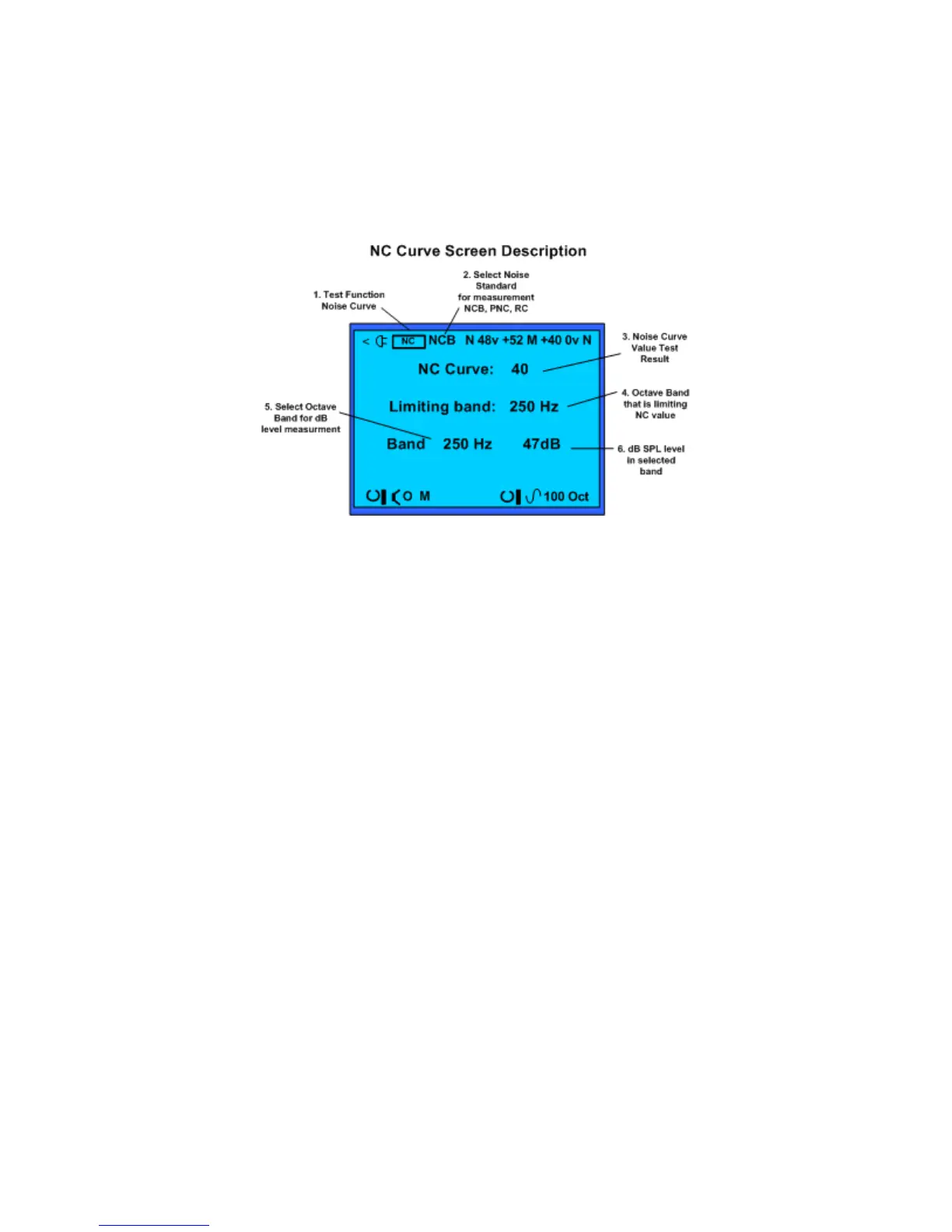
Noise Curve test screen and field descriptions.
Noise Curves Test Screen and Control Fields:
1. Test Function – Identifies Noise Curves (NC) as the selected function and measurement
screen.
2. Test Standard – Selects the standard used for determining the noise curve value. Select
from Balanced Noise Curves (NCB), Room Criteria (RC) or Preferred Noise Curve
(PNC).
3. Noise Curve Result – Measured Noise Curve value test result.
4. Limiting Octave Band – Indicates the octave band in which the level of noise is
exceeding the standard noise curve. Decreasing the room noise in this band improves the
NC value.
5. Select Octave Band – Selects one of the nine octave bands used in the NC Curve tests
for measurement.
6. Octave Band SPL Level – Displays the SPL level of the selected octave band.
Noise Curves Operation
1. Connect the microphone to the SP395 and position it in the center of the listening
position. The microphone is the only input that can be used for the noise criteria test.
2. Select the Noise Criteria function. Select the standard used for NC testing.
3. Quiet the room and read the NC background noise rating. The value in the NC Curve
field is the room’s background noise rating.
4. Read the octave band that is limiting the NC rating. The number in the Limiting Band
field indicates the octave band that contains the noise level that is limiting the NC rating.
If you can lower the noise level in this band, the NC rating will drop to a lower level.
5. View the noise SPL level for any octave band. The number in the Octave Band field
indicates the noise level in that particular band. Use this function to view the noise level in
the limiting band as you track down possible sources of that noise. Also use this function
to plot the noise levels against the NC curve chart in Appendix C, to check whether there
are equivalent levels of noise in multiple octave bands or primarily in one band.



 To Next Page