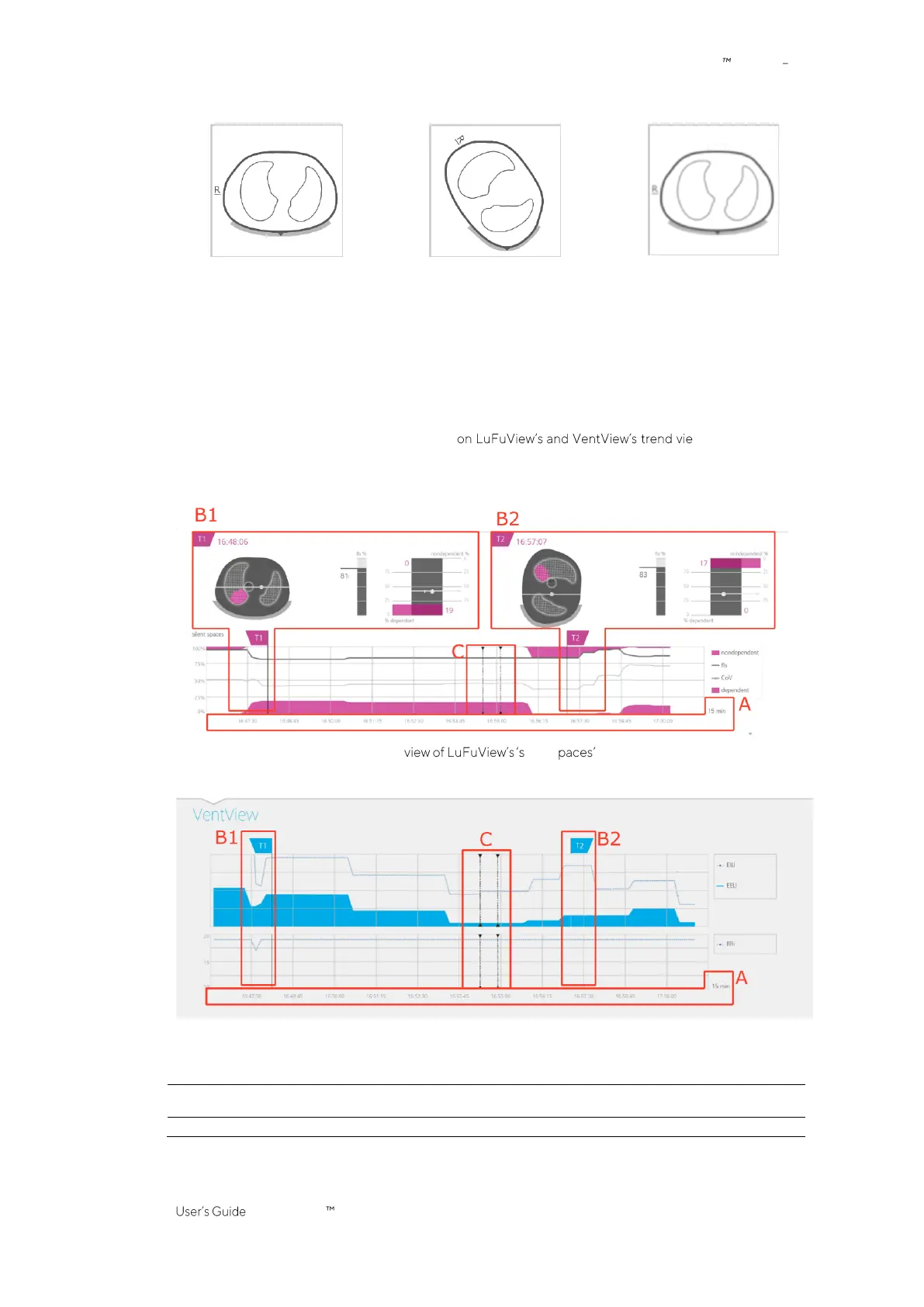
Figure 6-15: Image elements common to all EIT images.
monitoring possible
patient in supine position
monitoring possible
patient in left lateral position
monitoring not possible
patient in supine position
If monitoring is not possible (e.g. in case of insufficient belt to skin contact or while the system is calibrating
(6.6.4) if no belt connector or belt is connected (6.6.3) or in case of various system errors or faults (6.6.2)), all
common
EIT image
elements are displayed blurred (in certain cases without
Lung Contours
).
6.5.2 Common characteristics of trends
As illustrated in Figure 6-16 the trends available ws (6.3.2, 6.3.4, 6.4.2)
have the following common characteristics:
Figure 6-16: Common characteristics of trends
Trend ilent s area
Trend view of VentView
A. The trended values move from right to left, with the current time being on the right. The displayed time range is indicated on
the bottom right of the trends.
B. Moving the T1 (B1) or (B2) T2 flag in one trend view, will also move the corresponding flag in the two other trend views to the
same time.
C. Dotted black vertical lines with triangles at both ends (if any) identify operator events (9.11).



 To Next Page