2 The SenTec Digital Monitoring System (SDMS)
HB-005615-j
2.2 The SenTec Digital Monitor (SDM)
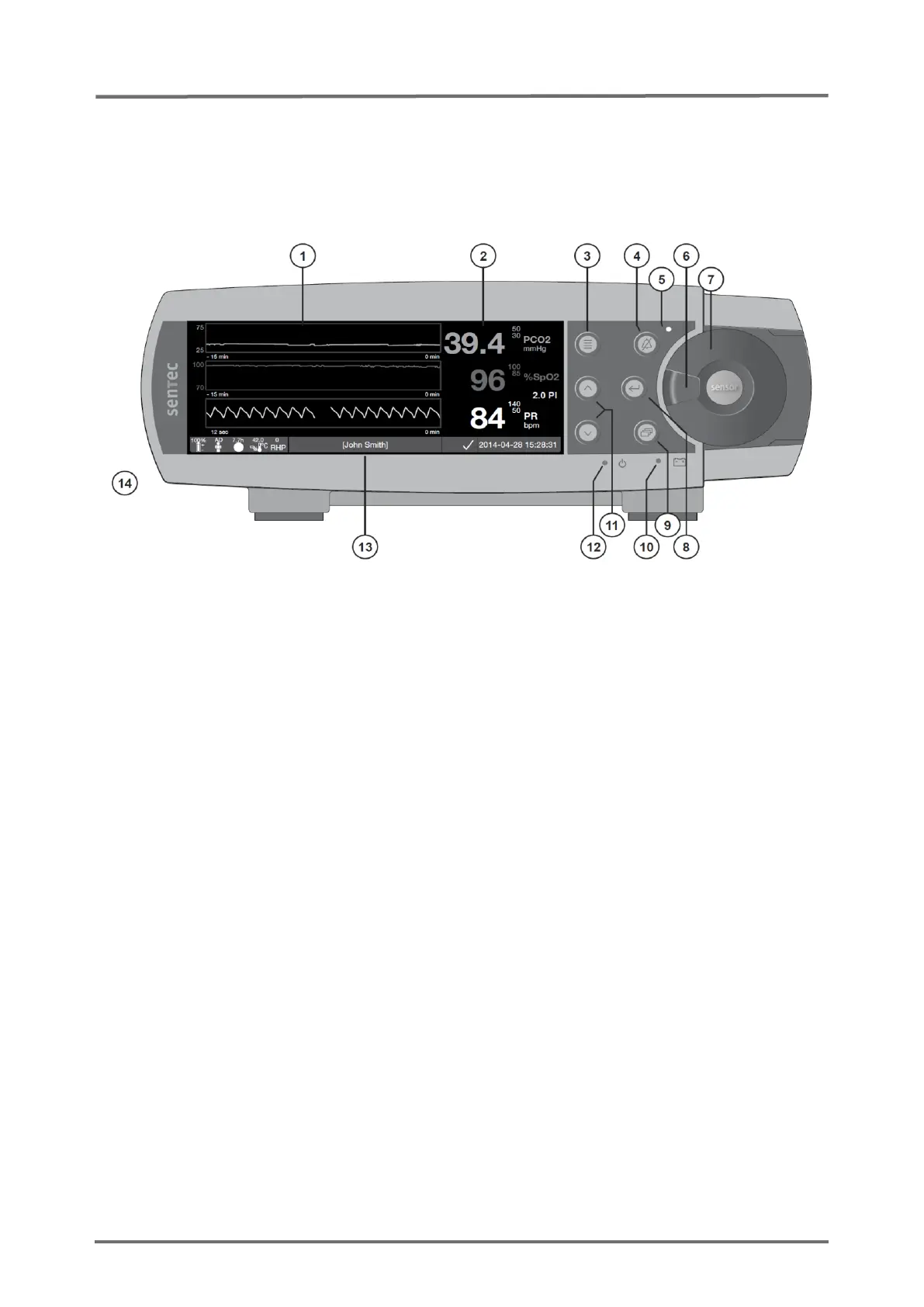
2.2.1 Front Panel
1 Trend Display Area
2 Numerical Display Area
3 Menu/ Previous Level Button
4 AUDIO PAUSED/OFF Button
5 AUDIO PAUSED/OFF Indicator (yellow LED)
6 Door Handle
7 Docking Station Door
(colored dot in center of door indicates the
SDM’s PO2 activation status: blue if
activated, orange otherwise)
8 Enter Button
9 Display Button
10 AC Power/Battery Indicator
(green/yellow LED)
11 UP/DOWN Buttons
12 ON/OFF Indicator (green LED)
13 Status Bar
14 Speaker (on the side)
Figure 1 Front Panel of the SDM
SDMs with firmware version SMB SW-V08.00/ MPB SW-V06.00 are available
with and without activated PO2-option. If the PO2-option is activated the
colored dot in the Docking Station Door of the respective SDM will be blue,
otherwise orange.



 To Next Page