3 Maintenance/Safety & Functionality Tests
SenTec Digital Monitoring System
3.3 Docking Station
3.3.1 Cleaning and Disinfection
Clean or disinfect the Docking Station (including the Docking Station gasket) as often
as required per institutional ordinances (recommended weekly) using a cotton swab
moistened with 70% isopropanol.
3.3.2 Visual Inspection
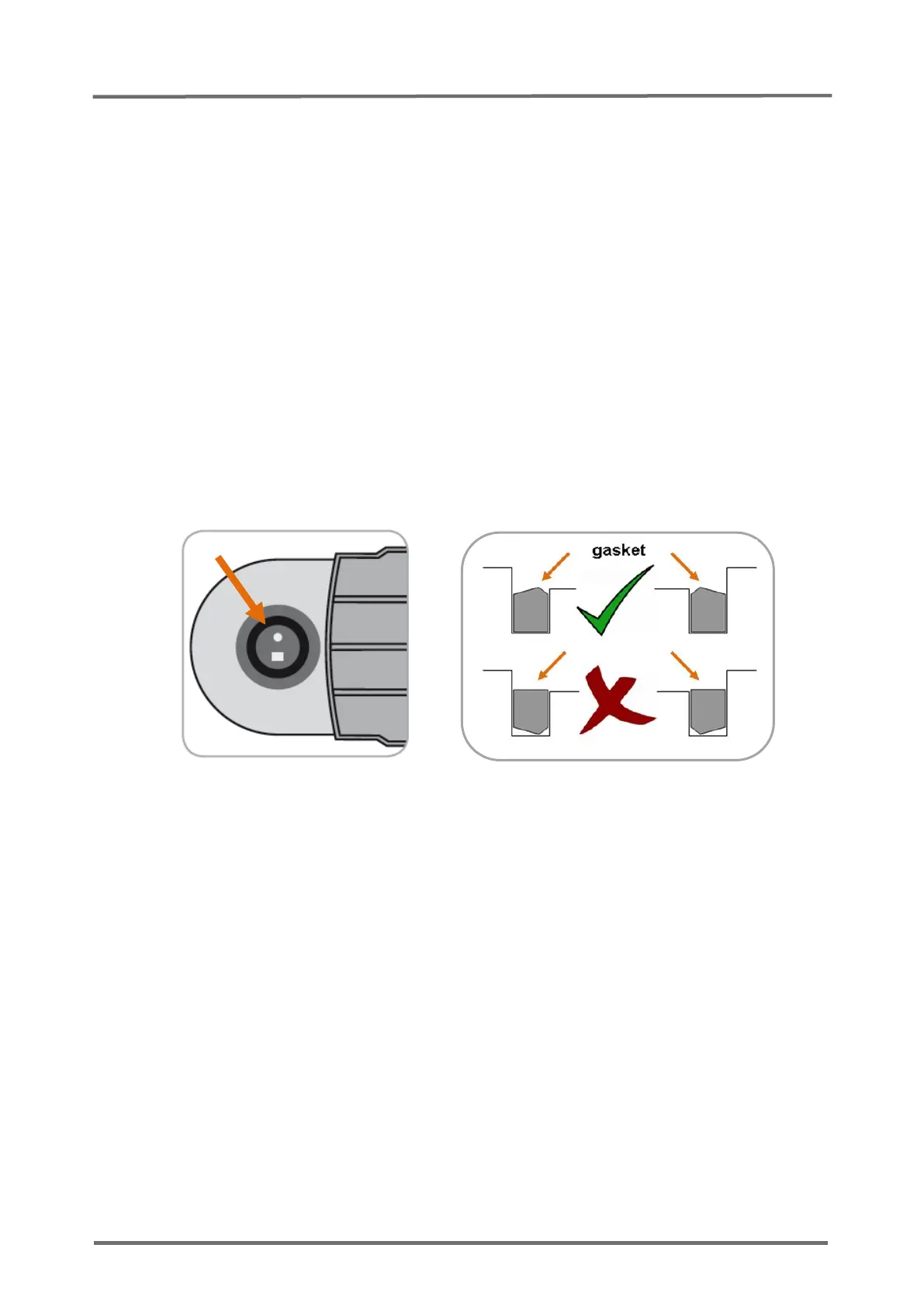
Inspect the Docking Station door and the gasket for mechanical damages. The closing
mechanism must lock properly.
If you detect a possible damage, replace the defective part according to
section
5 "Repairs".
Note: We recommend changing the gasket of the Docking Station annually.
Figure 10 Correct orientation of the Docking Station Gasket
3.3.3 Gas Level Indicator
Full
Service Gas
bottle
Check the functionality of the gas level indicator using a new gas bottle.
1. Screw in a new gas bottle and switch the SDM ON.
2. Insert the sensor in the Docking Station and verify that the "100% gas icon"
displays in the status bar.
3. Remove the gas bottle from the SDM and verify that the yellow "0% gas icon"
displays in the status bar.
If the expected result is not observed, refer to
section 4.2.4 "SDM specific
troubleshooting"
to further evaluate the problem.



 To Next Page