EasyManua.ls Logo

Sequential Pro One - Keyboard Controls Overview

Sequential Pro One
85 pages
Print Icon
To Next Page IconTo Next Page
To Previous Page IconTo Previous Page
Loading...
1-5
MIXER
ad
NOEE
TElST
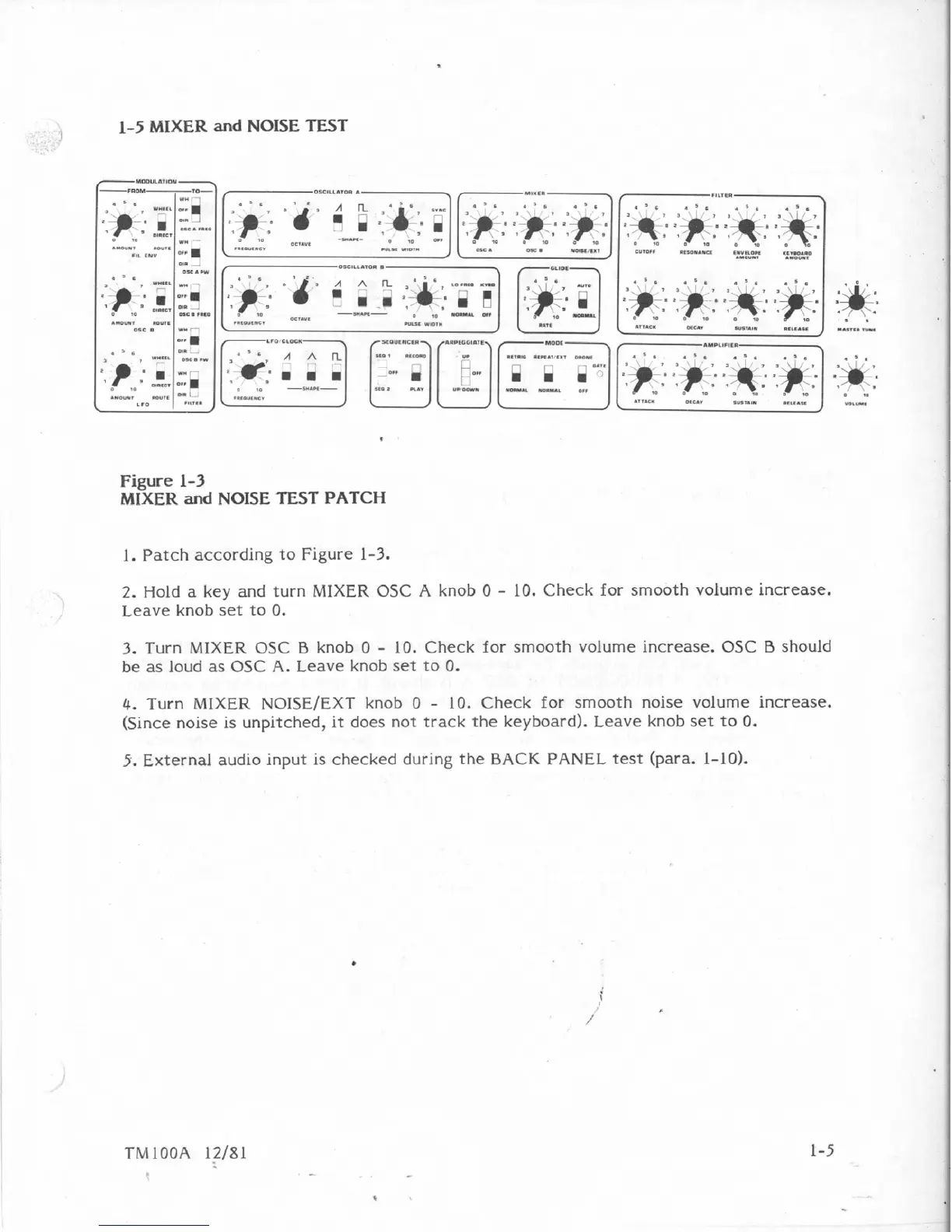
Figure
1-3
MIXER
and
NOISE
TEST
PATCH
1.
Patch
according
to
Figure
1-3,
2.
Hold
a
key
and
turn
MIXER
OSC
A
knob
0
-
10.
Check
for
smooth
vohme
increase.
Leave
knob
set
to
0.
3.
Turn
MIXER
OSC
B
knob
0
-
10.
Check
for
smooth
voEurne
increase.
OSC
B
should
be
as
loud
as
OSC
A.
Leave
knob
set
to
0.
4.
Turn
MIXER
NOlSE/EXT
knob
0
-
10.
Check
for
smooth
noise
volume
increase.
(Since
noise
is
unpitched,
it
does
not
track
the
keyboard).
Leave
knob
set
to
0.
5.
External
audio
input
is
checked
during
the
BACK
PANEL
test
(para.
1-10).
TMlOOA
12/81

Table of Contents

Other manuals for Sequential Pro One

Related product manuals